It's Tuesday night. A bill lands on your iPhone's lock screen, last month's categories look tidy, and your chequing account still won't stretch to payday. You don't need another chart showing where the money went. You need to know whether the cash you have will cover rent, food, and everything due before your next deposit.
A budget app for iPhone is worth keeping only if it answers that question, including when a bank connection stops working. Choose the app that helps you protect essentials and make a useful weekly decision, not the one with the prettiest dashboard.
What to Require Before You Subscribe
Start with a practical test, not an annual subscription. Enter real spending, add upcoming bills, and see whether the remaining cash makes sense without relying on a perfectly working bank feed.
In FP Canada's 2025 Financial Stress Index, 88% of Canadians said actions such as budgeting or saving would positively affect their finances, according to FP Canada. The useful question isn't whether budgeting sounds worthwhile. It's whether the app makes the next spending decision clearer.
Pass test for an iPhone budget app
Keep an app only when it passes the rows that match how you pay. A missing feature is a problem when you need its job done, not because another app offers it.
| Feature | Job it does | Who needs it | Pass test |
|---|---|---|---|
| Manual entry and CSV import | Log spending when a bank feed drops | Canadian users and smaller institutions | A purchase and old history work with no bank link |
| Category limits and pace alerts | Warn before the month runs out | Busy professionals | A mid-month warning if the current pace will miss the limit |
| Subscription detection | Surface recurring charges | People cutting waste | Repeating charges grouped into a cancel list |
| Optional bank sync | Save typing without locking you in | US sync users and cautious Canadian users | The budget still works after one account disconnects |
| Privacy and deletion | Limit sensitive spending data | Anyone linking accounts | Clear policy, few permissions, export and delete |
| Household sharing | One plan for shared bills | Couples and families | Two people see the same accounts, budgets, and goals |
| Rewards and unused credits | Recover cashback and expiring perks | Rewards maximizers | Credits and offers show before they expire |
| Goals tied to the budget | Fund a buffer from what is left | Single users building savings | Goal progress moves when spending stays under the limit |
For Canadian users, particularly those using smaller institutions, I'd treat manual entry and a clean CSV import as requirements rather than backup conveniences. In the United States, sync can save typing, but a disconnected account shouldn't make the rest of the budget unusable.
Test usefulness before paying
A free plan without a credit card is enough for an initial trial. Compare our plan details against the jobs you need, rather than paying for features you might use someday.
If you earn money through freelance work, separate invoicing from personal budgeting. GetBill's guide can help you compare small business invoicing software, while your personal budget should use money available for household spending, not unpaid invoices.
Practical rule: An app passes when it helps you make a decision before cash runs short. A polished explanation after the shortfall isn't enough.
Privacy Checks and a Bank Connection Test
Spending records can reveal medical purchases, addresses, routines, and family circumstances. Give an app only the access needed to do its job, even if granting everything would make signup faster.
The Office of the Privacy Commissioner of Canada's mobile-app guidance recommends trusted app stores, careful permission checks, device protection, updates, and removing unused apps.
Check access before entering financial information
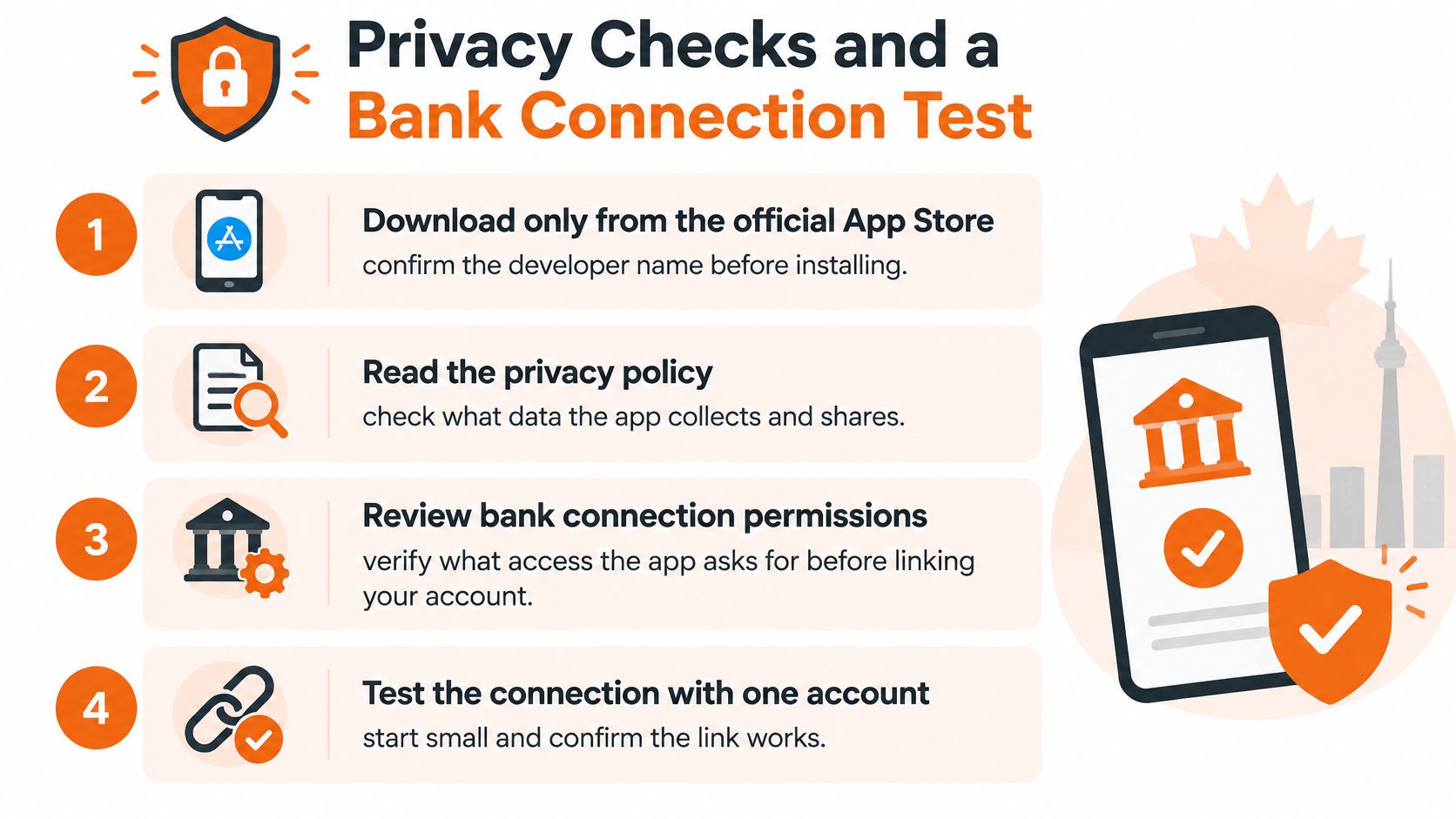
- Download from the official App Store. Confirm the developer name instead of trusting a familiar-looking icon or search advertisement.
- Read the privacy policy before creating an account. Look for what the developer collects, why it collects it, who receives it, and how long it stays.
- Match permissions to the task. Ordinary budgeting doesn't require your contacts, call logs, or precise location. Decline unrelated access.
- Protect the iPhone. Enable a device passcode and automatic lock. Use Face ID where available, without treating it as a substitute for understanding the app's data practices.
- Keep the app updated. Remove finance apps you no longer use, and separately check whether an unused account remains active.
- Find the exit before entering. Confirm that you can export history and request deletion of the account and associated data. Uninstalling an app isn't a deletion workflow you should assume works.
For help reviewing permissions beyond finance apps, the Digital Footprint Check permission management guide provides a useful companion checklist.
Canadian commercial apps generally fall under PIPEDA, while Quebec, Alberta, and British Columbia have substantially similar private-sector privacy laws; the Commissioner's guidance for app developers also recommends safeguards proportionate to sensitivity, including encryption during storage and transmission. Consent and deletion should be explicit, not hidden behind a generic toggle.
US readers should likewise favour clear encryption disclosures and a written deletion path. A reassuring security badge doesn't explain what happens to exported files, backups, or transaction notes.
Separate sync from the spending plan
Bank sync helps populate balances and first-pass categories. It doesn't prove that the budget works, and understanding bank account aggregation helps distinguish the connection service from the budgeting tool.
Test these failures during your trial:
- Missing transaction: Add a purchase manually, then check how you'll avoid counting it again when it imports.
- Misnamed payee: Correct the merchant and category without rebuilding the budget.
- Disconnected account: Pause or disconnect a test account and confirm that recorded transactions and the remaining plan stay usable.
If the app presents stale data as current, hides missing information, or loses the month's remaining cash calculation, don't treat that as a cosmetic flaw.
Match the App to How You Actually Spend
There isn't one best setup for everyone. Someone managing a single income needs a different tool from a couple sharing groceries or a freelancer waiting on uneven deposits.
Choose the job first. Then compare features that help you do it.
Which iPhone budget setup fits you
| Reader | Main job | Setup that fits | Ignore |
|---|---|---|---|
| Single user | One income and a buffer | Custom categories and one dated savings goal | Household invites |
| Young renter | Housing takes a large share | Separate rent, utilities, insurance, and tax lines | A universal housing percent |
| Household | Shared rent and groceries | Shared accounts, budgets, and goals | Two private spreadsheets |
| Busy professional | Little time to categorize | Auto-categories, pace alerts, and quick add | Typing every coffee |
| Rewards maximizer | Cut leaks and unused perks | Subscription list plus credits and expiring offers | A categories-only dashboard |
| Irregular income | Pay changes by week | Income when it arrives and a weekly remainder | One fixed monthly cap |
A single user can start with custom categories and one savings goal with a deadline. Adding household administration won't make that plan more accurate.
For a household, shared visibility matters more than extra charts. Fintrack Household Plans let family members share the same accounts, transactions, budgets, and goals; our Plus plan adds household sharing for two people, voice input, and higher AI usage limits.
A busy professional should favour automatic categorisation and quick entry, provided corrections are easy. We offer real-time spending alerts on mobile, but the useful test is whether the notification prompts a manageable action rather than another administrative task.
Set targets around your obligations
A universal housing allowance can be a poor starting point. A 2024 federal government analysis reported that Canadians aged 15 to 24 who weren't living with a parent spent an average of 23% of income on housing, compared with 16% across all age groups.
Record rent or mortgage, utilities, insurance, and property tax separately where they apply. Then examine what remains for food, transport, debt, and savings rather than forcing your circumstances into someone else's percentage.
If category boundaries help you stop spending money reserved for another purpose, an envelope budgeting app may fit better than a dashboard built mainly for reporting. For irregular income, enter deposits when they arrive and judge spending against funded obligations, not hoped-for earnings.
Business owners also need a separate operating budget. Nanak Accountants and Associates explains how to manage business costs more effectively, which is a different task from deciding what your household can afford this week.
If you're leaving Mint, Goodbudget, or PocketSmith, compare alternatives against the workflow you're trying to replace. Don't recreate every old category automatically, especially categories you never used to make a decision.
Buy for your current bottleneck. Ignore features in the table's final column unless your circumstances change.
Set Up the Month So Cash Lasts
Start with the money available for this month, then protect rent, food, and other commitments before setting flexible limits. A budget that looks balanced on screen is not useful if cash runs short before the next deposit.
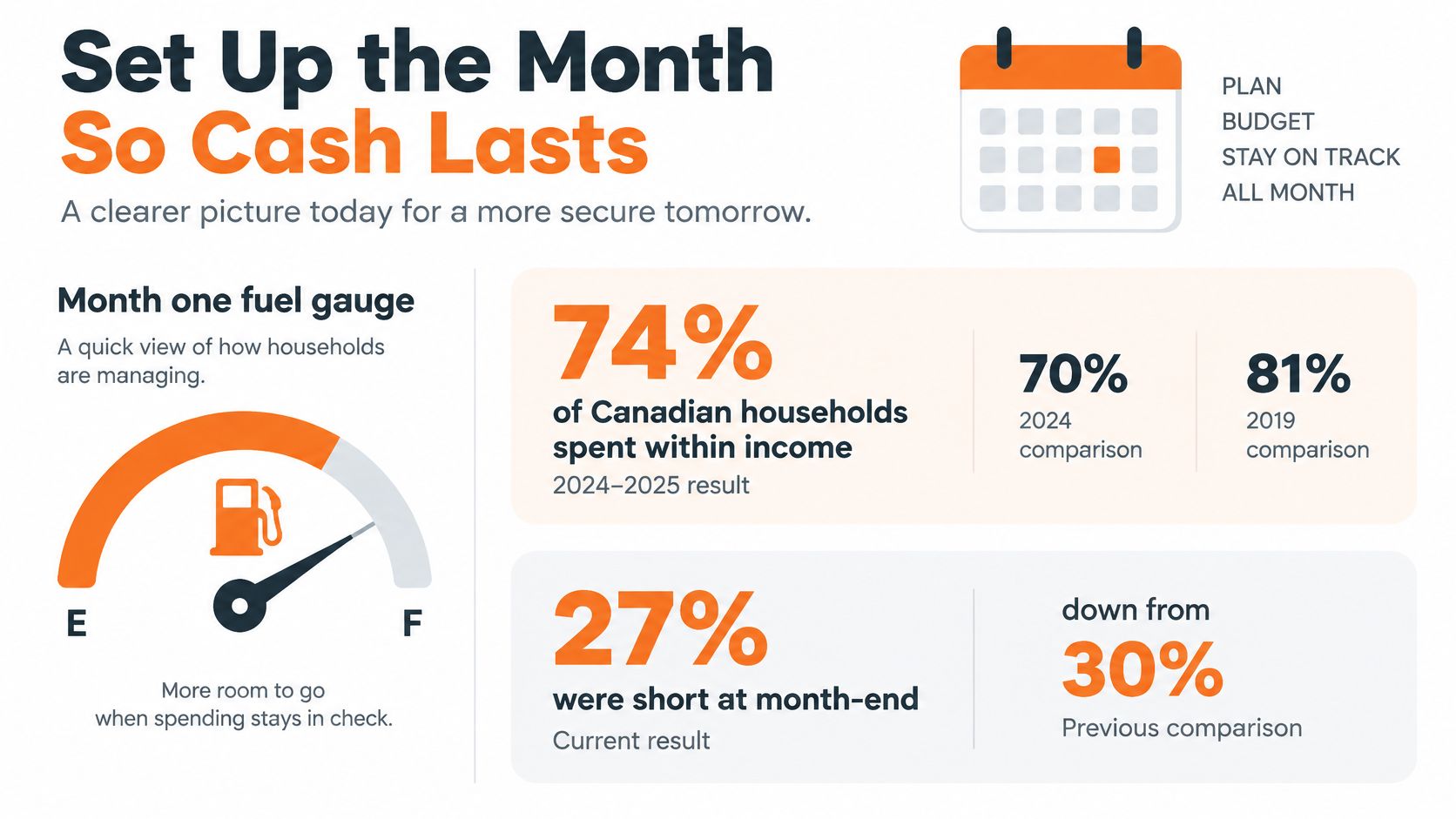
The Financial Consumer Agency of Canada's 2024–2025 annual report says 74% of Canadian households spent no more than their monthly income, compared with 70% in 2024 and 81% in 2019; 27% of Canadians said they were short of money at month-end, down from 32% in 2024. Spending within income does not guarantee that cash will be available when bills are due.
Build the plan from available money
Create the account and skip the bank link initially.
You can create a free Fintrack account in under a minute, with no credit card required. The Free plan includes manual expense tracking, CSV imports, and basic AI chat, so you can establish a weekly cash check before adding a bank connection.
Enter an opening balance that reflects money available for this plan. Leave overdraft limits and available credit out of your spending cash.
Enter take-home pay.
Use the amount that reaches your account, not gross salary. With irregular earnings, add each deposit after it arrives and fund obligations in due-date order.
Keep expected income separate from received income. An unpaid invoice can inform planning, but it cannot pay for groceries today.
Reserve essential commitments before allocating flexible spending.
Add rent or mortgage, utilities, insurance, debt minimums, and the phone bill. Include due dates so the monthly total does not hide a cash shortage before payday.
Use recent bills to set recurring costs such as rent, telecom, and financial services. Keep shopping and other discretionary categories adjustable, and account for known annual bills before they arrive.
Set flexible limits from a recent real month.
Start with groceries, transport, and eating out. Use actual spending as a baseline, then adjust for known changes such as commuting, household size, or dietary needs.
A limit that requires skipping adequate meals is not realistic. If essential costs exceed available income, show the shortfall instead of balancing the screen with fictional cuts.
Make warnings useful while you can act
Household spending has been rising in recent years, so look closely at recurring categories such as rent, telecom, and financial services rather than relying on one overall spending ceiling.
Turn on a pace alert.
Base warnings on category history and the limit you set, not an automatic percentage split. Fintrack's AI-recommended budgets analyze spending history to suggest realistic limits. Velocity alerts warn when your spending pace suggests you will exceed a budget before month-end.
Budget bars shift from green to yellow to red as spending approaches its limit. Treat the colour as a prompt to check the category, not a judgement about whether you have been good or bad.
A large grocery shop early in the month may be planned. Repeated restaurant spending that leaves too little for groceries calls for a change.
Add one savings goal with an amount and date.
An emergency buffer can help cover unexpected bills without relying on credit. Fund it from cash left after essential commitments, and link the savings goal to its budget so contributions reflect what is available.
Do not count the same money as both spendable cash and goal funding. If the contribution required by the deadline is unaffordable, change the deadline or target rather than borrowing to keep progress on track.
Review the plan every Sunday through the first month.
Check income, planned spending, and actual spending together. Fintrack's dashboard shows income, expenses, budgets, and goals in one place, but you still need to account for missing purchases and upcoming commitments.
With a shared plan, review the household total and, where your records allow, each person's spending. A change in who lives at home does not automatically indicate an individual spending problem.
Read the remainder, not just the balance
Use a cash-flow management approach to distinguish the account balance from money available to spend. Subtract unpaid commitments, planned essentials, and reserved savings before deciding what you can use for optional purchases.
Sunday question: After the bills and necessary spending still ahead, what can I spend this week without creating a problem before the next deposit?
If the answer is uncomfortable, correct a missing transaction, adjust a flexible category, or deliberately change a goal contribution. Keep rent and food money visible.
Three Weeks of Real Use
A useful budget routine is mostly ordinary. You open the app, check a small number of decisions, and get on with your day.
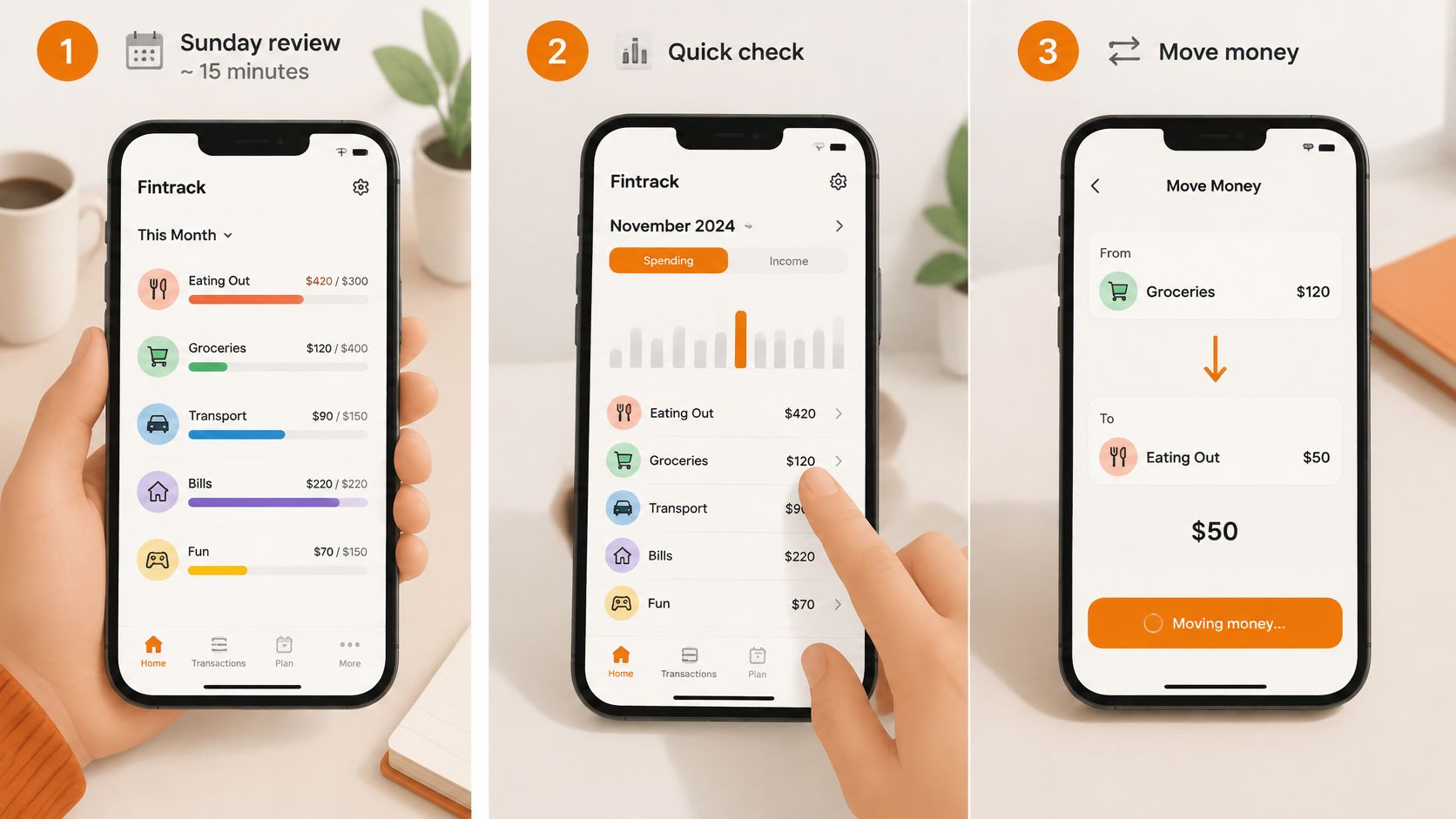
The Sunday adjustment
Say you open the budget on Sunday and see eating out approaching its limit while the grocery allowance is too thin for the meals planned. Check what's already spent and which bills are due before the next review.
Move unspent restaurant money into groceries, then leave the categories alone. You've changed a decision, not redesigned your financial life.
If a purchase is missing, Finny can add it from a conversation. A typed message such as “I spent $45 at Target on groceries” adds the transaction with the right category, saving you from navigating through separate entry fields.
The duplicate-charge check
During the next week, a real-time alert draws attention to another charge from a merchant you recently paid. Compare the amount, merchant, and transaction status before deciding it's a duplicate.
Our user Kyle describes the benefit this way:
“The spending alerts caught a duplicate charge I would have missed.”
An alert is a reason to investigate, not proof that a merchant charged you incorrectly. If the bank shows a pending authorisation alongside a posted purchase, check whether both are payable.
Mark a confirmed duplicate for follow-up and contact the merchant or card issuer as appropriate. Don't delete a real unresolved charge just to make the budget look right, and don't rebuild the rest of the month around it.
The rewards pass and the false saving
At the following review, sort subscriptions above an amount you choose. Cancel one you no longer use, check the cancellation confirmation, and inspect any credit or offer expiring soon.
Finny can compare spending across months and surface unused benefits using your own financial information rather than generic tips. Move a freed amount towards the savings goal, but don't count a possible discount as cash until it reduces an actual expense.
A low grocery total needs a different kind of attention. In a 2025 PPIC survey of Californians, three in ten said someone in their household had reduced meals or cut back on food to save money, rising to one-half among lower-income residents.
If your grocery spending fell because meals were cut to cover rent, don't label that progress. Raise the grocery floor, inspect a cancellable bill or subscription, and make the remaining shortfall visible. Protecting adequate food matters more than keeping a category green.
Choose the Setup You Will Still Use Next Month
Choose the app that fits the work you'll do. A feature that needs constant attention can be a poor fit even when it works exactly as advertised.
Use clear go-or-no-go rules
- Choose sync-first only after testing your banks. Keep it as the main workflow only when connections stay dependable through a full month, including payday and bill payments.
- Favour manual-first when continuity matters most. That's a sensible starting point in Canada, with a credit union, or after losing usable history when a feed dropped.
- Choose household sharing only with participation. A second person needs to open the app and use the shared plan. An unanswered invitation doesn't create coordination.
- Choose a rewards view for an existing problem. If you already miss credits or recurring charges, it has a job. Otherwise, keep the setup simpler.
If none of those needs is pressing, start with income, fixed bills, three flexible limits, and one goal. Add personal finance automation only where it removes a task you understand and can still check.
Keep the first decision small
You can build that first month with category limits and savings goals in Fintrack budget planning. It works without a bank connection, alerts and a simple dashboard are available on mobile, and the free plan needs no credit card.
Judge the setup by whether you can read the remainder and make a calm decision. You don't need every transaction perfectly labelled before you can protect the next bill.
Fintrack brings expense tracking, category budgets, and savings goals together so you can plan around the money you have. Visit Fintrack, enter this month's pay and bills, then check what remains on Sunday.