
You open your banking app and scroll through a long list of transactions. There's a grocery order, a few restaurant charges, several recurring bills, and a payment you don't recognise immediately. By the time you finish reviewing everything, you still can't explain where the month's money went.
That's the friction an AI budgeting assistant is designed to remove. It can organise transactions, identify patterns, surface subscriptions, and answer questions about your spending without requiring you to maintain a spreadsheet every day. The technology doesn't replace your judgement. It gives you a clearer starting point for making decisions.
Why Manual Budgeting Feels Like a Second Job
Manual budgeting usually begins with good intentions. You collect receipts, open a spreadsheet, create categories, and promise yourself you'll update everything regularly. A busy week follows, then another, and the system slowly becomes a record of what happened rather than a tool for deciding what to do next.
The difficulty isn't necessarily a lack of discipline. Manual tracking asks you to remember small purchases, interpret inconsistent merchant descriptions, decide where each transaction belongs, and keep the records current. Those tasks compete with work, family responsibilities, bill payments, and the ordinary interruptions of daily life.
Statistics Canada's household spending diary illustrates the effort involved. Respondents are asked to record expenses across 7 or 14 consecutive days, including the date, description, and cost, and to use receipts when possible so they don't have to rely on memory. That approach works for careful data collection, but repeating it indefinitely can feel exhausting for a household trying to manage its own finances. (Statistics Canada's household spending diary)

Where the system breaks down
Consider a renter moving into a first apartment. They need to separate rent, utilities, groceries, transport, household items, and flexible spending, but the first month also brings irregular purchases and unfamiliar bills. A practical first apartment budgeting guide 2026 can help establish the categories, but the ongoing work still requires regular transaction review.
Manual systems also struggle with recurring charges. A streaming service, cloud storage plan, gym membership, or annual renewal can sit inside a card statement without attracting attention. In Canada, communication services can include telephone, cellphone, television, satellite radio, and Internet costs, so a useful tracker needs categories that reflect real household bills rather than only broad labels. (Statistics Canada's spending category definitions)
An AI assistant offers a different arrangement. Instead of asking you to classify every purchase from scratch, it can do the first pass, learn from corrections, and bring important patterns to your attention.
How an AI Budgeting Assistant Actually Works
An AI budgeting assistant usually combines transaction data, pattern recognition, and a conversational interface. You can think of it as a financial organiser that becomes more familiar with your habits as you review its work.
Step one is collecting usable data
The assistant may connect to financial accounts, depending on the tool and the available infrastructure. It can also support manual entry, which is useful if you prefer not to connect a bank, use cash frequently, or want to add only selected transactions.
Canada's consumer-driven banking framework is intended to let approved third parties access user-authorised account, balance, transaction, and product data through APIs. The initial scope includes chequing, savings, credit, loan, and investment accounts, although the framework isn't yet fully live and secure sharing infrastructure is still being implemented. (Canada's consumer-driven banking framework)
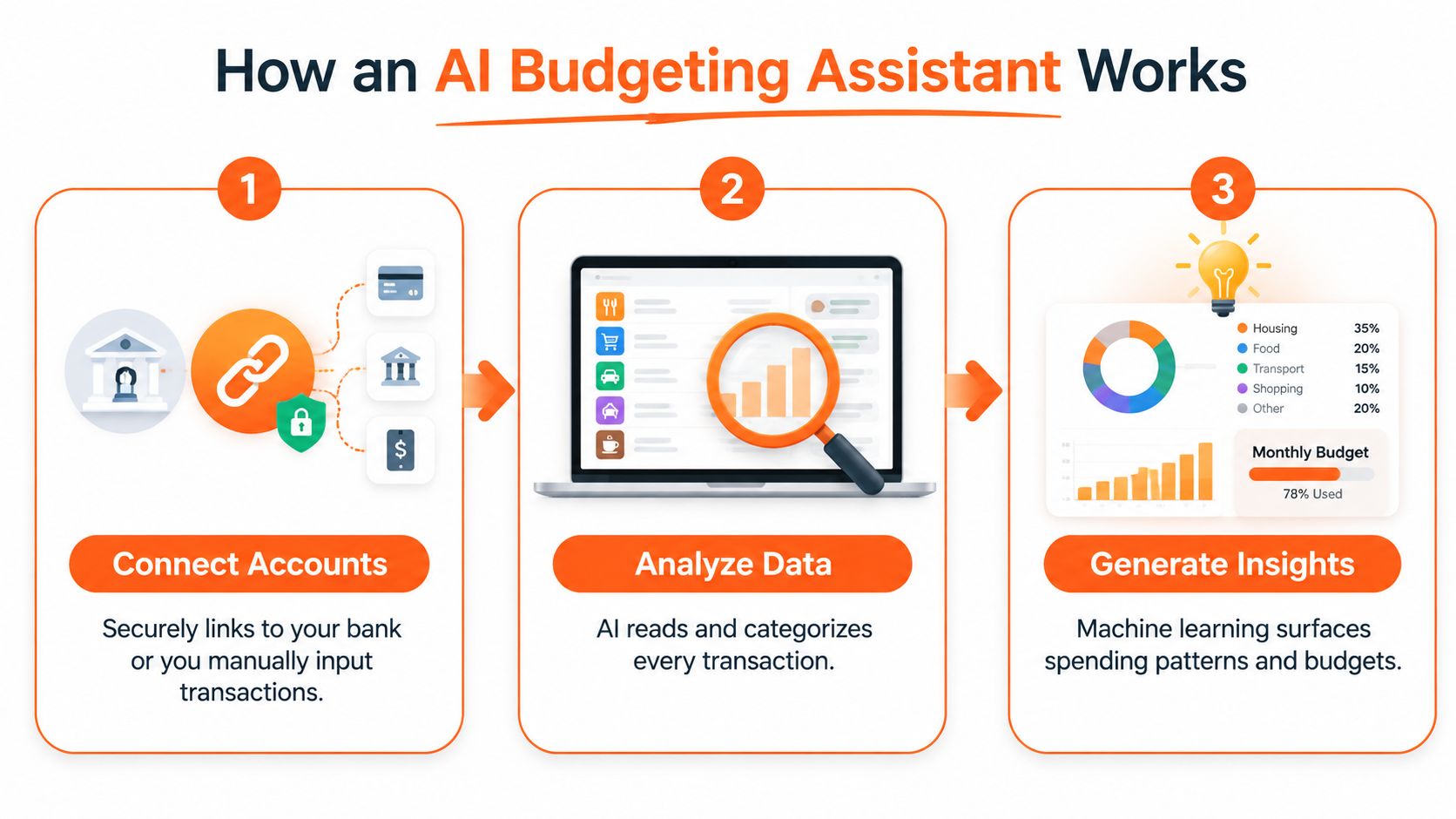
Step two is interpreting transactions
The system examines details such as merchant names, amounts, dates, and recurring patterns. It might learn that a coffee shop near your workplace belongs under dining out, while a monthly Netflix payment belongs under entertainment. The result isn't just a list of charges. It's a structured view of how money moves through your household.
Categorisation rules often depend on context. Statistics Canada's diary guidance says in-store and online purchases should generally be entered without taxes unless tax is already included, while restaurant and café totals should include taxes, tips, and alcoholic beverages, with alcohol recorded separately in a designated column. (Statistics Canada's expense recording rules)
Step three is learning through feedback
AI categorisation isn't perfect on the first attempt. If the assistant places a pharmacy purchase in health when it should be household spending, you correct it. Those corrections help the system recognise your preferences instead of forcing you to accept a fixed set of rules.
Natural language processing adds another layer. You can ask, “How much did I spend on groceries last month?” or “Which subscriptions renewed recently?” without filtering columns or building a formula. Fintrack's AI assistant is designed around this kind of question-based review, turning transaction data into plain-language answers and practical prompts.
The Real Benefits of Automating Your Budget
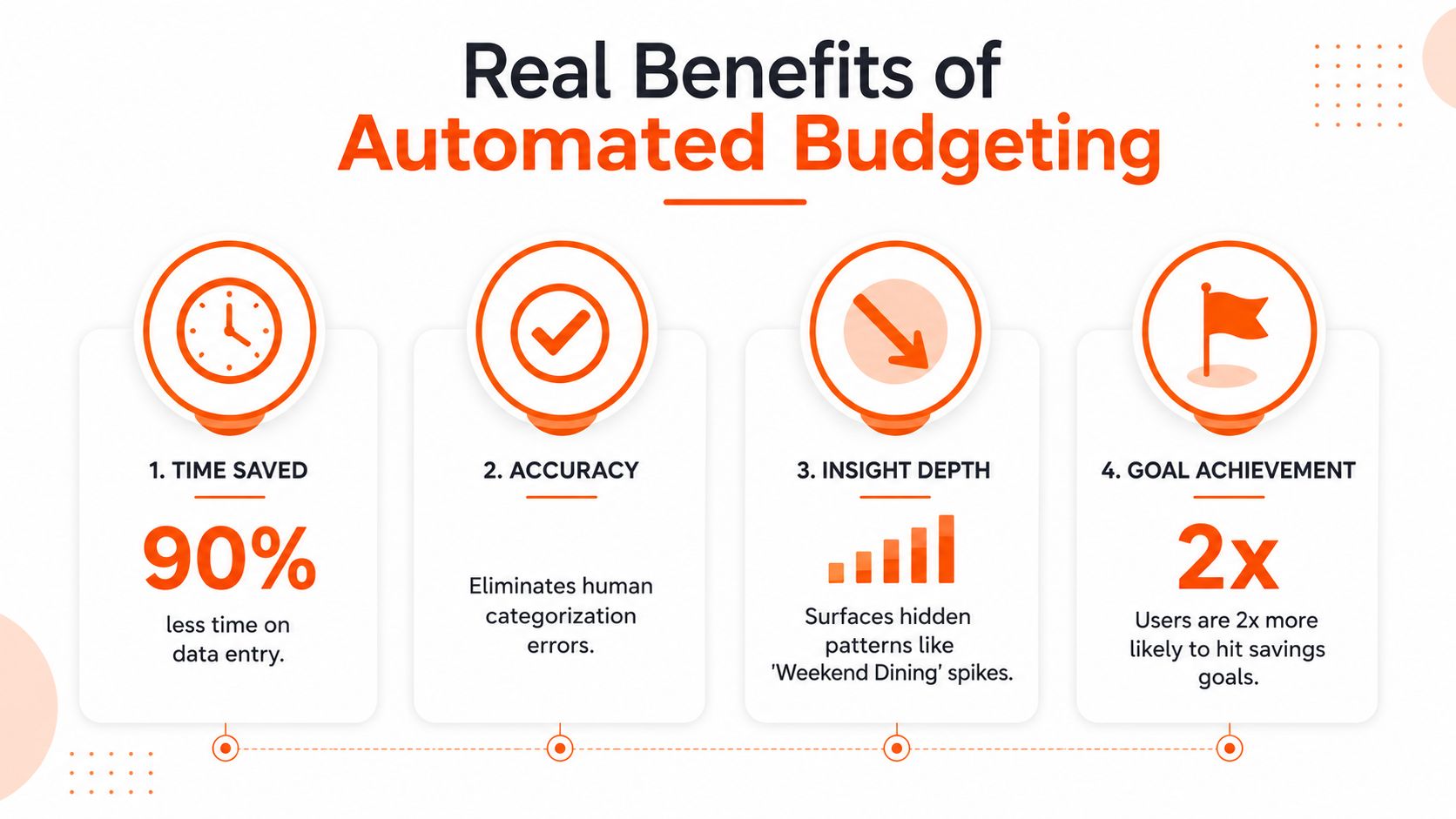
Automation is useful when it removes a repeated task and makes the result easier to act on. In budgeting, that means reducing manual entry, improving visibility, and highlighting decisions that might otherwise stay buried in a statement.
Canada already has a significant audience for this approach. A 2024 BMO survey found that 33% of Canadians were using AI to help manage their finances. Among those users, common tasks included learning personal finance topics at 45%, creating or updating household budgets at 43%, identifying new investment strategies at 42%, building savings at 40%, and creating or updating financial plans at 40%. (BMO's 2024 survey on AI and financial management)
Automation reduces the cost of attention
The first benefit is simple. You don't have to begin every review by copying transactions into a spreadsheet and assigning labels one by one. That leaves more attention for questions such as whether your grocery budget still fits, whether a bill changed, or whether a savings transfer is realistic.
The Canadian banking environment supports frequent digital money activity. Reporting summarised by the Canadian Bankers Association found that 87% of Canadians had used online banking in the past year, 70% had used a banking app, and 30% relied on banking apps for most banking activities. Canadians used mobile banking apps about 7.4 times per month, while earlier survey coverage found that 72% of Canadian financial-app users used them weekly or daily. (Canadian Bankers Association reporting on digital banking use)
It makes hidden patterns easier to see
An assistant can group transactions across accounts and look for repeated behaviour. That could mean frequent dining out on weekends, an increasing household bill, duplicate charges, or a subscription that renews after you've stopped using it.
Subscription leakage is especially relevant in Canada. Canadian streaming subscription spending reached $5.3 billion in 2023, compared with $3.4 billion in 2022, a 55.8% increase. (Canadian streaming subscription spending) The point isn't that every streaming service is wasteful. It's that recurring charges can grow quickly enough to affect cash-flow planning when nobody reviews them.
Conversational review lowers the barrier
A question-and-answer interface can be easier than a spreadsheet, particularly when you're checking one decision rather than conducting a complete monthly review. You can ask about groceries, transport, dining, or recurring bills and then decide whether the answer calls for a budget change.
The assistant should inform your choices, not make major financial decisions on your behalf. A clear answer is valuable only when you understand the category, check the underlying transactions, and choose an action that fits your circumstances. For a broader look at organising transactions, see this expense tracking app guide.
Core Features That Make AI Budgeting Different
A basic expense tracker records what you enter. An AI budgeting assistant aims to interpret that information and help you respond to it. The difference becomes clearer when you compare the tasks side by side.
| Feature | Traditional Budgeting | AI Budgeting Assistant |
|---|---|---|
| Categorisation | You assign labels manually and maintain rules yourself | The system suggests categories and adapts when you correct them |
| Spending alerts | You notice issues during a later review | The tool can flag unusual activity or duplicate charges for attention |
| Forecasting | You set a static limit based on an estimate | The assistant can use past patterns to support planning for expected expenses |
| Subscription review | You search statements and remember renewals | The tool looks for recurring dates, merchants, and amounts |
| Rewards recovery | Cashback, credits, and loyalty value may remain scattered | A benefits view can bring unused value into one review |
| Budget questions | You filter reports or build spreadsheet formulas | You ask a natural-language question and review the answer |
Categorisation should reduce work
Automatic categorisation addresses the most obvious manual pain point. Merchant names can be unclear, and the same merchant can represent different types of spending. A useful system lets you correct exceptions rather than pretending every transaction has a universal answer.
Fintrack's automatic expense categorisation feature is an example of this approach. It's still sensible to review new categories, especially for mixed retailers, reimbursements, transfers, and business-related purchases.
Alerts and forecasting serve different purposes
An alert is about attention now. It can prompt you to inspect an unfamiliar charge, a duplicate transaction, or a category that's approaching its limit. Forecasting is about preparation. It can help you think about irregular bills and upcoming renewals before they compete with everyday spending.
Subscription detection needs to recognise recurring patterns across dates and amounts. It also needs to handle annual billing, monthly billing, changed prices, and exceptions, or it may miss a renewal or flag a legitimate variation.
Rewards recovery adds another layer. Cashback, unused credits, loyalty points, discounts, and expiring offers are easy to overlook when they sit outside a conventional spending report. A benefits-focused view can make them part of the same monthly money review.
Privacy and Security: What You Should Demand
An AI budgeting assistant may spot a forgotten subscription or unusual charge, but it still needs access to sensitive financial information. Before connecting an account, check what permissions the product requests, how it stores and protects data, and whether you can use it without linking a bank.
Look for bank-level encryption, plain-language privacy documentation, and recognised controls such as SOC 2 compliance. Read-only access should be the default. A budgeting tool generally needs to view balances and transactions, not initiate transfers or make payments. These safeguards cannot remove every risk, but they set a stronger boundary than sharing passwords or granting unnecessary permissions.
Canadian and US users should also ask how account connections work. In Canada, consumer-driven banking is intended to replace fragile screen-scraping and password sharing with user-authorised API data flows. Broader account and transaction data can improve merchant matching, anomaly detection, and subscription discovery, which matters when recurring charges are easy to miss. Canadian implementation is still developing, so a responsible product should support consent renewal and offer more than one connection method.
Questions to ask before connecting an account
- Access scope: Does the app need read-only access, and can you select which accounts to include?
- Data control: Can you delete your information or disconnect an account without contacting support?
- Third parties: Does the privacy policy explain whether data is shared with service providers or advertisers?
- Operational controls: Does the company describe encryption, monitoring, authentication, and incident response?
- Alternative entry: Can you track spending through manual entry if you do not want to connect a bank?
The answers should be specific. Vague assurances do not explain what happens to transaction data after it enters the system. Review this resource on data protection for subscribers, then compare its principles with the finance app's own documentation. Fintrack explains its handling of personal information in its privacy policy.
A clear privacy policy should also explain retention, deletion, account disconnection, and how the company responds to a security incident. Those details help you judge whether automation reduces tracking work without asking for more access than the budgeting task requires.
How to Adopt an AI Budgeting Assistant Effectively
The smoothest setup starts small. You don't need to connect every account, create dozens of categories, or redesign your financial life on the first day.
Begin with a controlled first review
Choose whether you'll connect accounts or use manual entry. If you connect accounts, start with the accounts that matter most for day-to-day spending. If you enter transactions manually, decide which purchases you'll record and keep the method consistent.
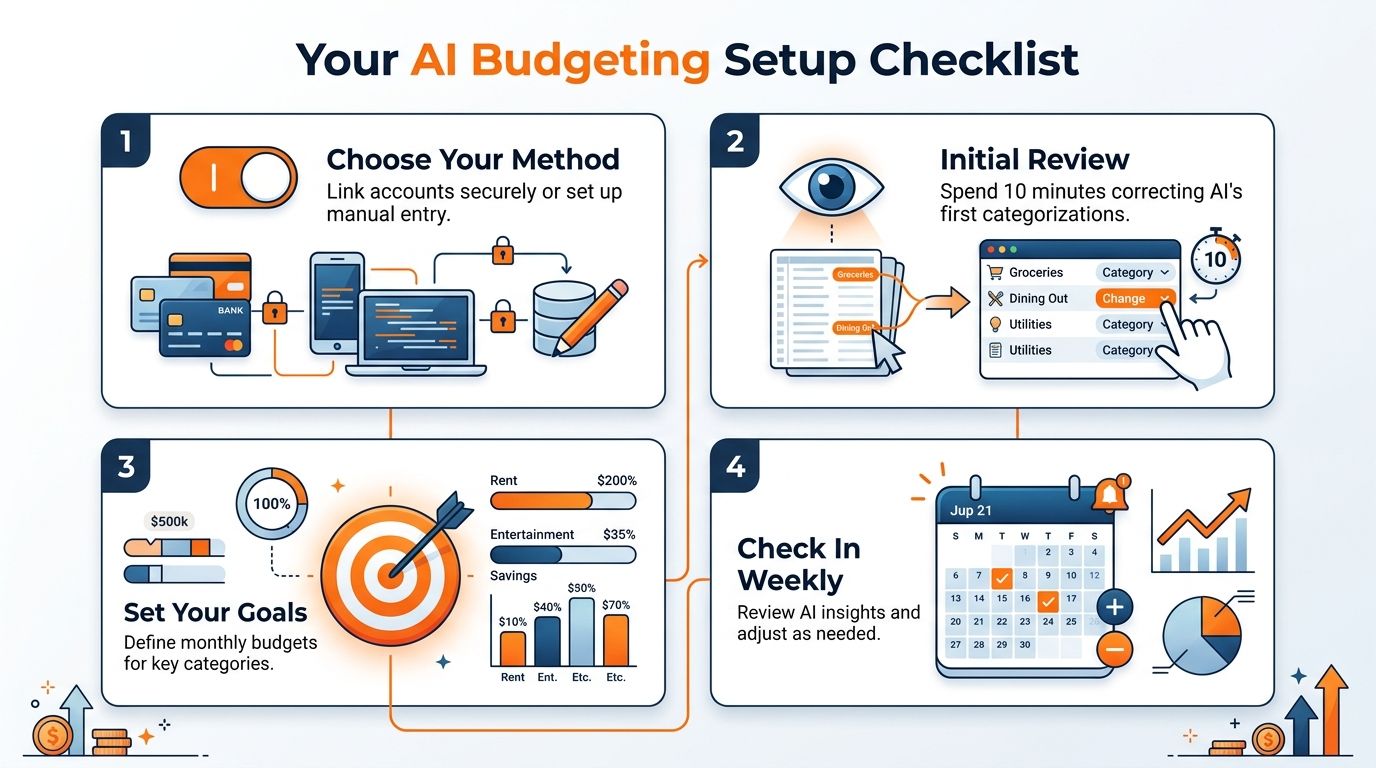
Review the first categorisations before relying on the summaries. Correct obvious mistakes, check transfers and reimbursements, and confirm that recurring bills appear in sensible categories. A few careful corrections can make later reviews more useful because the system has a clearer picture of your preferences.
For Canadian users, account connectivity may change as consumer-driven banking infrastructure matures. This overview of bank account aggregation can help you understand the difference between connected data and manual tracking.
Build a manageable review rhythm
Set budget targets for categories that matter most to you, such as groceries, dining, transport, or communication services. Use your existing spending as a reference, but leave room for irregular costs instead of treating every month as identical.
Then create a simple weekly routine:
- Inspect unusual activity: Check unfamiliar charges, duplicate transactions, and sudden changes.
- Review subscriptions: Confirm which recurring services you still use and note annual renewals.
- Ask one useful question: Try a prompt such as “What changed in my spending this week?”
- Choose one action: Adjust a category, cancel a service, move money toward a goal, or leave the plan unchanged with a clear reason.
Households should agree on shared categories and decide which goals belong to everyone. A short weekly review is often easier to sustain than a large month-end reconciliation.
Your Next Step Toward Smarter Money Management
An AI budgeting assistant is most useful when it turns scattered activity into a decision you can understand. It can reduce the repeated work of manual tracking, make recurring charges easier to review, and give you a conversational way to examine spending without building spreadsheet formulas.
The Canadian evidence supports the timing of this shift. People already use online banking and mobile apps for balances, transactions, and bill payments, while BMO's survey found that Canadians are applying AI to budgeting, savings, and financial planning. In the United States, the same practical questions apply even though account connections, privacy rules, and product availability can differ by provider.
The technology still needs supervision. Check categories, question unusual recommendations, and use alerts as prompts to investigate rather than as automatic proof that something is wrong. An assistant can identify a pattern, but you decide whether the right response is to change a budget, cancel a subscription, move money, or do nothing.
Practical rule: Use AI to make money information easier to see, then use your own priorities to decide what happens next.
Better money management doesn't require you to become a full-time bookkeeper. It requires a process that fits your actual life, whether that means secure account connections, manual entry, weekly questions, or a combination of all three. The right tool should make the next useful action clearer without taking control away from you.
Fintrack brings transactions, budgets, goals, subscription detection, alerts, and benefits into one personal finance workspace, with Finny available for natural-language questions about your spending. Visit Fintrack to explore the AI assistant and start reviewing your money with a method that fits how you already manage it.