
The end of the month arrives, and your balance is lower than expected. You remember the groceries, the rent, and the occasional coffee, but you can't explain the rest of the gap. Nothing looks large enough to cause concern on its own, yet the total tells a different story.
That's the problem automated insights are designed to solve. Instead of showing only a list of transactions, a modern finance app can organise activity, notice changes, explain possible causes, and suggest a practical next step. The aim isn't to hand control of your money to software. It's to turn scattered activity into a story you can understand and check.
The Moment You Realize Your Money Has a Story
Maya checks her account before payday and sees that she has less room than planned. She opens her banking app and scrolls through a long list of purchases. There are several food deliveries, a few rides, a streaming charge, and a larger-than-usual grocery bill. Each transaction makes sense, but the pattern doesn't.
A basic spending chart might show that dining costs rose. A notification might point out one unusual charge. Neither necessarily answers the question Maya has: what changed, and why did it affect the rest of the month?
That question matters because money problems rarely arrive as one dramatic transaction. They often build through repeated choices, timing changes, recurring bills, or expenses that appear in the wrong category. A useful tool should help you connect those pieces without requiring you to study a spreadsheet every evening.
From unease to a usable explanation
A helpful explanation might say that restaurant spending increased because Friday takeaway became a weekly habit, while a recurring service fee was also charged earlier than usual. That message gives Maya something she can evaluate. She might keep the Friday meals, reduce another category, or review the recurring charge.
The explanation can still be wrong, so it shouldn't replace her judgement. Its value is that it gives her a sensible starting point instead of asking her to search blindly.
Practical rule: An insight should help you decide what to check next, not pressure you into accepting an automated conclusion.
This is the difference between seeing numbers and understanding behaviour. The numbers are the evidence. The story is the organised interpretation that helps you act.
What Automated Insights Actually Are
Automated insights are created through a sequence of steps. The software starts with financial activity, looks for meaningful patterns, and then presents the result in language a person can use.
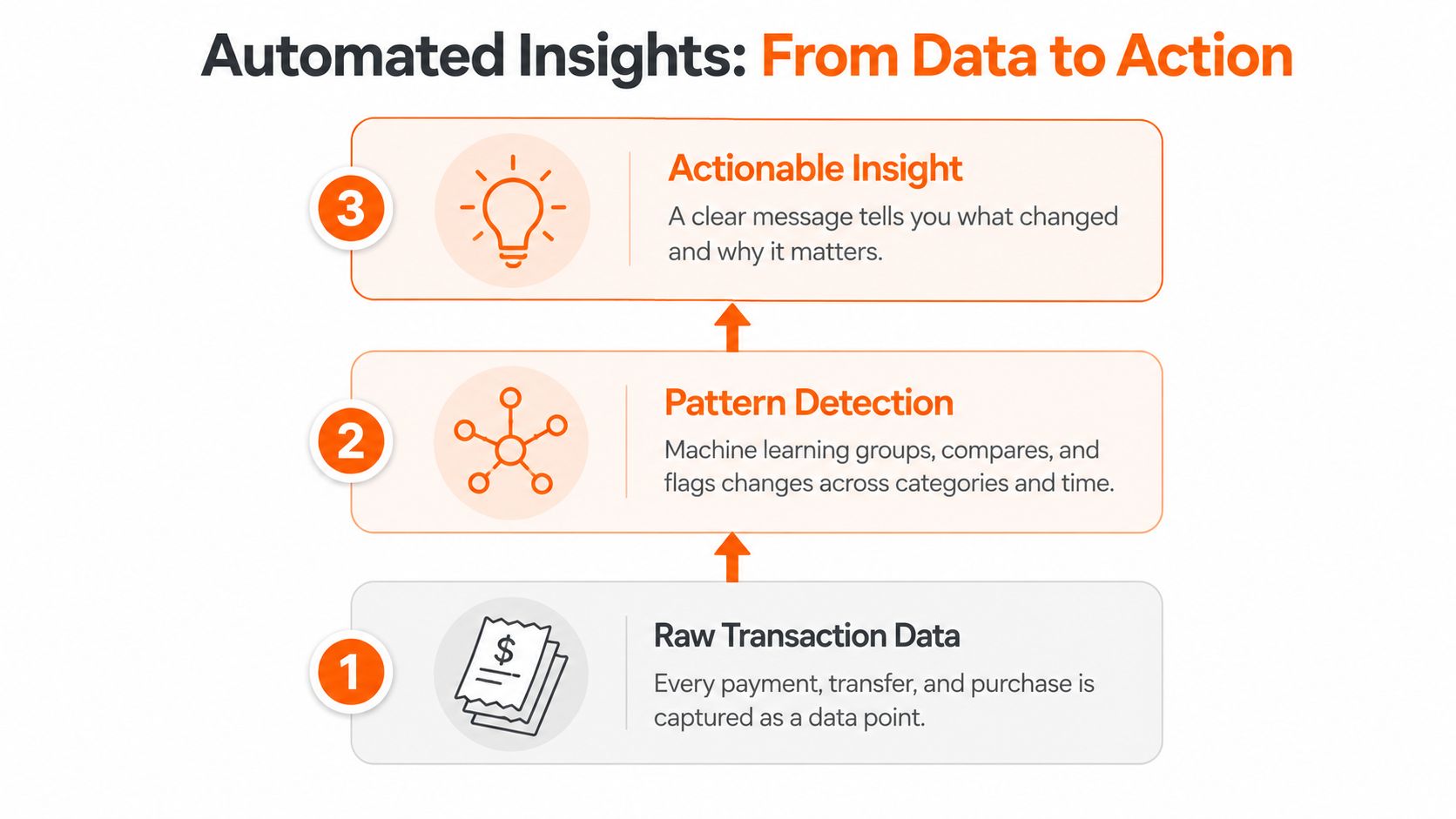
First comes the raw data
Every payment, transfer, deposit, refund, and purchase becomes a data point. Useful fields can include the amount, date, merchant description, account, and category. If a purchase is missing, duplicated, or assigned to the wrong account, later analysis starts with a distorted picture.
Think of this stage as a librarian receiving a cart of unsorted books. The librarian can't describe the collection until the books are available and identifiable.
Next comes pattern detection
Machine learning models compare activity across categories and periods. They may group similar merchants, notice that a charge repeats, flag a transaction that sits outside a normal range, or compare current spending with a user's own history.
An insight is a meaningful interpretation of the data. An anomaly is activity that differs noticeably from an expected pattern. A trend is a repeated direction of change, such as transport costs gradually rising. A recommendation adds a possible action, such as reviewing a recurring payment or adjusting a category limit.
The model doesn't need to understand your life in the human sense. It identifies relationships in the information it has been given.
Finally, language makes the result usable
Natural language generation turns model output into a readable sentence. Instead of presenting a technical result, the app might explain that grocery spending is higher because several larger purchases occurred close together.
A chart can show movement. A notification can interrupt your attention. Automated insights combine detection with interpretation, and the strongest versions add a next step. Fintrack's AI budgeting assistant is an example of the broader shift toward asking finance questions in ordinary language rather than searching through reports manually.
The important distinction is simple: an automated insight should answer more than “what happened?” It should help clarify what changed, what may be connected to that change, and what you could review next.
Where the Data Comes From
An app can only produce useful automated insights from the information available to it. Most personal finance tools draw from a combination of connected accounts, card feeds, manual entries, and file imports.
A bank connection can bring transactions in with little typing. Credit card feeds add another view of spending, especially when purchases are made on a card rather than a chequing account. Manual entry takes more effort, but it can cover cash purchases or accounts that aren't supported by a connection. CSV imports can fill historical gaps or provide a controlled way to bring in records.
The choice affects speed, coverage, and the chance of error.
| Data Sources Compared | Setup Effort | Coverage | Accuracy Risk |
|---|---|---|---|
| Bank aggregation | Usually low after connection | Connected account activity | Pending items, duplicate records, or merchant labels |
| Credit card feed | Usually low after connection | Card purchases and payments | Timing differences and unclear merchant descriptions |
| Manual entry | Higher | Cash and unsupported activity | Missed entries or typing mistakes |
| CSV import | Moderate | Historical or exported records | Inconsistent columns, categories, or dates |
Open banking connections are efficient when they work well, but they don't automatically explain every transaction. A manual entry can be more descriptive because you choose the label, although it depends on you recording the purchase consistently. The practical trade-off is convenience versus control, not a universal winner. For background on how connected accounts are assembled, see this explanation of bank account aggregation.
Why clean inputs matter
Merchant names often arrive in unfamiliar forms. A single retailer may appear under a corporate name, a payment processor, or a shortened label. Pending transactions can change before they settle, and shared accounts can mix your purchases with activity from a partner or family member.
Those issues affect confidence. If the app sees a clean, complete history, it has a stronger basis for detecting a recurring payment or comparing one category with another. If the record is partial or inconsistent, the result should be treated as a prompt to inspect the underlying transactions.
Fintrack's bank-free option can also matter for Canadian users who prefer manual expense tracking without a bank connection. The best setup is the one that captures enough of your real activity while keeping the level of effort manageable.
What Automated Insights Look Like in Your App
Most automated insights fall into three practical groups: signals, context, and action. An alert gets your attention, a trend helps you interpret movement, and a recommendation gives you a possible response.
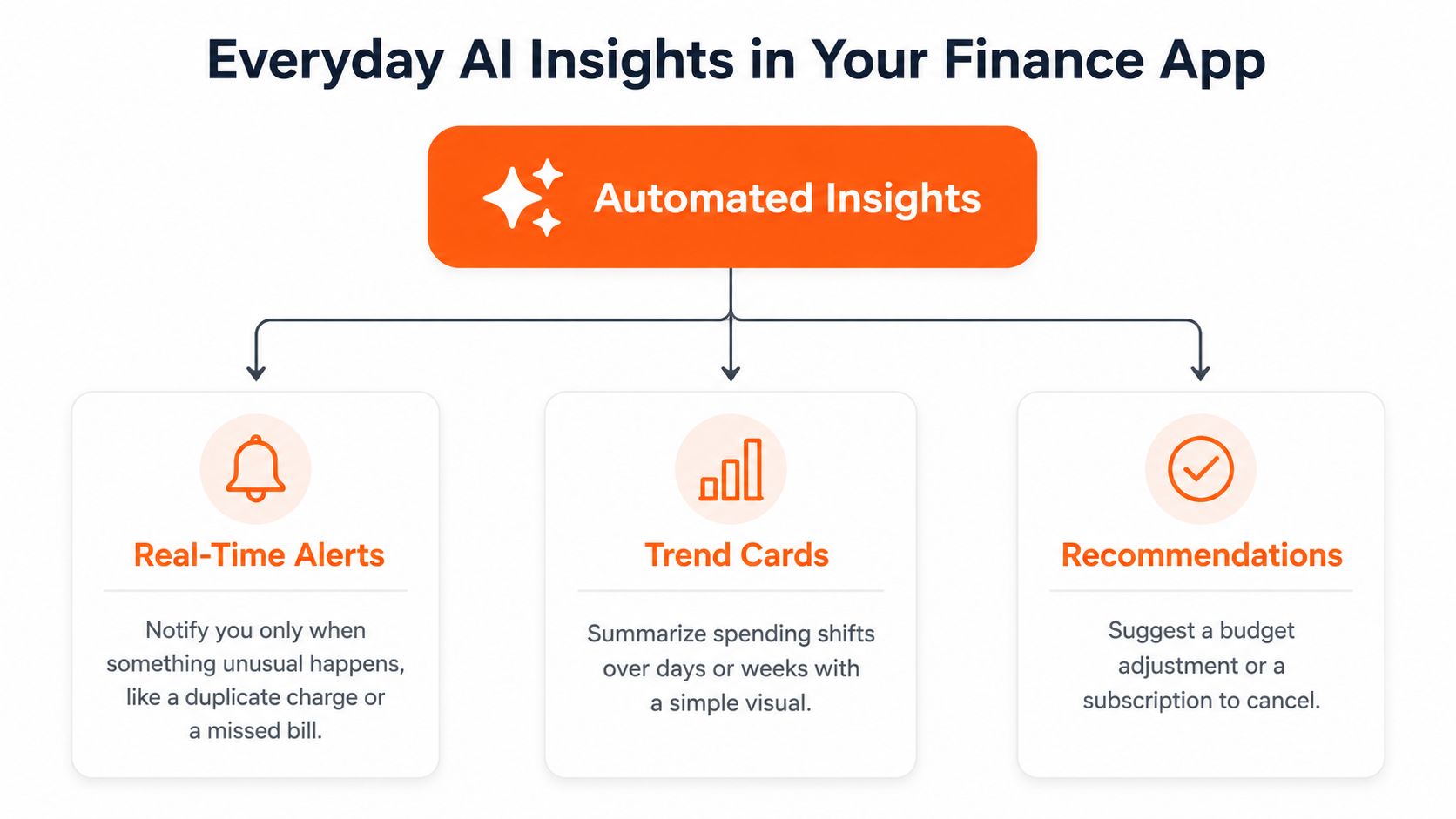
Alerts provide the signal
An alert works best when it's specific. It might flag a duplicate-looking charge, an unusual payment, or a bill that appears to have changed. The purpose isn't to notify you about every ordinary purchase. Too many interruptions teach people to dismiss all notifications, including the useful ones.
Canadian banks have a formal example of this notification principle. The Financial Consumer Agency of Canada says the e-alert obligation came into force on June 30, 2022, requiring banks to send alerts without delay when a personal deposit account or certain available credit falls below a prescribed amount. The Financial Consumer Protection Framework explanation provides the relevant details.
Trend cards provide context
A trend card turns separate transactions into a comparison. It may show that dining, transit, or household spending moved upward relative to a previous period, then identify the merchants or days contributing to the difference.
The comparison matters because a single purchase can mislead you. A larger grocery bill may be a one-off event, while several smaller food orders may reveal a new routine. A trend view gives you a way to distinguish an isolated event from repeated behaviour.
Recommendations suggest action
A recommendation goes beyond describing a change. It might suggest reviewing a subscription, setting a realistic category cap, or checking whether a recurring payment still belongs in your plan.
The recommendation shouldn't assume it knows your priorities. A person may willingly spend more on dining during a busy month, or keep a service because it supports their work. Good recommendations leave room for confirmation and make the proposed action clear. Fintrack's AI transaction insights are designed around this kind of spending breakdown and category-level interpretation.
Real Workflows That Turn Data Into Decisions
An individual alert rarely solves a money problem. The useful part is the chain that follows: notice a change, investigate the pattern, understand a likely cause, and choose a response.
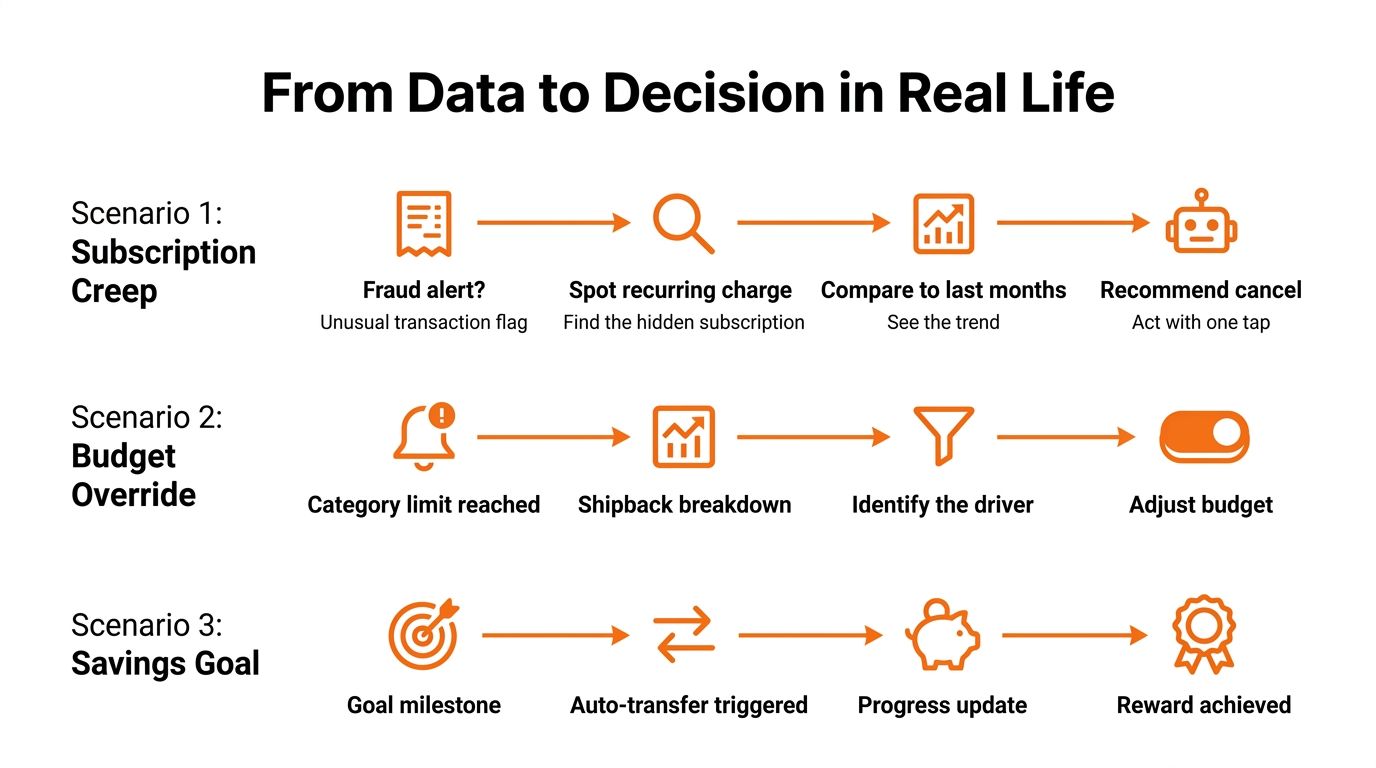
Subscription creep
You notice a small recurring charge that you don't immediately recognise. The app flags it as unusual because it's new to the account, then groups it with similar monthly payments.
A trend view shows that the charge has continued across recent months. The explanation doesn't need to claim the subscription is wasteful. It only needs to make the recurring pattern visible, so you can decide whether to cancel it, keep it, or move it into a more accurate category.
Before acting, check the original merchant receipt and confirm the payment isn't tied to a service you still use. A careful cash flow insight from statements can help you connect recurring entries with the wider movement in your account.
A dining-out spike
The app notices that restaurant spending sits outside your usual range. A category summary then shows that the increase isn't spread evenly across the month. It's concentrated around Friday orders from a small group of merchants.
That explanation is more useful than a generic warning because it points to a behaviour and a time. You could set a Friday meal limit, plan one takeaway night, or move money from another flexible category. The recommendation should reflect your past behaviour rather than suggest an unrealistic restriction.
You may also discover that one restaurant is being classified as groceries or that a delivery service is recorded separately from the meal. Review the labels before changing the budget. If the records don't match reality, start with account reconciliation guidance so future patterns have a cleaner foundation.
A low-cash warning
A forward-looking insight can identify a likely cash squeeze before it appears in your balance. The app sees that upcoming bills and regular spending may leave less available cash than you normally require.
A trend card can explain the gap by showing the timing of a large bill, a delayed income payment, or a recent rise in essential spending. A recommendation might suggest reviewing the payment date or transferring money from savings, but the decision remains yours.
This workflow works best when the forecast is visible as an estimate, not a promise. Check whether the app has included all accounts, pending items, expected income, and upcoming obligations before relying on the warning.
Where Automated Insights Still Fall Short
Automated insights can be helpful without being perfectly accurate. The main weakness usually isn't that software can't find patterns. It's that the pattern may not have enough context to explain your real situation.
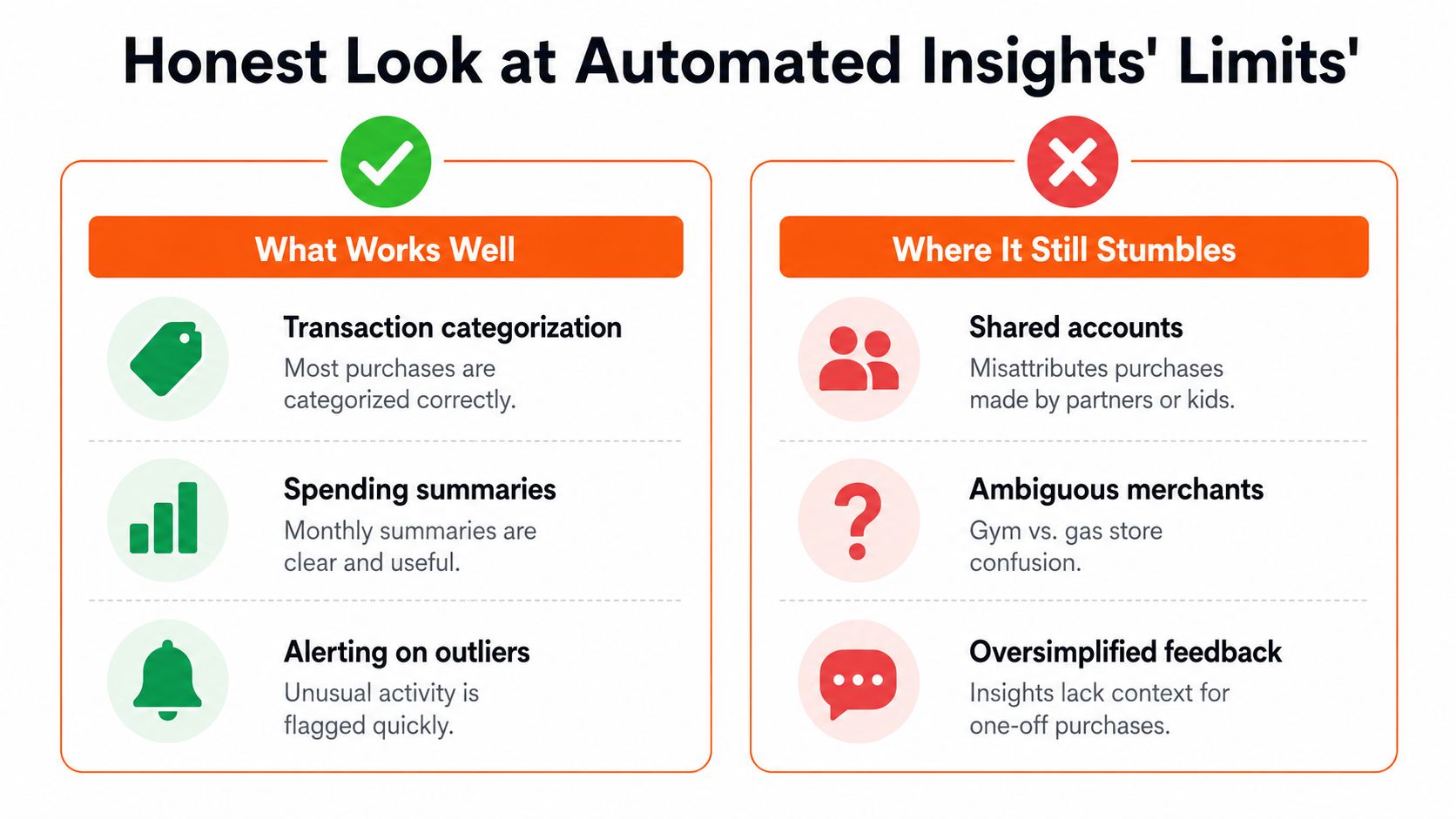
Categorisation is a good example. A University of Wisconsin expense-tracking study found that respondents reported high accuracy in manual tracking, with about 85.50% saying they always ensured accurate category assignment and about 93.47% saying they always ensured accurate transaction-date recording. Those figures describe respondents' own manual practices, not a guarantee for every app, but they show why human review still matters when labels affect a budget. See the University of Wisconsin expense-tracking study for the reported findings.
An industry article claims first-pass AI categorisation accuracy above 95% for routine personal transactions in 2026, compared with roughly 68% to 70% for older rules-based systems, and describes models using merchant name, amount, time of day, frequency, and receipt data. Treat those figures as the article's industry claim, not a universal benchmark. The AI expense categorisation discussion also illustrates why routine purchases are easier than ambiguous ones.
Context can break the pattern
Shared accounts create attribution problems. Cash purchases may never enter the system, irregular income can make forecasts unstable, and one large purchase can distort a baseline. A charge from a merchant with an unclear name may be classified correctly most of the time but still fail on the transaction that matters to you.
There's another important distinction: correlation isn't causation. An app may correctly detect that dining rose after a schedule change, but it can't prove the schedule caused the spending. Use the explanation as a hypothesis to verify, especially before moving money or changing a long-term plan.
False alarms and opaque reasoning are also trust problems. If an alert feels wrong, correct the transaction, review the explanation, and decide whether the feature's settings need adjusting. Staying involved turns limitations into quality checks rather than reasons to ignore every automated message.
Privacy, Security, and Smart Setup
Financial automation requires access to sensitive information, so convenience shouldn't be the only selection criterion. Before connecting an account, find out what the app can access, how it receives the data, how long it keeps it, and how you can revoke permission.
A read-only connection is designed to retrieve account information without granting the app permission to move funds. Account aggregators can use tokenised access so the finance app doesn't need to store your direct banking credentials, although you should still verify the provider, permissions, and connected institution.
Questions to ask before connecting
Look for clear documentation rather than vague security language. A privacy policy should explain data use and retention, while security materials should identify safeguards for data in transit and at rest.
- Independent assurance: Check for published security audits, SOC 2 or equivalent reports, and clear explanations of how controls are maintained.
- Permission scope: Confirm whether the connection is read-only and whether you can limit which accounts are included.
- Retention rules: Look for a defined retention window instead of an open-ended promise to store information indefinitely.
- Revocation: Make sure you can disconnect an account and understand what happens to previously imported records.
- Official channels: Don't provide your full banking password through an unfamiliar form or a route outside the bank's recognised connection process.
For a useful comparison point, review how a service such as Family Folder describes its privacy practices. The purpose isn't to treat one policy as a universal standard. It's to get comfortable reading what a financial app promises.
Fintrack publishes its privacy information for users who want to review its approach before deciding how to track their finances.
A controlled setup routine
Start with the accounts that matter most to your question, not every account you have. Enable only notifications you'll act on, review connected accounts regularly, and keep manual notes for transactions that need personal context.
A secure setup preserves choice. Automation should reduce routine work, not remove your ability to inspect, correct, or disconnect.
Putting Automated Insights to Work in Your Routine
You don't need to monitor your finances constantly. A short routine gives automated insights a defined job while keeping your decisions human.
A simple weekly rhythm
On Sunday, glance at the trend summary. Look for one meaningful change in a flexible category and ask whether it matches what happened in your week.
Mid-week, review only flagged alerts. Check the original transaction, correct the category if needed, and decide whether the alert requires action. If nothing is unusual, move on.
At month-end, compare category movement with your actual goals. A higher dining total may be acceptable if you planned for it. A quiet rise in recurring charges may deserve attention even when the individual amounts feel small.
Pair each insight with one clear human decision:
- Keep the pattern and leave the plan unchanged.
- Correct the data so later analysis improves.
- Adjust a limit for the next period.
- Investigate a merchant or recurring payment.
- Move money only after checking upcoming obligations.
That approach keeps the app as a prompt rather than an autopilot. It also makes causal explanations more useful because you're testing whether the suggested reason fits your life.
For people who want a bank connection, a manual workflow, or both, Fintrack can organise transactions, surface spending trends, and present financial questions in plain language. Its budget planning feature fits a repeatable review routine without requiring you to build the process from scratch.
If you want to turn this approach into a weekly habit, visit Fintrack to review your spending patterns, investigate changes, and connect each insight with a decision that fits your actual goals. You can use connected accounts or manual entry, then keep the final judgement with you.