
On a Tuesday evening in a small Toronto apartment, Maya checks her phone while waiting for dinner to finish. A $47 charge from a Vancouver merchant appears on her account, even though she hasn't visited Vancouver or recognised the business.
She taps the transaction, checks the date, compares the order number with her email, and then pauses over her bank's phone number. The useful part of the alert isn't that it will eventually appear in a monthly spending report. It's that Maya has the chance to act while the charge is still fresh.
That moment captures the central purpose of real time expense tracking. It brings a transaction, its category, and a possible warning close to the moment money moves. A clear transaction history still matters, but speed changes what you can do with the information.
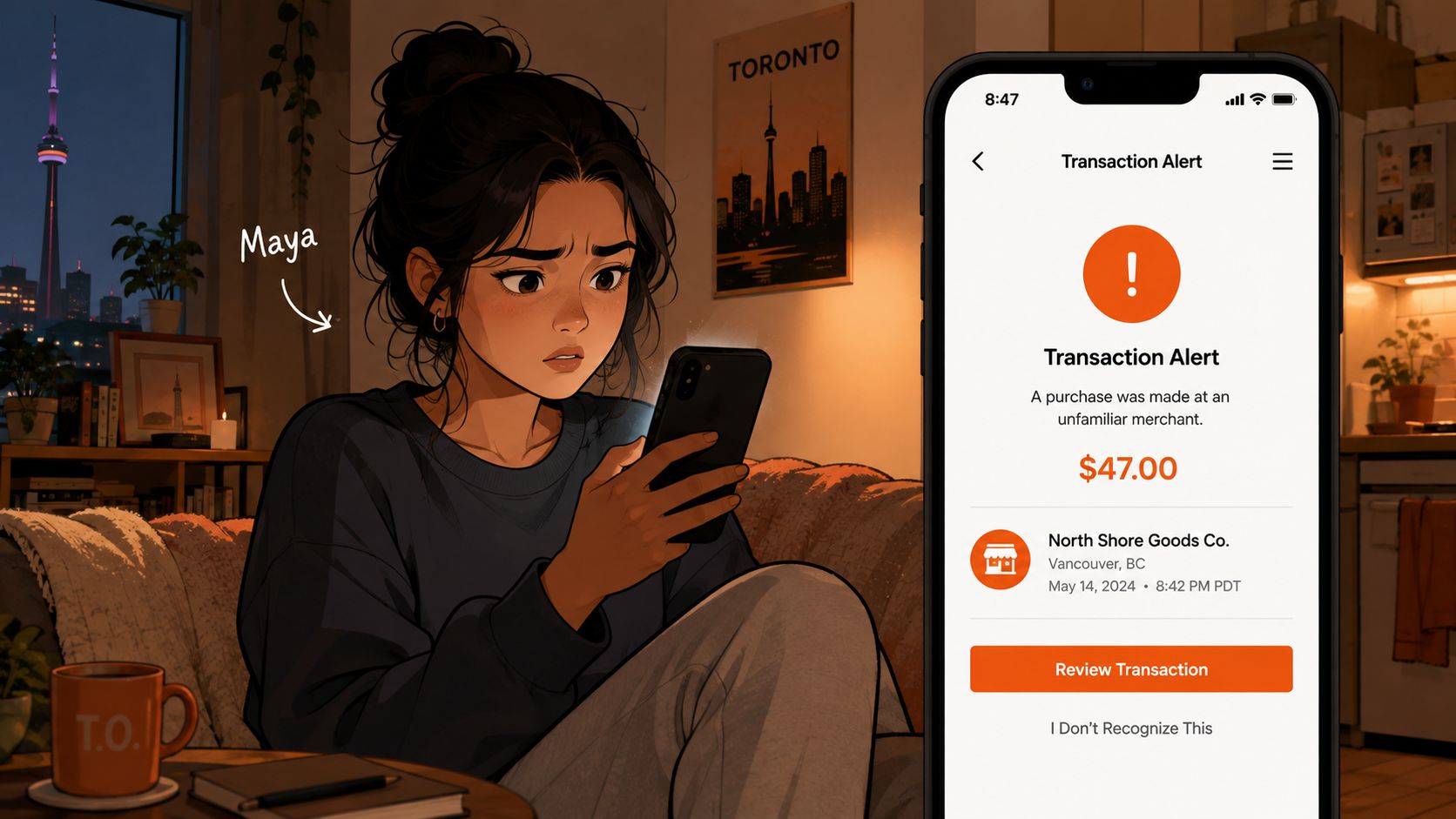
The alert on Maya's screen depends on several connected steps. A card network sends an authorisation request, the bank records the transaction, a data connection retrieves it, and an app turns the raw details into something a person can understand. The sections below unpack that process and show how faster signals support fraud checks, spending decisions, and privacy-conscious manual tracking.
The Moment You Check Your Phone After a Strange Charge
Maya's first instinct is to confirm whether the charge is unfamiliar. She opens the merchant details, looks at the transaction date, and checks whether the amount matches a recent online purchase. A delivery service, hotel deposit, or digital subscription can sometimes use a business name that looks nothing like the brand a customer remembers.
That quick check separates a mistake from a warning. If the charge is legitimate, Maya can label it correctly and move on. If it isn't, she can freeze the card, contact the bank, and investigate before another transaction appears.
Speed changes the available choices
A monthly review might show the same charge later, but it removes the urgency that makes action easier. By then, a person may have forgotten the purchase, missed the cancellation window for a recurring service, or overlooked a second unfamiliar payment.
Real time tracking also helps with ordinary decisions. A notification after an unplanned restaurant visit can prompt someone to adjust the rest of the week's spending while there is still time to do so. The information becomes useful because it arrives before the decision has disappeared into the past.
Practical rule: An alert earns its place when it helps you decide what to do next, not merely when it records what already happened.
The goal isn't to watch every transaction obsessively. It's to create a reliable signal for unusual activity, recurring charges, and spending that deserves attention. The system should make the important moments easier to spot without turning every coffee purchase into an emergency.
What Real Time Expense Tracking Actually Means
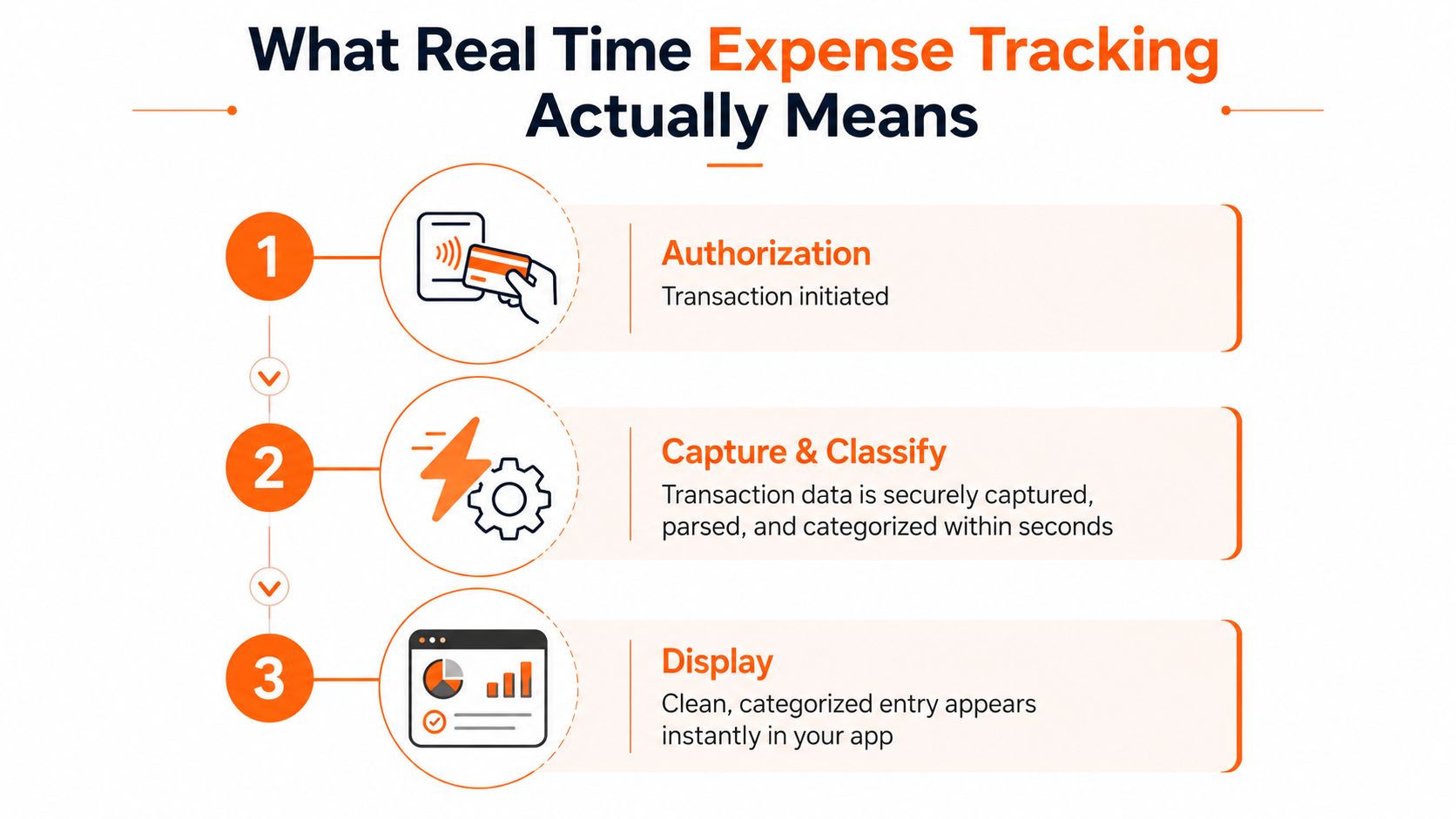
Real time expense tracking means capturing, processing, and displaying a transaction close to the moment it's authorised. In practice, the timing can range from seconds to a few minutes, depending on the bank, card network, data provider, and app.
A simple payment flow looks like this:
- Authorisation begins. You tap a card or complete an online purchase. The merchant sends a request to the card issuer.
- The bank responds. The issuing bank approves or declines the request. An approved payment creates an initial transaction signal.
- The transaction is captured. The bank or data provider makes the transaction details available to an expense app through a connected data route.
- The app cleans the data. It may organise the merchant name, amount, currency, date, and spending category.
- The notification arrives. A push alert or in-app update shows the user what happened.
Real time versus near real time
The label can be used loosely. An app that refreshes every few hours may still feel current, but it isn't delivering the same decision speed as a system that displays an authorisation within moments.
Pending and completed transactions can also differ. A restaurant payment might first appear as a pending amount and later change when the merchant finalises it. A petrol station or hotel can place a temporary hold that doesn't match the final charge. Good tracking should make that status visible instead of presenting every early amount as settled fact.
The practical test is simple: can you see a meaningful spending signal while the transaction is still fresh? If the answer is yes, the system can support rapid fraud checks and spending adjustments. If the answer is no, it functions more like periodic bookkeeping.
How the Data Gets From Your Card to Your Screen
Canadian expense apps generally use one of three routes to bring transaction information into a current view. Each route balances speed, institutional coverage, privacy, and user effort differently.
| Data path | Typical latency | Coverage in Canada | Privacy and control | Main trade-off |
|---|---|---|---|---|
| Open finance or open banking API | Often fast when supported | Depends on participating institutions and partner connections | Consent is handled through the bank or provider | A connection may not support every account |
| Direct aggregator integration | Can be fast, depending on the institution | Often broad across linked services | Users should review storage, permissions, and residency terms | Cross-border handling and occasional connection failures need attention |
| Manual entry or receipt scanning | Immediate after the user records it | Works with any account or payment method | Strong local control, with no account connection required | The user must remember to enter each purchase |
Connected bank routes
Open finance and open banking connections use permissioned data access between an institution, a provider, and an app. Partners such as Flinks or Wealthsimple may return structured transaction fields, but the experience depends on which financial institutions are supported and what consent steps the bank requires.
A connected account can reduce typing, although a dropped connection can delay updates. Users should know how the app handles missing data, reauthorisation, and duplicate transactions. The safest setup gives a clear way to disconnect access and review what permission was granted.
For a broader explanation of how these connections work, see this guide to bank account aggregation.
Aggregators and manual tracking
Services such as Plaid and Yodlee sit behind many apps with Canadian and US coverage. They can simplify access to multiple institutions, but Canadian users may want to ask where information is stored, which entities can access it, and whether the connection is read-only.
Manual entry is slower only if the user delays it. Recording a purchase immediately, scanning a receipt, or adding it by voice can keep the ledger current without sharing bank credentials. That approach suits people who want a privacy-first workflow, use institutions an app doesn't support, or prefer to keep selected accounts offline.
The strongest setup isn't necessarily one that connects everything. It lets you choose which accounts update automatically and which transactions stay under your direct control.
How Transactions Get Sorted Into Categories
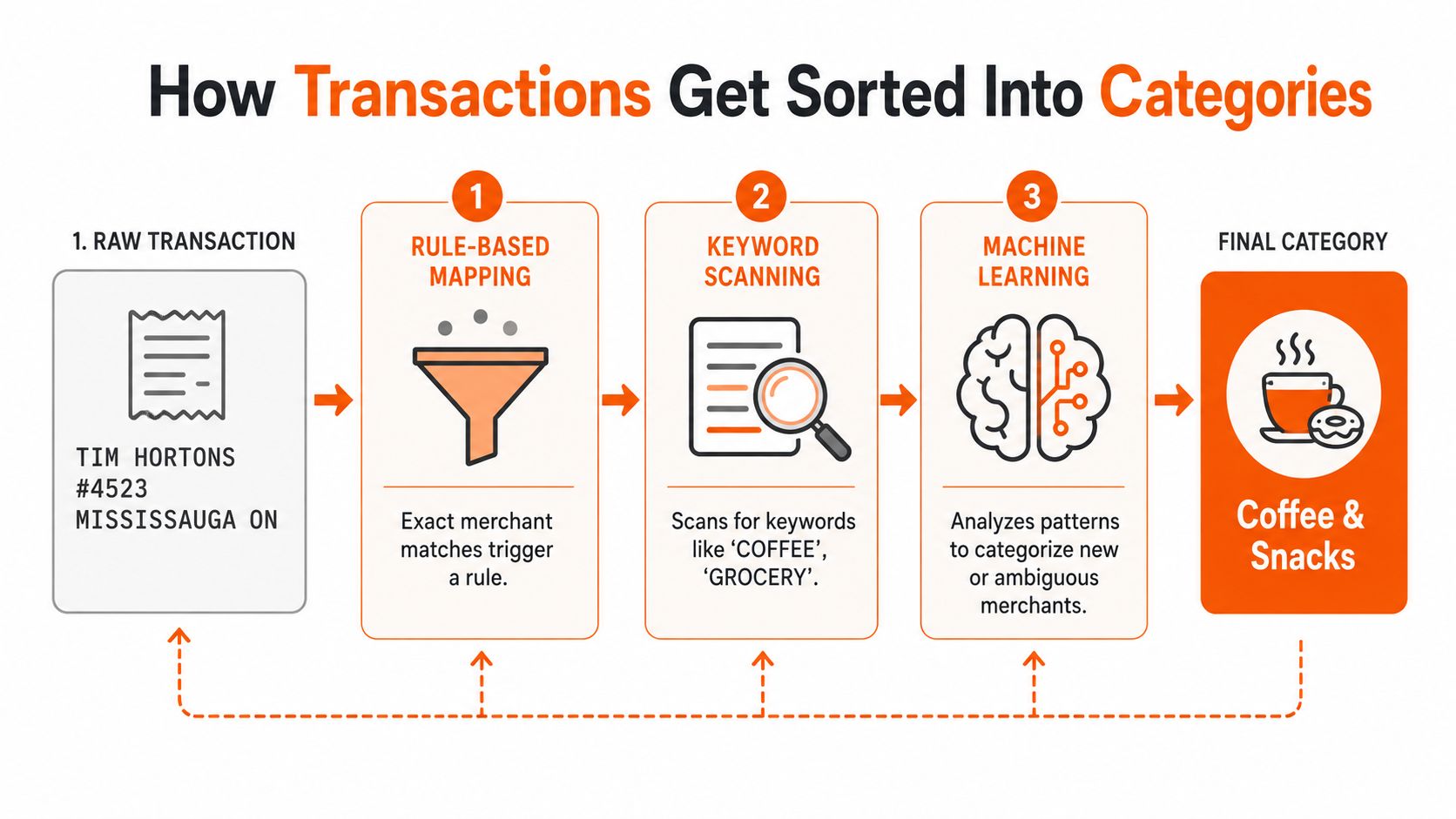
A bank feed often produces a merchant string such as TIM HORTONS #4523 MISSISSAUGA ON. That raw label isn't very helpful when you're trying to answer a question such as, “How much did I spend on coffee this week?” Categorisation turns the string into a usable description, such as Coffee & Snacks or Dining.
Three layers of classification
The first layer uses fixed rules. Payment networks and banks may provide a Merchant Category Code, and an app can map known merchants to a standard group. If a business has a stable identity, an exact match can classify it quickly.
The second layer examines clues in the transaction:
- Merchant words: Terms connected to coffee, groceries, fuel, or travel can narrow the likely category.
- Location details: City and province information can help distinguish a local shop from an online marketplace.
- Recurring patterns: Similar amounts and dates may indicate a subscription or regular bill.
The third layer uses machine learning or AI to handle new and ambiguous merchants. It compares the current transaction with prior labels, related merchant patterns, and the user's previous corrections.
Why corrections matter
A category becomes more useful when it reflects how you make decisions. A large retailer might sell groceries, clothing, and household goods, while a cash withdrawal says nothing about what happened after the money left the account.
The app should let you correct a label, split a transaction, or mark an entry for review. Corrections give the system a better record of your preferences, which can make future classifications cleaner. Uncertain entries deserve a confidence flag rather than false precision.
Cash tips, foreign transactions, refunds, and mixed purchases remain difficult edge cases. A useful categorisation system recognises uncertainty and makes review quick. You can explore how automatic expense categorisation fits into that workflow.
Why Real Time Tracking Changes Your Money Decisions
The main benefit of real time tracking is decision speed. A record that appears while a transaction is still recent can help you challenge fraud, stop a recurring charge, or change a spending choice before the month-end review.
Canadian banking tools already demonstrate this fraud-control role. Scotiabank says eligible fraud alerts operate in real time, 24 hours a day, 7 days a week, and may block a card while contacting the customer by push notification, text, email, or phone through its Scotia fraud alerts programme. RBC also offers instant alerts for suspicious Interac e-Transfers and out-of-pattern credit card purchases, along with alerts for selected balance and purchase conditions.
Three decisions that benefit from speed
| Decision | Real time, seconds to minutes | Weekly or monthly review |
|---|---|---|
| Possible fraud | Check the merchant, freeze the card, and contact the bank promptly | Investigate after the charge has blended into other activity |
| Subscription renewal | Question an unfamiliar recurring payment while the charge is visible | Notice the pattern after several charges |
| Overspending | Adjust the next purchase or category plan immediately | Review the result after the spending has already happened |
Canadian fraud telemetry also shows why alerts need precision. Central 1 reported that its fraud engine detected and stopped 62% of fraudulent Interac e-Transfer transactions in Q1 2025 across 209 financial institutions, while averaging 2.7 alerts for every real fraud case and flagging 278 wire transactions across more than 78,000 payments in its member activity. Those figures point to a practical design problem: an alert model must catch suspicious activity without creating so much noise that people stop paying attention. Central 1's Q1 2025 fraud highlights provide the underlying context.
FICO's 2025 Canada survey found that 69% of Canadian consumers wanted banks to protect them from scams during real-time payment transactions, while 83% reported recently receiving a scam text, email, or phone call. The expectation is clear. People want monitoring that understands context, not merely a balance that updates after the fact. You can see how automated patterns can support this kind of review in automated financial insights.
The Alert Fatigue Problem and How to Avoid It
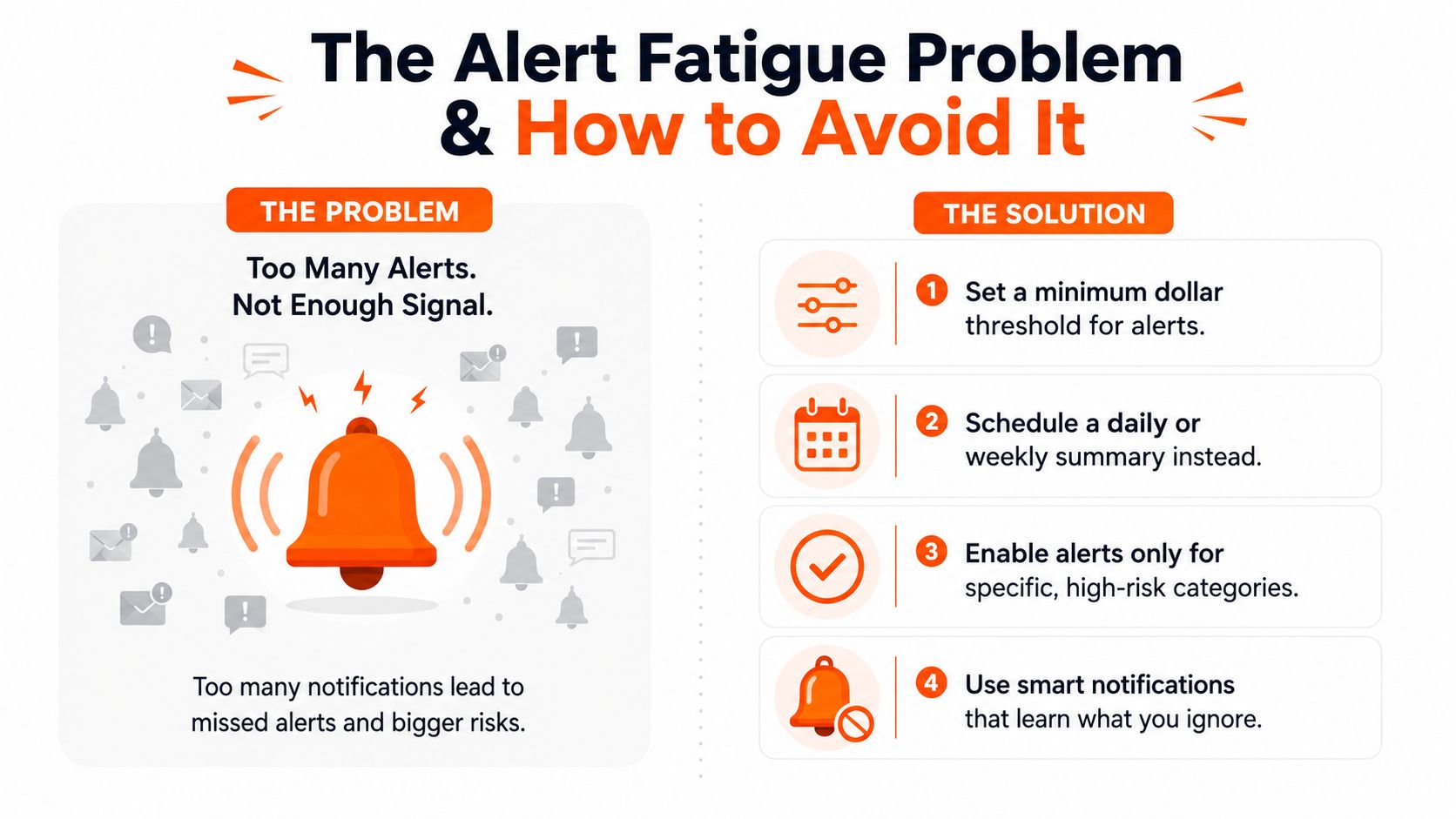
More notifications don't automatically create better protection. If an app sends a ping for every ordinary purchase, users may swipe away the coffee alert, the grocery alert, and eventually the message about a suspicious charge.
Alert fatigue happens when repeated low-value notifications reduce attention. The problem isn't only inconvenience. False positives make it harder to distinguish a useful warning from routine account activity.
Tune alerts around the action
Start with the decisions you want to make. Fraud detection may justify broad coverage, while budgeting usually works better with fewer, more targeted signals.
- Set a minimum amount: Use a personal threshold for purchases that deserve immediate attention.
- Create trusted merchants: Keep ordinary recurring payments from interrupting your day.
- Filter by category: Prioritise high-risk or high-impact categories instead of every transaction.
- Schedule quiet hours: Allow urgent security alerts through while muting routine updates at night.
- Use a digest: Combine small purchases into an evening or weekly summary.
Subscription renewals need careful handling. You may want a reminder before a recurring charge without treating every known renewal as possible fraud. Likewise, a category limit can help with budgeting, but it shouldn't replace the bank's broader security monitoring.
If you can't act on an alert within five seconds, consider batching or muting it.
Review the settings after using them for a while. The right configuration is personal, and a useful system should let you change thresholds without rebuilding the whole budget.
What to Look For in a Real Time Expense App
Choose an app by asking practical questions, not by trusting the label “real time.” A provider may refresh quickly for one institution and slowly for another, so the experience matters more than the marketing phrase.
Check the connection
Ask whether the app supports direct Canadian bank integrations or providers such as Flinks. Find out whether CSV import can cover a missing institution, how the app handles a dropped connection, and whether you can reconnect without losing categories or notes.
Data control deserves equal attention. Look for a clear permission screen, read-only credentials where available, simple disconnection, and an export option such as CSV or OFX. Canadian users may also want to ask about data residency and cross-border storage before linking an account.
Test the speed
Find out whether “real time” means seconds, minutes, or periodic refreshes. Push notifications usually support faster action than email, but a notification isn't useful if the underlying transaction is still pending or missing key merchant details.
For readers comparing dashboards and monitoring tools more broadly, this real time analytics platform guide offers useful context on how live data views differ from periodic reporting.
Inspect categorisation controls
A reliable app should let you correct a category, lock a rule, and split a mixed transaction. Check whether it identifies recurring payments and whether it explains uncertain classifications instead of filing everything into a broad group.
Configure the alerts
Look for per-category thresholds, quiet hours, and summary modes. You should be able to mute routine subscription renewals without weakening warnings for unfamiliar merchants or other suspicious activity.
Consider a bank-free route
Some people don't want to connect every account. Manual entry, receipt scanning, CSV uploads, voice input, and chat-based additions can keep a spending record current while leaving bank access disconnected.
Fintrack's AI expense tracker supports manual entry, CSV uploads, voice input, and chat-based transaction additions, with automated classification and spending breakdowns. That makes it a relevant option for someone who wants current expense visibility while retaining control over which accounts connect.
Putting It All Together This Week
You don't need to connect every account or activate every notification at once. A smaller setup gives you time to check the data and decide which alerts help.
- Start with one account. Choose the card or account you use most often. This keeps the first wave of notifications manageable and gives categorisation time to reflect your corrections.
- Create two alerts. Set one for a transaction above your personal threshold and one for spending above a category budget. Leave the rest off for two weeks.
- Audit the first month. Export the categorised transactions to a spreadsheet and compare the totals with the bank statement. Check pending items, refunds, duplicate entries, and recurring charges you may have forgotten.
Canadian budgeting guidance also supports a live checklist approach. Create a list of expected expenses and mark each item when it's paid, rather than waiting until the end of the month to reconstruct what happened. The Federal Consumer Agency of Canada offers a budget planner, while Canadian professional-accounting guidance describes checking off expected expenses as they're paid through Budgetify's practical tracking guidance.
If you'd rather start with that setup already organised, Fintrack's transaction tracking tools can help you record, categorise, and review spending without requiring every bank account to be connected.
Fintrack lets you add expenses manually, by chat, voice, or CSV, then organises them into categories and spending views. Visit Fintrack to set up a focused real time tracking workflow with only the alerts and accounts you want to use.