
You open your banking app to check one card payment, then end up staring at a long list of charges, transfers, fees, and refunds. By the time you've scrolled to the bottom, you still can't say where most of your money went. That's where transaction history matters, because it gives you a chronological record of what happened, not just a balance at one point in time.
Think of it as your financial trail. Every deposit, withdrawal, transfer, fee, and refund leaves a mark, and those marks are what you use to understand cash flow, spot errors, and build a clearer budget. A useful comparison is a market chart, where each price movement tells part of the story, not just the final number, and you can even view Bitcoin stats and charts to see how a live record can show movement over time.
If you've already read our guide on what expense tracking is, this is the next layer. Expense tracking tells you where money goes, while transaction history gives you the raw material behind that answer, line by line.
What Transaction History Actually Means for Your Money
A lot of people think transaction history is just a list inside a banking app. It's more useful than that. It's the chronological record of financial activity tied to your accounts, and that makes it the base layer for budgeting, cash-flow planning, and noticing patterns before they turn into problems.
Why the record matters more than the balance
A balance only tells you what's left right now. Transaction history shows how you got there, which is why it's so valuable when your month feels tight but the reason isn't obvious. If rent hit early, a bill posted twice, or a few “small” purchases stacked up, the history reveals the story the balance can't.
This is why transaction history is becoming more central in markets where digital payments dominate everyday life. In Ghana, annual mobile money transactions rose from 2.86 billion in 2020 to 8.09 billion in 2024, about 2.8× the 2020 level, according to the Federal Reserve Bank of St. Louis series. That scale shows how transaction records can become a high-frequency view of daily money behaviour.
The practical takeaway is simple. If you want a realistic budget, you need the record of what cleared, not the estimate in your head.
Transaction history versus statements and pending charges
People often mix up three things. Transaction history is the running record of activity, account statements are usually periodic summaries, and pending charges are items that haven't fully posted yet. That distinction matters because a pending restaurant bill, for example, can temporarily make your spending look higher than it really is.
Practical rule: if you're trying to understand this month's cash flow, focus on posted transactions first, then review pending items separately.
That habit keeps you from reacting too early. It also helps you spot whether a strange-looking charge is still in transit or has cleared.
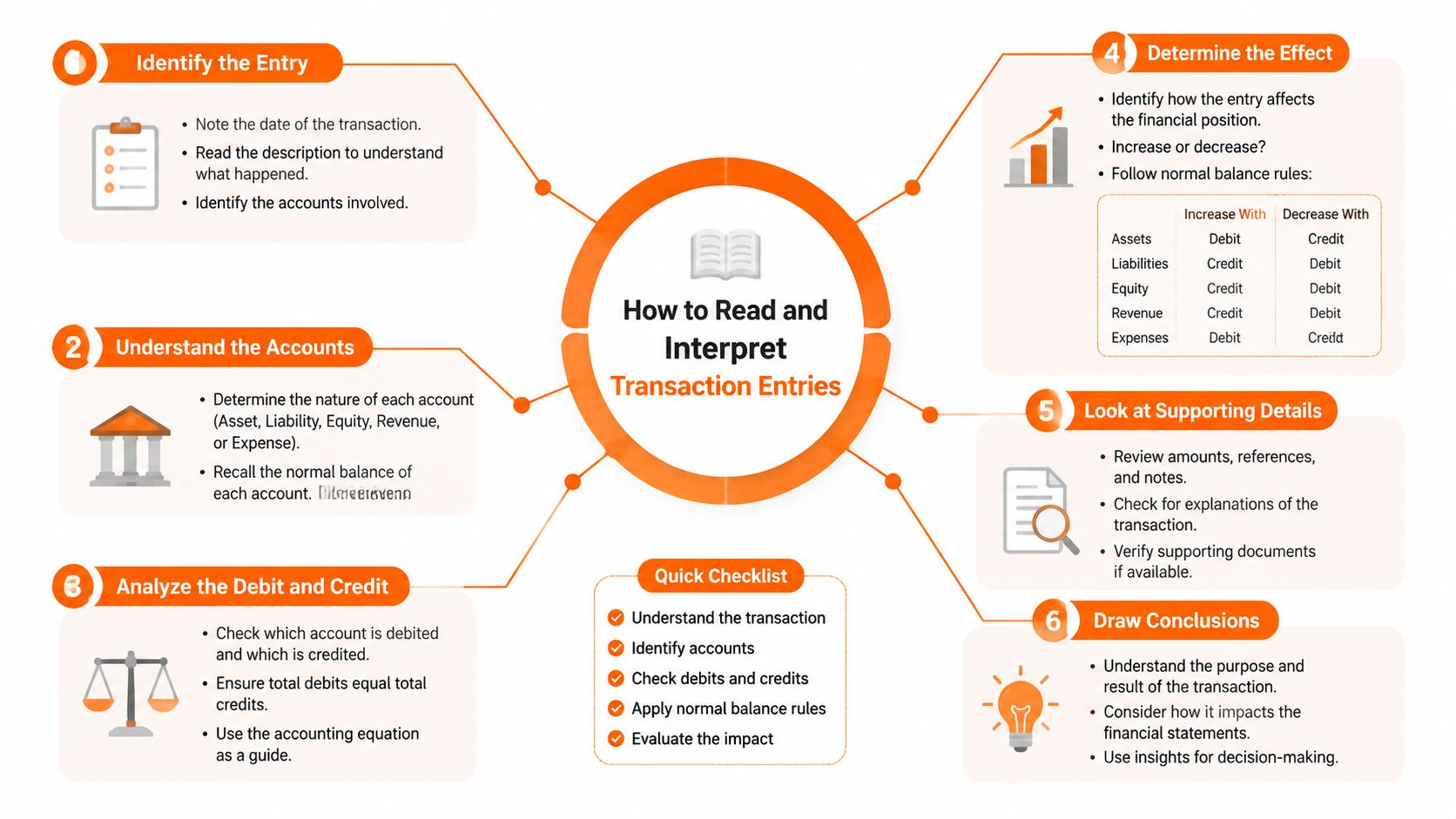
How to Read and Interpret Transaction Entries
A transaction line can look simple, but each field gives you a clue. Once you know what to look for, you can read most entries without guessing, and that lowers the stress of seeing a charge you don't recognise.
Break the line into parts
A typical entry usually includes the date, merchant name, amount, category, status, and sometimes a reference ID. Start with the date, because timing is often the first clue when you're matching a payment to a real-world purchase. Then check the amount and status, since pending and posted charges can look similar but mean different things.
Merchant names are where many people get confused. A charge might show the payment processor, the parent company, or a shortened legal name instead of the storefront you remember. That doesn't automatically mean the charge is wrong, it just means you need to trace the name back to the business you dealt with.
What refunds, reversals, and partial captures mean
Refunds move money back to you, reversals cancel a charge, and partial captures happen when only part of an initial authorisation posts. Those differences matter because they change how a transaction should appear in your record. If you're checking a refund and the original charge still sits in pending status, it may be waiting to resolve rather than showing a duplicate.
A good habit is to match each unfamiliar entry to one of three questions, did I authorise it, did it post correctly, or is it still being finalised?
If the answer is unclear, note the merchant, the amount, and the date before you contact support. That gives you a cleaner dispute trail and makes categorising spending later much easier.
For a plain-language reminder of who's paying whom in a transaction, our payor versus payee guide helps anchor the basics without financial jargon.
Why Transaction History Matters for Budgeting and Fraud Detection
A budget built on guesses breaks down fast. A budget built on transaction history stays closer to reality, because it shows what you spent, not what you hoped you spent. That difference is the reason transaction history is so useful for both day-to-day budgeting and catching suspicious activity early.
Budgeting gets sharper when the record is honest
A monthly plan often fails because people rely on memory. Groceries drift up a little, takeout appears more often than expected, and a subscription renews in the background. When you review your transaction history, those patterns stop being vague impressions and become visible line items.
That matters in larger financial systems too. The U.S. Bureau of Economic Analysis reports quarterly international transaction data, and in Q1 2026 the U.S. current-account deficit widened to $226.8 billion, up $5.8 billion or 2.6% from the previous quarter, while net international investment position stood at –$21.27 trillion with $43.37 trillion in foreign assets and $64.64 trillion in liabilities, according to the BEA international transactions release. At that scale, the logic is the same as in personal finance, transaction history only becomes useful when you study it over time.
For personal budgeting, the lesson is straightforward. Repeated review tells you whether your plan matches reality.
Fraud detection depends on early eyes
A small unfamiliar charge can be the first sign of a bigger problem. If you review transaction history regularly, you're more likely to catch an unauthorised card swipe, a duplicate charge, or a subscription you forgot to cancel before it keeps repeating. That early notice can make disputes simpler and reduce the chance that a bad charge blends into the rest of your month.
A weekly review is enough for most users. Look for new merchants, repeated amounts, and anything that appears in a category you don't normally use. If something looks off, act fast and keep a note of the date and amount so you can describe the issue clearly.
If you want a reason budgeting matters beyond theory, our budgeting importance guide connects the dots between awareness, control, and daily decision-making.
How to Export, Reconcile, and Organize Your Records
Once you start treating transaction history like a working record instead of a passive list, exporting and organising it becomes useful fast. The goal isn't to make more files for the sake of it. The goal is to build a clean record you can trust when you're comparing accounts, preparing taxes, or checking whether your spending lines up with reality.
Export first, then compare
Most banking and card apps let you export records in formats such as CSV, PDF, or OFX. CSV is often the easiest to sort, PDF is useful for a human-readable archive, and OFX can be handy if you're moving data into a personal finance tool. Before importing anything, check that the date range, account name, and currency are correct.
Work happens during reconciliation. Match the exported record against your own notes and account balance, then look for gaps caused by pending transactions, delayed postings, or activity spread across more than one account. If the numbers don't line up, don't rush to assume fraud, start by checking timing and duplication first.
Practical rule: reconcile on a regular monthly schedule, and compare exported records against your actual closing balance before filing anything away.
That habit prevents confusion later. It also makes it easier to answer questions from an accountant, lender, or advisor because your records already line up.
Keep the files easy to find
Use a simple folder pattern by month and account. Save the exported file, note any disputed items, and keep a short summary of anything unusual that month. If you manage multiple accounts, a naming system like that saves a lot of time when you need to find one specific statement later.
A tool like Stewart Accounting Services' guide to bank reconciliations is useful if you want to understand the bookkeeping logic behind the process. If you prefer a consumer-facing workflow, Fintrack can consolidate transactions and also support manual entry for accounts without bank connections, which is especially helpful when you're tracking a few different sources in Canada or the U.S.
For a closer look at app-based record keeping, see our budgeting app without a bank connection guide.
Using Transaction History to Find Hidden Value and Prevent Waste
Transaction history isn't only about control. It can also surface money you're already paying for but not using. That shift matters, because the same record that helps you budget can also help you recover hidden value and stop waste before it repeats.
Look for charges that no longer earn their keep
Subscription waste often hides in plain sight. A streaming plan may still be active even though nobody uses it, a free trial may have turned into a paid charge, or a once-useful app may now be sitting on autopilot. When you scan several months of history, those patterns become easier to notice than they ever do in a single statement.
Recurring charges can also change. A service you meant to cancel can keep billing, or a vendor can appear more often than you realised because the charge is small and familiar. That's where history becomes diagnostic, because it shows repetition, not just isolated purchases.
Use history as a forward-looking filter
If a charge repeats on the same date each month, ask whether it's still worth it. If two similar charges appear close together, check whether one was accidental or duplicated. If you see a small but steady purchase pattern, decide whether it's a convenience or a leak.
The useful question isn't just “what happened?” It's “what should I stop, recover, or prevent next month?”
That mindset connects naturally to benefits and rewards. Fintrack's Benefits Wallet is one example of a tool that can help surface hidden value like cashback, credits, loyalty points, and expiring offers, alongside alerts that can flag unusual activity or duplicate charges.
If subscriptions are your biggest pain point, our subscription management guide can help you sort the keepers from the waste.
Best Practices for Securing Your Transaction History
Transaction history is sensitive by nature, so protect it the same way you protect your banking login. Use strong authentication on financial apps, review what permissions each app can access, and avoid public Wi-Fi when you're checking accounts or sharing records. If you need to send history to an accountant or advisor, share only the files they need.
Keep an eye on retention and storage, too. If a service stores your data for longer than you expected, read the policy and make sure you're comfortable with how the records are handled. A simple rule helps here, the fewer places your financial history lives, the easier it is to keep track of.
Fintrack uses bank-level encryption, SOC 2 compliant infrastructure, and GDPR-ready practices, which matters because transaction records aren't just numbers, they're a map of your habits. Security should feel built in, not bolted on.
If your transaction history feels messy, Fintrack can help you pull the pieces into one clearer view, track spending patterns, and spot hidden value before it disappears. Visit Fintrack to explore transaction tracking, real-time alerts, and a cleaner way to review your money.