
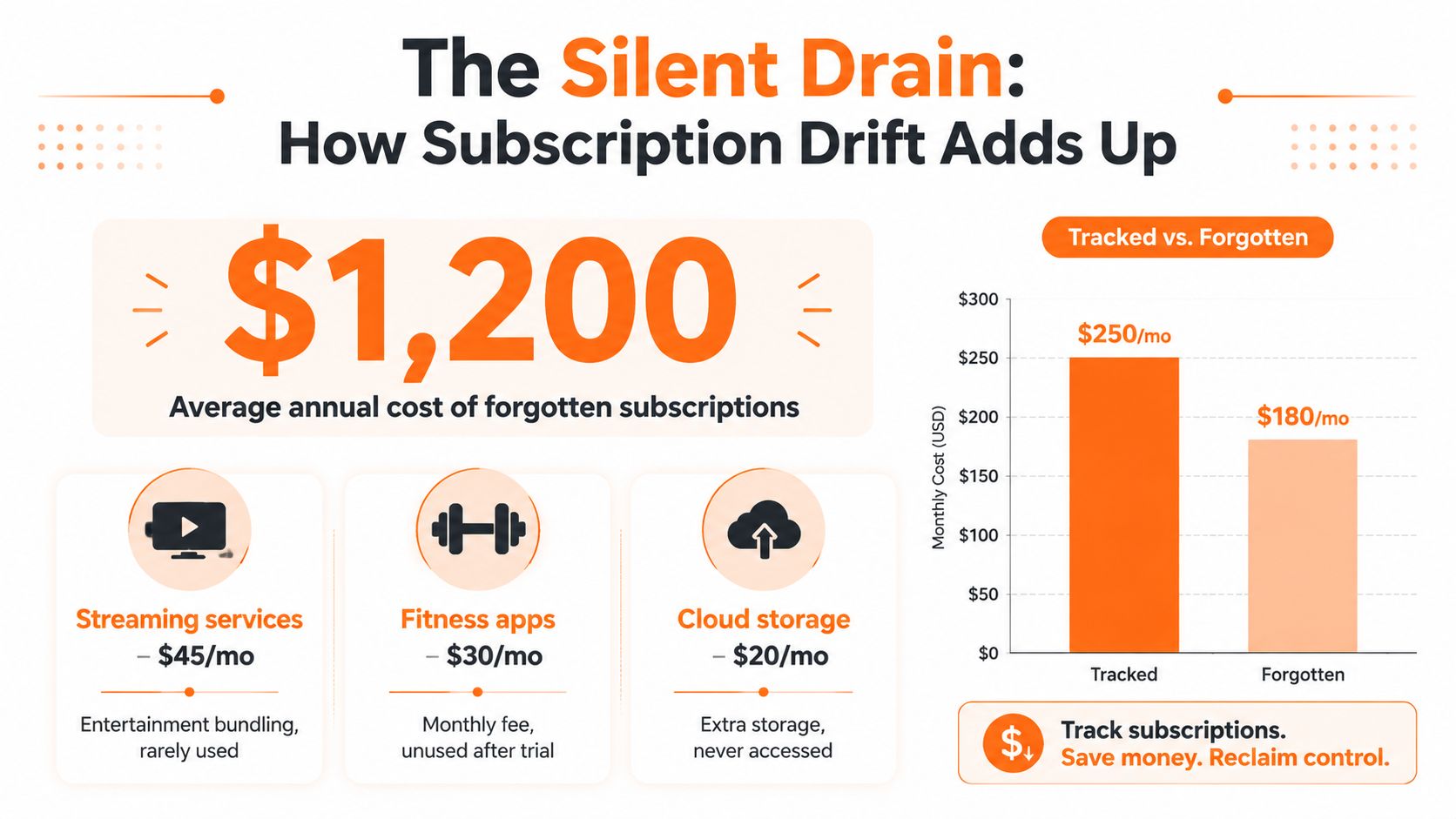
You check your credit card statement and spot a yearly charge for an app you haven't opened in months. Then you find the streaming service you meant to cancel, the fitness trial that converted, and the software plan billed through a different card. None of these charges looks disastrous alone. Together, they can crowd out money meant for groceries, debt payments, or savings.
A subscription tracker app can help, but only if it does more than display a list of merchants. The useful kind finds recurring charges across your payment methods, warns you before renewals, identifies services you barely use, and helps you make a cancellation decision. This guide focuses on the practical workflow, privacy trade-offs, and Canada-specific subscription habits that matter in 2026.
The Moment You Realise How Much Is Renewing
You spot a yearly charge for an app you have not opened in months. The sign-up happened during a free trial, the welcome email is buried, and the cancellation date never reached your calendar. One forgotten renewal is enough to expose a larger problem.
Check every payment route before blaming one card. A streaming plan may sit on your credit card, another may run through an app store, cloud storage may draw from a debit account, and software may use PayPal. A family member might cover one service while you pay separately for a similar plan nobody remembers using. This is subscription drift, the steady buildup of recurring commitments that no longer fit your household priorities.
Canadian households have a concrete reason to review these charges. A 2024 survey found that 73% of Canadians had been caught by recurring subscriptions after free trials or forgotten renewals, while respondents averaged 8 recurring subscriptions despite initially believing they had only 4. It also reported that 66% had paid for a subscription they forgot about and 55% had delayed cancelling at least once. The survey included 516 Canadian adults surveyed online between February 2 and 13, 2024, according to the Canada-specific subscription survey.
Why mental accounting breaks down
Grouping services into labels such as streaming, storage, and work tools hides the details that control your cash flow. You need the merchant, billing date, renewal price, payment rail, and actual usage for each commitment.
Canada's communications spending shows how recurring digital bills are shifting between services. The CRTC reported average household communications spending of $233.00 per month in 2017, including $101.00 for mobile, $54.17 for internet, $52.58 for television distribution, and $25.25 for landline services. In its 2024 household data, average monthly BDU spending fell from $36.2 in 2021 to $28.6 in 2024, while online undertaking spending rose from $25.7 to $34.7. Audio online spending increased from $6.1 to $8.3, and audiovisual online spending rose from $25.1 to $35.2, as shown in the CRTC household communications data.
That streaming migration changes what a useful subscription tracker app must do. It should detect charges across cards, bank accounts, app stores, and payment services, then flag underused plans when the household budget tightens. Review renewals alongside usage, cancel the services that no longer earn their place, and use this guide to managing subscriptions to set up a repeatable review.
What a Subscription Tracker App Does
A subscription tracker app turns recurring charges into decisions. It identifies commitments across your household finances, estimates what will renew, and puts underused services in front of you when the budget starts tightening.
That makes it different from a standard expense tracker. A general tool may label a software charge after it clears. A subscription-focused app should recognise the billing pattern, connect related charges, estimate the next renewal, and give you time to cancel before another payment leaves the account.
The detection layer
A reliable tracker uses several signals:
- Merchant matching: It connects slightly different transaction descriptions to the same vendor.
- Cadence matching: It compares repeated charges across monthly, annual, and irregular billing cycles.
- Trial conversion clues: It spots a small or promotional first charge followed by a recurring payment.
- Category grouping: It sorts services into streaming, software, news, fitness, storage, memberships, and other useful groups.
- Payment coverage: It checks connected bank accounts, cards, app stores, and payment services, plus commitments you enter manually.
Broad payment coverage matters in Canada, where streaming spending is moving between traditional distributors and online services. A household that watches for card charges alone can miss a plan billed through an app store, PayPal, or another payment rail. The app should flag those charges alongside usage, not leave you with a passive list.
The output should answer three questions: which subscriptions are active, when each will renew, and what each costs as a monthly run rate and annual commitment.
Reporting is only half the job
Tracking becomes useful when it creates a clear next action. Let each household member mark a service to keep, review, or cancel. The app should link to the merchant's cancellation page or billing settings, while showing whether billing runs through Apple, Google, a telecom provider, PayPal, or the vendor directly.
Practical rule: If an app shows a charge but leaves you to remember the renewal and locate the cancellation route, it is a ledger, not a cancellation workflow.
Shared context prevents bad cuts. A service may look wasteful on your list but still earn its place because another household member uses it. The reverse problem is just as common: two people pay for overlapping plans without realising it. Record the owner, users, billing method, renewal date, usage signal, and cancellation status.
For a wider view of the workflow, review this subscription management app overview. Choose a tool that reduces the distance between spotting an overlooked charge and deciding what happens next.
Core Features That Make Trackers Useful
The best features aren't decorative. They prevent missed renewals, expose duplicate services, and make the cost of keeping a plan harder to ignore.
Canada's payment mix makes broad detection especially important. One Canadian survey found that 47% of subscriptions were paid by credit card, 27% by Visa or Mastercard debit, 11% through PayPal, and 4% by prepaid cards, with users averaging 8 recurring subscriptions, according to the Canadian payment-mix reporting. A tracker that monitors only one account can miss the subscription you most want to find.
Rank features by the money they can save
| Feature | What It Does | Why It Matters |
|---|---|---|
| Recurring-charge detection | Finds repeated merchant patterns across accounts and payment methods | A missed subscription can't be evaluated or cancelled |
| Renewal and trial alerts | Warns before a free trial or recurring bill converts | Timing matters more than a reminder after the charge clears |
| Usage and underuse flags | Highlights services you rarely open or haven't reviewed | Low utilisation is a direct cancellation signal |
| Annualised cost view | Shows the yearly commitment beside the monthly run rate | Small monthly charges look different when aggregated |
| Vendor categorisation | Separates streaming, software, news, fitness, and other services | Clear categories reveal overlap and spending concentration |
| Household sharing | Records who uses and pays for each plan | Shared services need a keep-or-cut decision based on actual use |
| Cancellation links | Opens the relevant merchant, app store, or billing portal | Fewer steps mean less procrastination |
The first three features deserve priority. Detection finds the commitments, alerts create a decision window, and underuse flags tell you where to look first. Categorisation and annual views then give that decision context.
Don't confuse coverage with convenience
A tracker may connect easily to a bank but still miss services billed through a separate card, an app store, a mobile carrier, or prepaid balance. Manual entry can cover those gaps, but only if you maintain it. The practical standard is coverage across every payment rail, not a polished dashboard attached to one account.
Automatic categorisation helps when merchant descriptions are messy or unfamiliar. Fintrack's automatic expense categorisation feature is relevant for users who want recurring charges grouped without building every category from scratch.
Privacy and Security Trade-offs You Should Weigh
Bank syncing isn't automatically safer, and manual entry isn't automatically better. Each approach solves a different problem, and each creates a different kind of exposure.
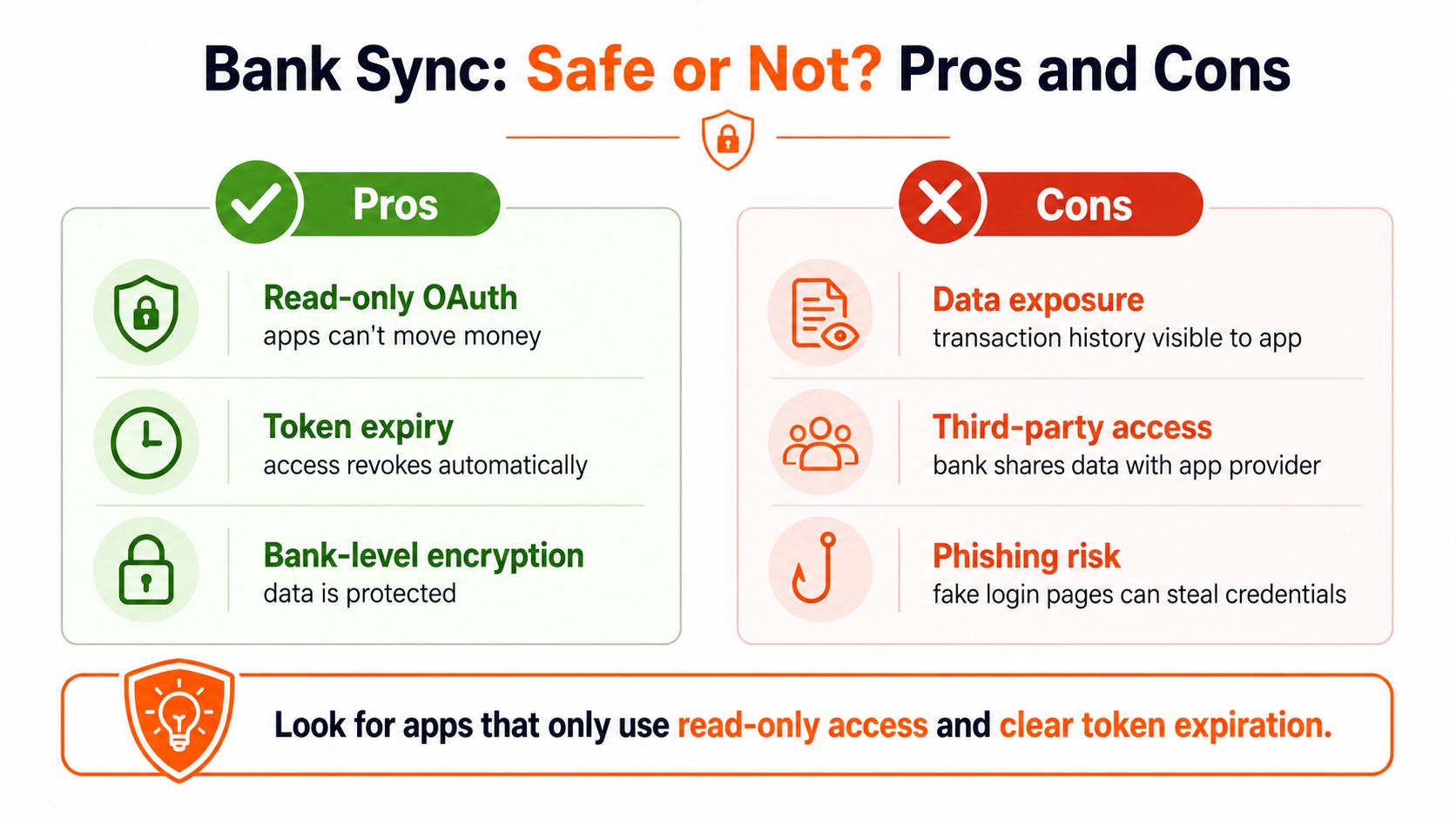
A connected app typically uses an authorisation flow that lets a third party retrieve account data without giving it permission to move money. Look for read-only access, clear permission scopes, and token expiry. Token expiry matters because access should stop when the authorisation ends or you revoke it.
The privacy question is broader than whether the app can withdraw funds. A connected service may still receive transaction history, merchant names, dates, balances, and account details. That information can reveal health spending, work tools, travel, family activity, and other patterns you may not want stored outside your bank.
Connected accounts versus manual tracking
Bank sync offers completeness and convenience. It can surface a recurring charge you forgot to enter, including one billed through an account you rarely check. The trade-off is that you must trust the provider's security controls, data retention practices, and third-party integrations.
Manual entry offers isolation. You can record the merchant, price, renewal date, and payment method without handing over banking credentials or transaction history. The weakness is human forgetfulness. If you forget a card, a PayPal account, or a family member's plan, the tracker can't discover it.
Canadian payment flows add more room for blind spots. Interac e-Transfer activity, credit card processors, app-store billing, and prepaid balances may produce different descriptors or leave recurring commitments outside a single statement view. Connected access can improve visibility, but it doesn't guarantee perfect classification.
Security check: Choose an app that explains what it can read, whether it stores transaction data, how you revoke access, and when authorisation tokens expire.
Fintrack supports manual expense tracking without a bank connection, which suits users who prioritise control over automatic discovery. For more detail on connected-account architecture and the questions to ask, read this bank account aggregation guide.
My verdict is simple. Choose bank sync if missed charges are your main risk and the provider's permissions are clear. Choose manual entry if data exposure concerns you more than convenience. A hybrid approach often works best, connect the account you use most and manually add everything the connection can't see.
A Practical Workflow for Cutting Wasteful Subscriptions
A tracker won't save money by existing on your phone. It saves money when you use its findings to cancel something you don't need.
Start with a clean review
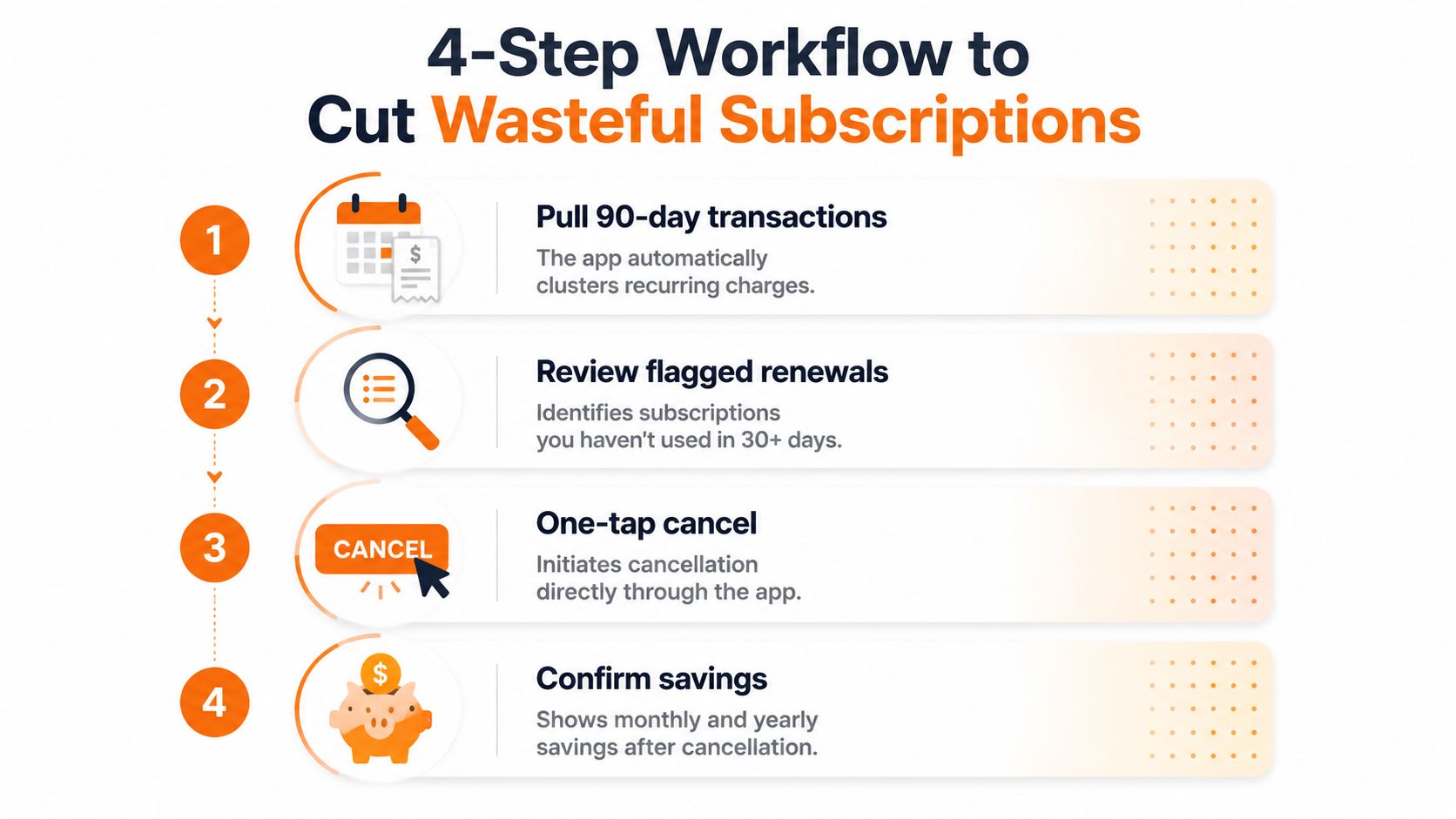
1. Pull recent transactions. Review a meaningful transaction history and let the app group repeated merchant descriptions. A 90-day view can expose monthly patterns and may also show the first payment for a newer plan, but annual subscriptions need separate attention because they may not appear in a short window.
2. Label every commitment. Use three practical tags:
- Keep: You use it and would replace it if it disappeared.
- Trial: You haven't tested its ongoing value yet, or its price is about to change.
- Cut: You don't use it, have a duplicate, or wouldn't buy it again today.
Don't defend a subscription because you paid for the current billing period. That money is already gone. Judge the next renewal.
Use behaviour, not guilt
3. Test actual use. A useful rule is to ask whether you opened the service at least twice during the month. That isn't a universal law, but it forces a decision based on behaviour rather than intention. If you keep saying you'll use an app later, move it to Trial and set a firm review date.
Cost pressure makes this review more urgent for streaming households. Angus Reid reported that 32% of Canadians cancelled at least one streaming subscription in the previous six months. Among those who cancelled, 53% cited saving money and 39% said they weren't using the service enough, according to the Angus Reid streaming survey. Those reasons should shape your review order, start with expensive or underused entertainment plans.
4. Cancel and verify. Cancel through the merchant portal, app store, telecom account, or payment service that controls the billing. Save the confirmation screen or email, then review the account again after the next expected billing point. PayPal and Apple billing deserve extra care because cancelling a merchant account may not always cancel the billing authorisation.
Some niche services provide their own account controls. For example, if you manage a tasting membership, use the provider's control your tasting plan page rather than assuming deleting the app ends the recurring payment.
Money-saving rule: Sort by annual cost first, then by usage. A small monthly charge can become a serious leak when you let it renew repeatedly.
If the subscription runs through an iPhone, follow a dedicated guide to cancelling an app subscription on iPhone and confirm the renewal status in your Apple account.
Evaluating Apps Like Fintrack with a Decision Checklist
Don't choose a tracker because its dashboard looks clean. Score it against the job you need it to perform, then test whether it finds and manages your commitments.
Use this weighting:
- Detection accuracy, 25%: Does it find recurring charges across your real accounts and billing methods?
- Multi-rail support, 20%: Can it cover credit cards, debit, PayPal, app stores, carrier billing, and manual entries?
- Cancellation reminders, 20%: Does it warn you early enough to act?
- Usage and category clarity, 15%: Can you identify underused services and duplicate categories?
- Export options, 10%: Can you retain or review your subscription data elsewhere?
- Interface and price, 10% combined: Is it easy to use, and does its cost make sense for your situation?
The weighting is deliberate. A beautiful app that misses charges fails at its central purpose. Price matters, but a free tool that leaves you unaware of recurring bills isn't free in any meaningful budgeting sense.
Compare the trade-offs honestly
The table below is a decision framework, not a claim that every app performs identically. Score each provider using your own accounts, statements, and cancellation needs.
| Criterion (Weight) | Fintrack | Bank-Sync Competitor | Manual-Entry App |
|---|---|---|---|
| Detection accuracy, 25% | Can combine available transaction visibility with manual entry | Strong convenience when connected accounts are supported | Depends on the completeness of your entries |
| Multi-rail support, 20% | Manual entry helps cover accounts or methods outside a connection | May miss unsupported accounts, app stores, or separate billing rails | Can include any rail you remember to add |
| Cancellation reminders, 20% | Supports reminders before renewals | Often provides alerts tied to detected recurring charges | Reminders work only when dates are maintained |
| Usage and category clarity, 15% | Organises spending and recurring commitments for review | Usually categorises connected transactions | Requires more user-maintained detail |
| Export options, 10% | Check the current product settings before choosing | Varies by provider and plan | Often depends on the app's storage and export design |
| Interface and price, 10% combined | Evaluate the workflow during a trial | Compare ongoing fees with the value of automation | Often simpler, but requires more upkeep |
Run a 30-day trial before committing to any tracker. Test whether it catches your annual plans, family-shared services, app-store charges, and less obvious payment methods. Then ask one blunt question: did the app help you cancel or downgrade anything you wouldn't have noticed otherwise?
Treat the tracker itself like a subscription. If it adds another recurring bill without producing useful decisions, remove it.
Putting It All Together Without Overcomplicating Your Money
Start with the account or card you use most. Review the flagged renewals within 48 hours, cancel one obvious waste item immediately, and only then expand coverage to secondary cards, PayPal, app stores, or manual entries.
Keep the first review focused. Record the owner, vendor, billing cycle, renewal date, payment method, and Keep, Trial, or Cut status. A benefits wallet can also give you one place to review subscriptions, memberships, credits, rewards, and other unused value before you pay for something new.
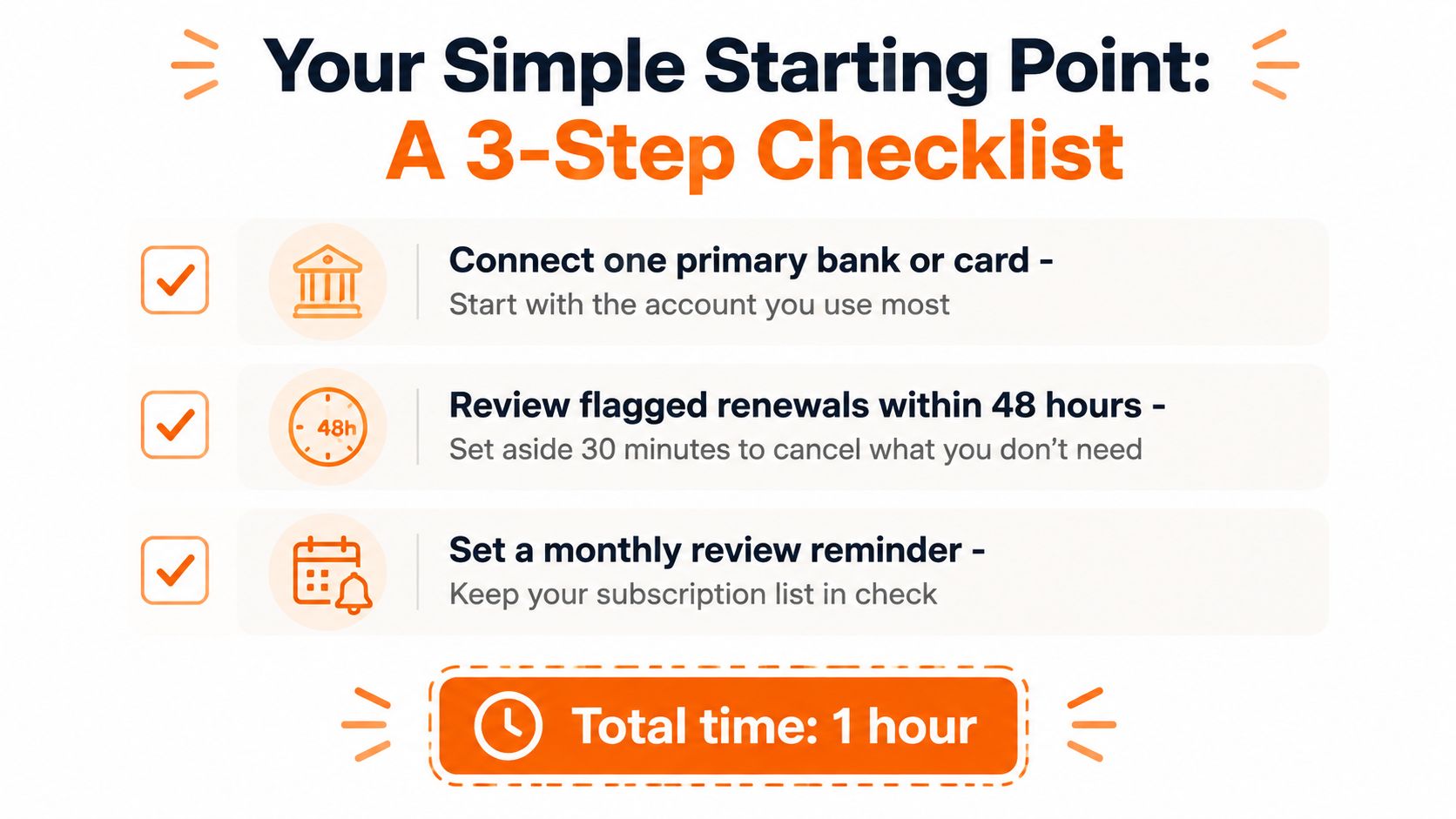
The important part is the decision, not the dashboard. Starting with one account and one cancellation beats waiting until every financial detail is perfectly organised.
Fintrack helps you organise recurring expenses, monitor upcoming renewals, and review benefits and unused value in one place, with manual entry available when you don't want to connect a bank. Visit Fintrack to set up a focused subscription review and turn the next renewal list into practical budget decisions.