You check your bank balance and recognise the number, but not the spending behind it. A few coffees, a quick takeaway, a subscription renewal, and cash purchases from the week have blurred into one frustrating question: where did the money go?
A daily expense tracker gives you a clearer answer while the details are still fresh. The aim isn't to punish every small purchase. It's to create a simple feedback loop that shows what you're spending, which costs keep recurring, and where your budget needs a practical adjustment.
Why Tracking Daily Expenses Changes Your Financial Reality
End-of-month reviews are useful for reporting, but they're late for decision-making. By the time you notice that dining out, transport, or small convenience purchases ran over plan, the money has already left your account and the opportunity to change course has passed.
Daily visibility changes the timing. You see a purchase when you can still remember why you made it, whether it was planned, and whether another similar charge is likely to appear. That makes the tracker a decision tool rather than a monthly autopsy.
California's public finance system illustrates the value of this approach at a much larger scale. The state's Open FI$Cal expenditure data can be viewed through annual summaries, monthly summaries, and individual transactions, with spending organised by month. Households don't need government-level reporting, but the principle is the same: detailed transactions become useful when they're grouped into categories and reviewed regularly.
Small purchases need a visible home
Inflation makes delayed review even less forgiving for California households. As of December 2024, the average household was paying $1,278 more per month for the same basket of goods and services than in January 2021, according to the U.S. Joint Economic Committee's California Inflation Update. The report identifies increases of $198 per month for food, $301 for shelter, and $283 for transportation compared with January 2021.
Those pressures don't appear as one neat budget line. They show up through supermarket receipts, fuel purchases, rent, delivery charges, and higher everyday prices. A daily record helps you distinguish a genuine price increase from a habit that has gradually expanded.
Practical rule: Track first, judge later. You need an accurate picture before deciding what deserves to change.
A tracker can also support related planning. If grocery costs are putting pressure on your budget, a practical budget meal plan can help turn a vague intention to spend less into a concrete shopping and cooking routine. For the basic principles behind recording and reviewing spending, see what expense tracking involves.
Choosing Categories and Capture Methods That Actually Work
A tracker fails when it asks you to record more detail than you'll maintain. Start with broad categories that answer real questions, such as groceries, housing, transport, dining, subscriptions, health, personal, and other. Add a category only when the distinction will change a decision.
A grocery purchase and a restaurant bill usually deserve separate categories because you can act on them differently. Splitting groceries into produce, snacks, household goods, and ten other subcategories usually creates maintenance work without improving the decision.
Pick a capture method you can sustain
Manual entry works well when awareness and privacy matter. You record the amount, category, payment method, and an optional note immediately or during a short daily check-in. Fintrack supports manual entry without requiring a bank connection, which is useful when you want to include cash and avoid relying entirely on imported transactions.
Receipt capture suits people who make many purchases, need records for reimbursement, or tend to forget details. Keep the process short: photograph the receipt, confirm the amount and category, then discard or file the paper. Don't build a workflow that requires you to transcribe every line unless you genuinely need that level of detail.
Bank synchronisation reduces typing and can help collect recurring bills and card purchases. Its weakness is visibility. Imported data can miss cash, pending transactions, split purchases, and charges made through payment methods that aren't connected.
Canada's payment data makes the cash gap hard to ignore. The Bank of Canada's 2024 Methods-of-Payment survey found that cash was used in 21% of purchases and represented 11% of purchase value. A bank feed can therefore look complete while omitting a meaningful part of everyday spending.
Reconcile the wallet, not just the account
If you withdraw cash, create a simple cash account in your tracker. The Bank of Canada reported that Canadians withdrew cash from ABMs an average of 1.9 times per month in 2023 in its Methods-of-Payment survey. After each withdrawal, record cash spending as it happens and compare the remaining wallet balance with your log.
Use this short setup:
- Create six to eight useful categories. Keep the structure easy to scan.
- Add every payment method. Include cash, credit, debit, and digital wallets.
- Choose one default capture route. Use manual entry, receipt capture, or import as your main method.
- Review uncategorised items daily. Don't let an inbox of unresolved charges become a second budgeting problem.
For more examples of workable category structures, use this guide to categories of expense. The right system captures enough detail to guide action, without turning a coffee purchase into administrative work.
Building Daily Habits and Setting Up Automation
A tracker often fails on an ordinary day: a cash purchase goes unrecorded, a subscription renews unnoticed, and two missed check-ins turn into a week of reconstruction. The fix is a routine designed for imperfect logging, not an elaborate system that depends on constant attention.
The Financial Consumer Agency of Canada's budgeting over time research separates consistent budgeters, intermittent budgeters, and consistent non-budgeters across three quizzes conducted over two years. The practical lesson is clear. Financial visibility comes from repeated behaviour, not one enthusiastic setup session.
Attach the check-in to an existing cue, such as morning coffee, checking email, or plugging in your phone at night. Keep the first pass short: enter missing transactions, correct obvious categories, and flag anything unusual. A routine that takes a few minutes is easier to maintain than a perfect review postponed indefinitely.
Make the habit resistant to busy days
Use three safeguards:
- Capture purchases promptly. Manual entry soon after a transaction helps preserve cash purchases and reduces end-of-day guesswork.
- Set one daily reminder. A single notification prompts action without creating alerts that become easy to ignore.
- Review weekly. Scan for recurring charges, category drift, duplicate entries, and purchases that need splitting or explanation.
A digital tool, including a spreadsheet, mobile app, or other financial software, was the most common budgeting method in the Canadian Financial Capability Survey, used by 20% of respondents. The tool lowers recording friction, but it cannot compensate for skipped entries or an untracked wallet.
The useful standard: A tracker does not need perfect data. It needs a reliable enough record to support your next decision.
Automation should handle repetitive work while leaving room for judgment. Imported transactions can surface bills and card activity, but manual entry still matters for cash and purchases outside connected accounts. Alerts can identify duplicate charges or unusual activity before those items disappear into a monthly statement.
Subscription creep needs its own check. A 2025 Spring Financial survey reported that 90% of Canadians said they knew how much they spend on subscriptions each month, as described in Spring Financial's subscription guidance. Awareness still does not guarantee control. List recurring services, note overlapping benefits, and review charges before renewal. That process exposes subscriptions you forgot, rarely use, or no longer need.
For ways to reduce repetitive money administration, review personal finance automation. Make the routine easier to repeat with a trigger, one small action, and a defined review point. The Fluidwave consistency habits guide applies the same structure to maintaining habits.
Comparing Spreadsheets and Dedicated Expense Apps
A spreadsheet is a reasonable starting point. It gives you complete control over categories, formulas, layout, and storage, and it can be a good fit if you enjoy maintaining financial systems. The problem appears when tracking depends on too many manual steps, especially on a phone or when several payment methods are involved.
A dedicated app usually reduces the distance between a purchase and its record. That convenience can preserve the habit, but it may come with fewer customisation options, account permissions, or a recurring cost. The right choice depends less on technical capability than on how much maintenance you're willing to do.
Spreadsheets vs Dedicated Expense Apps
| Feature | Custom Spreadsheet | Dedicated Expense App |
|---|---|---|
| Setup | You design categories, formulas, and views | Categories and reports are usually ready to use |
| Customisation | Very high, if you maintain the formulas | Moderate, depending on the app |
| Manual entry | Often awkward on mobile | Usually designed for quick phone entry |
| Bank connection | Requires separate imports or manual updates | May support synchronisation, where available |
| Cash tracking | Easy in principle, but entirely manual | Often supports a separate cash account |
| Reports | You build them yourself | Charts and summaries are typically built in |
| Privacy | You control where the file is stored | You review the app's data practices |
| Maintenance | Reconciliation and formula checks are your responsibility | The provider maintains the tracking interface |
A spreadsheet works best for a person who wants full ownership and doesn't mind regular cleanup. It breaks down when the file becomes a backlog, the mobile version is inconvenient, or formulas stop reflecting the categories you use.
An app works best when speed matters and you want prompts, categorisation, or searchable transaction history. It breaks down when automation creates false confidence and you stop recording cash or reviewing imported items. Some people use a hybrid approach, with an app for daily capture and a spreadsheet for occasional analysis.
Before choosing, ask three questions:
- Will I open it on a busy day?
- Can it record cash without awkward workarounds?
- Can I export or review the information in a way I understand?
If you're comparing features in more detail, this overview of an expense tracking app can help you assess the trade-offs. The same principle applies to digital distractions generally. For example, someone evaluating app controls may also look at how TiedSiren blocks apps, but a finance tracker still needs to fit your actual spending routine.
Automating Insights and Rewards Recovery
A transaction list answers what happened. A useful financial system also helps answer what deserves attention next.
Subscription detection is one example. It can group recurring charges across entertainment, cloud storage, apps, and memberships, then prompt you to check whether each service is still used. Treating every subscription as a permanent fixed cost hides choices that are still available.
Look for leaks, not just totals. A recurring charge becomes actionable when you can identify its owner, frequency, purpose, and last meaningful use.
Rewards and benefits are another overlooked layer. A benefits wallet can bring together cashback, unused credits, loyalty points, discounts, and expiring offers, so you can check available value before paying full price or letting an entitlement expire. That turns expense tracking from a record of losses into a review of value already connected to your spending.

Turn raw entries into decisions
A stronger daily review asks:
- What changed? Compare today's purchases with your normal pattern.
- What repeats? Mark subscriptions, memberships, instalments, and regular transfers.
- What can I recover? Check credits, cashback, discounts, and loyalty balances.
- What needs a decision? Cancel, downgrade, move category, or keep intentionally.
Automation is valuable when it handles sorting and surfaces questions you wouldn't notice in a long ledger. It isn't a substitute for judgement. A duplicated merchant name may be a legitimate split payment, and an unfamiliar charge may need verification before you act.
Fintrack combines manual transactions, CSV uploads, and conversational questions about spending in one dashboard. Its Finny assistant can help users query categories and trends, while real-time alerts, subscription detection, and a Benefits Wallet support the review process. You can read more about automated insights before deciding which parts of your own workflow should be automated.
The practical target is not a perfectly passive system. It's a tracker that catches the details you tend to miss, keeps recurring costs visible, and gives you a short list of decisions instead of another pile of data.
Taking the First Step Toward Clearer Finances
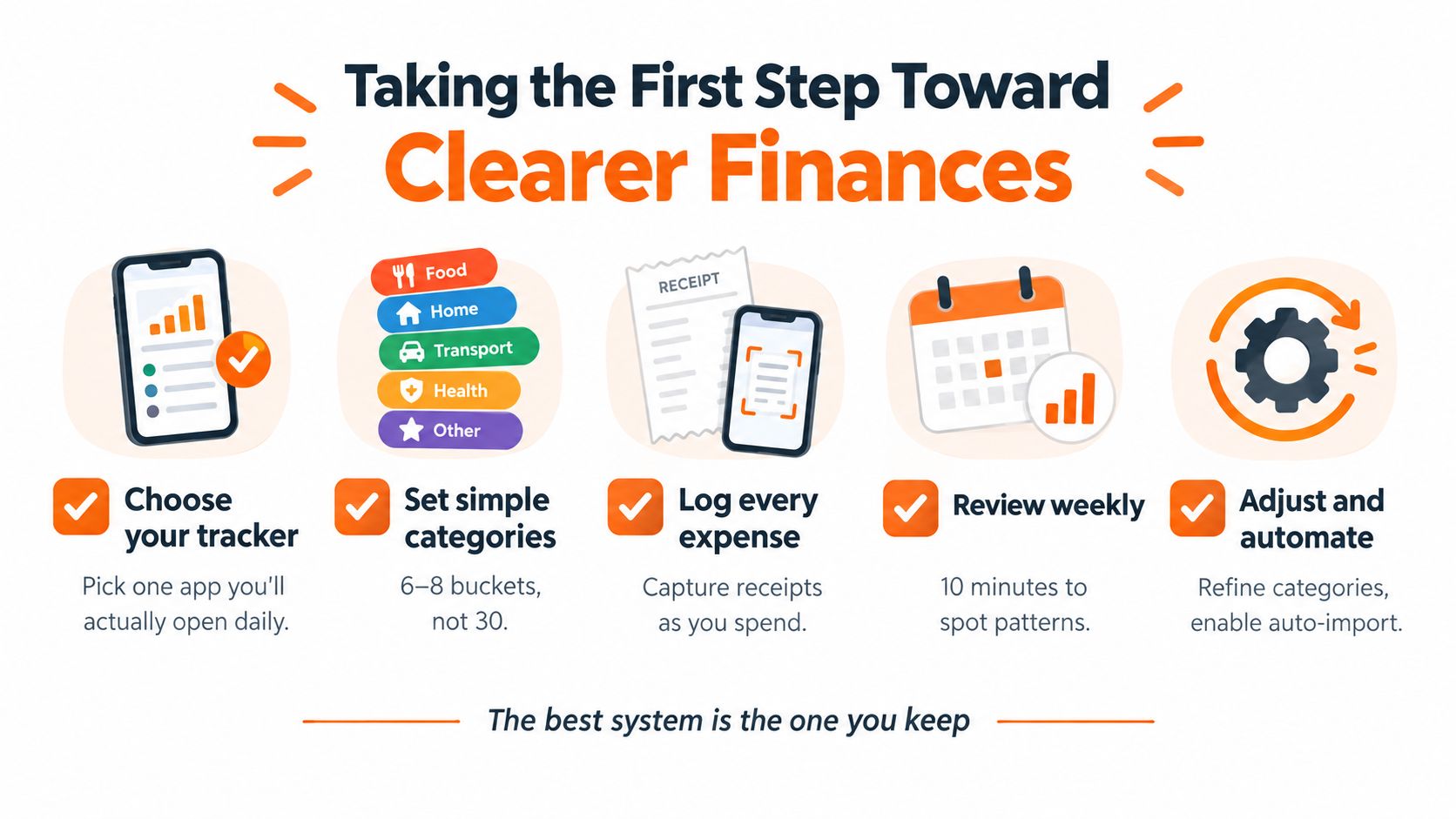
Build the first version around behaviour, not features. Choose a tracker you'll open, keep categories broad, and record cash as deliberately as card spending.

Use this starting checklist:
- Choose one capture method. Manual entry, receipts, import, or a practical combination.
- Record every payment method. Bank feeds aren't a replacement for cash logs.
- Review daily. Correct categories while you still remember the purchase.
- Review weekly. Look for recurring charges, drift, and missing transactions.
- Test the system for two weeks. Use the record to establish your real spending baseline before changing several habits at once.
The best system is the one that survives travel, busy evenings, forgotten receipts, and irregular purchases. Start with enough structure to make decisions, then add automation only where it removes repetitive effort without hiding the spending itself.
Fintrack lets you add transactions through manual entry, chat, voice, CSV upload, or connected data, then ask questions about your spending and review alerts, subscriptions, and available benefits. Visit Fintrack to set up a daily tracking workflow that includes both the purchases your bank feed captures and the cash expenses it doesn't.