
You check your bank balance near the end of the month and see a number that feels familiar, but not useful. Rent came out, groceries happened, a few online orders arrived, and several small card payments disappeared into the background. You know you spent money, but you can't explain where it went without opening several statements and reconstructing the month from memory.
The practical answer to how to track monthly spending isn't a more complicated spreadsheet. It's a low-friction routine that captures transactions frequently, keeps categories broad enough to maintain, and shows problems while you can still respond. The system below works with automatic feeds or manual entry, so you can track spending even if you don't keep a formal budget.
Why Most Spending Trackers Fail by Week Two
A typical spending tracker starts with good intentions. You create a detailed spreadsheet, list every possible category, assign strict limits, and promise to enter each purchase immediately. For a few days, the system feels organised. Then a restaurant charge lands on one card, a cash purchase never gets recorded, and an online order needs to be split between household supplies and personal spending.
By the second week, the spreadsheet has become a chore. If your income changes from month to month, or you use several cards and payment methods, rigid envelopes can feel disconnected from real life. End-of-month reconciliation creates a second problem: you're trying to remember small purchases after the fact, precisely when your memory is least reliable.
Practical rule: A tracker that captures most spending consistently is more useful than a perfect system you abandon.
Canadian household spending data illustrates why frequent capture matters. Statistics Canada's Survey of Household Spending has collected expenditure information since 1997 and uses diary-style recording, with respondents asked to document daily expenses for 7 days in the provinces and 14 days in the territories. The 2023 cycle reported average household spending of $76,750, up 14.3% from 2021, based on 9,991 households in the provinces and 732 households in territorial capitals. Those figures aren't a personal target, but they show why category totals and short entry habits are more dependable than one big monthly memory exercise.
Replace discipline with fewer decisions
Start by separating tracking from budgeting. You don't need to decide whether every purchase was wise at the moment you record it. Capture the transaction, assign a broad category, and review the pattern later.
A useful first month can be observation-only:
- Capture everything: Include bills, card purchases, cash, transfers, and shared expenses.
- Keep categories broad: Begin with housing, food, transport, subscriptions, personal, and other.
- Review briefly: Look for repeated patterns instead of judging individual purchases.
- Adjust next month: Set limits only after you understand your normal spending.
That approach also helps people who don't maintain a formal budget. In an Ipsos Financial Confidence survey from 2025, 36% of Canadians said they didn't have a budget for day-to-day expenses, while 34% had one but didn't always follow it. The practical gap isn't a lack of budgeting advice. It's the friction between a detailed plan and the way people spend.
Connect Your Accounts or Choose Manual Entry
The first setup decision is whether your tracker should import transactions automatically or rely on your own entries. Neither option is universally better. The right choice depends on how much automation you trust, whether your institutions are supported, and how consistently you'll record purchases.
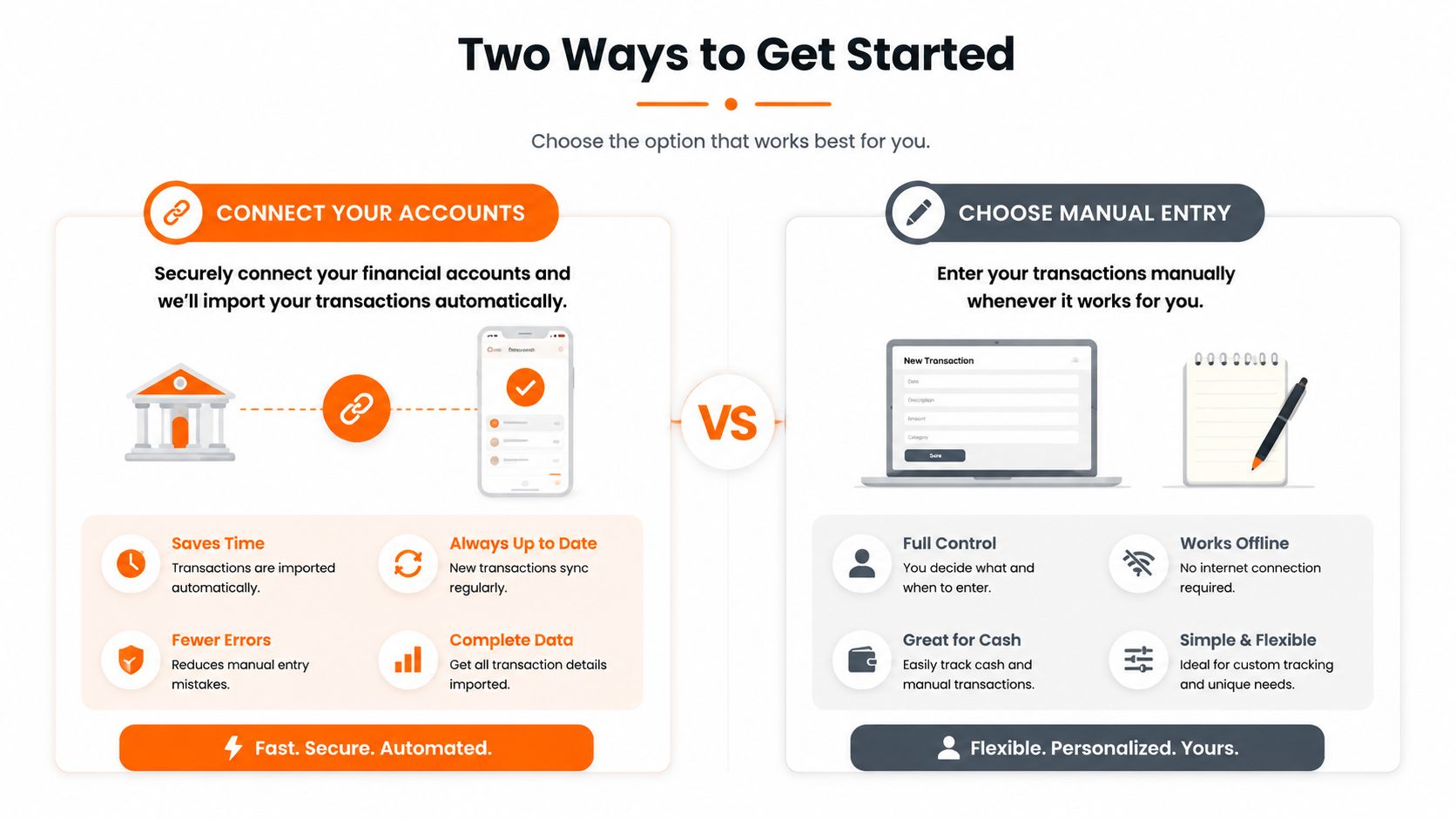
Choose the workflow you'll maintain
Automatic connection reduces daily effort. Once connected, your tracker can bring in card and account transactions, which makes it easier to notice recurring charges, unusual activity, and spending across multiple payment methods. The trade-off is trust. You need to understand the app's permissions, data practices, security controls, and how it handles credentials or connection providers.
Coverage can also be uneven. Smaller Canadian credit unions and regional institutions may not work smoothly with apps designed primarily around US financial networks. If a connection fails, repeated troubleshooting can create more friction than the original manual process.
Manual entry gives you control and broad compatibility. You can record cash purchases, prepaid cards, accounts that don't support connections, and transactions you want to keep outside a bank feed. The cost is habit. You'll need a quick entry routine, ideally immediately after buying something or during a short daily check-in.
Fintrack supports connected accounts and manual entry, including a bank-free approach that can suit Canadian users whose institutions aren't covered by a particular app. For readers comparing broader operational approaches, Rally's overview of accounting and spend management is useful context because it shows how transaction controls and reporting can extend beyond personal tracking. You can also review the practical distinction between connected and unconnected workflows in Fintrack's guide to bank account aggregation.
Use this quick decision check
Choose connected tracking if:
- You use several cards: Automatic imports reduce the chance of missing transactions.
- You dislike data entry: Feeds remove most of the repetitive work.
- You're comfortable reviewing permissions: You're willing to assess privacy and security before connecting.
Choose manual entry if:
- Your institution isn't supported: You don't want coverage limitations to stop your system.
- You use cash often: Manual capture keeps cash spending visible.
- You prefer separation: You want to track without sharing bank access.
Whichever route you choose, set a short recurring review. Automatic feeds still need checking for duplicates, pending transactions, and incorrect categories, while manual entry needs consistency more than detail.
Categorize Transactions Without Overthinking It
Categories should answer useful questions, not recreate your entire tax return. If your system has too many labels, every transaction becomes a decision. If it has too few, you won't know which habits you can change.
Start with six broad groups:
- Housing: Rent, mortgage payments, utilities, insurance, and household bills.
- Food: Groceries, takeout, restaurants, and coffee.
- Transport: Fuel, public transport, parking, repairs, and car payments.
- Subscriptions: Streaming, software, memberships, and recurring services.
- Personal: Clothing, hobbies, self-care, gifts, and discretionary purchases.
- Other: Medical costs, fees, irregular purchases, and anything that doesn't fit.

Refine only when a pattern earns its own category
Suppose food is your largest flexible category. You might later separate groceries from dining out because those expenses require different decisions. You don't need separate categories for every shop, restaurant, or delivery service from the beginning.
AI-assisted tagging can reduce the repetitive work. An app can suggest a category based on the merchant and your previous corrections, then you review the exceptions instead of sorting every transaction from scratch. Fintrack's automatic expense categorization feature follows that kind of review-first workflow.
Ambiguous merchants need a simple rule. Amazon might represent groceries, electronics, gifts, or household items, so don't accept an automatic label blindly. Open the transaction, choose the category that reflects the purchase, and make a note if you need to split the charge. The purpose is not accounting-level precision. It's making sure a large or repeated pattern appears in the right place.
Keep the category test practical
Ask yourself, “Would this category change a decision?” If separating coffee from restaurants won't affect your behaviour, keep them together. If subscriptions are easy to cancel but disappear inside “personal,” give them their own category.
Statistics Canada's SHS questionnaire also provides a useful accuracy principle. It instructs respondents to record the cost in Canadian dollars after deducting coupons, rebates, or gift certificates, as shown in the SHS questionnaire. Apply the same rule to your tracker. Record what you paid, not the sticker price, and don't treat a rebate as spending that never left your account.
Set Spending Limits and Real-Time Alerts
Monthly totals are retrospective. Real-time alerts give you time to act before the month becomes difficult, especially when one category starts running ahead of plan or an unusually large purchase reduces available cash.
The 50/30/20 framework offers a practical starting point for broad limits. It assigns 50% of after-tax income to needs, 30% to wants, and 20% to savings and debt repayment. Needs include housing, groceries, utilities, insurance, and minimum debt payments, as described in MoneyMetrics' Canadian budget framework. Use those proportions as a structure, not a test. Housing costs, irregular income, family needs, and debt obligations may require a different balance.
Build limits from observation
During your first month, track before setting strict limits. Your actual category totals show what needs attention and which targets are unrealistic. A limit that ignores fixed obligations creates constant warnings, and repeated warnings quickly become background noise.
Set alerts that support decisions:
- Approaching-limit alerts: A notification when dining out reaches 80% of its monthly allocation leaves time to adjust the rest of the month.
- Single-transaction alerts: A threshold for one unusually large purchase gives you a pause before the charge creates a cash-flow problem.
- Unusual-activity alerts: A charge that differs from your normal pattern deserves review, even when the category still has room.
- Shared-expense reminders: Bills paid for another person should be marked clearly so your totals reflect your own spending.
The Consumer Financial Protection Bureau's spending tracker recommends sorting spending during the month, keeping receipts together, and totaling categories at month-end, including bills shared with others. An app-assisted workflow reduces paper handling while preserving the useful habit: capture transactions throughout the month and review categories before the final day. Fintrack's AI budgeting assistant can support that workflow by helping surface spending patterns and timely decisions.
Use alerts to protect cash flow
Canadian evidence links budgeting with fewer day-to-day cash shortages. The Financial Consumer Agency of Canada reported that 17% of Canadians said their monthly spending exceeded their income, while 27% said they borrowed for food or daily expenses. Among budgeters, 18% reported spending beyond monthly income compared with 29% among non-budgeters, and 31% of budgeters said they needed to borrow for day-to-day expenses compared with 42% of non-budgeters, according to the 2019 Canadian Financial Capability Survey.
Start with one approaching-limit alert at 80%, then review every limit after your first month of data. Raise targets that trigger warnings for unavoidable bills, and lower or split targets where the alert arrives too late to change the decision.
Find and Cut Wasted Spending Automatically
Wasted spending usually hides in transactions you stopped noticing. A service renews, a free trial becomes a paid plan, or a subscription you thought you cancelled continues charging the same account. The individual charges may look harmless, but recurring payments deserve a dedicated review because they repeat without requiring a new decision.
Start with the recurring-transactions list in your tracker. Sort it by merchant, amount, or renewal timing, then ask three questions:
- Do I still use it? If you can't remember the last time you used the service, mark it for cancellation.
- Does it duplicate something else? Two similar streaming, storage, fitness, or software services may serve the same purpose.
- Did the price or status change? A trial conversion, fee increase, or reactivated account can look like a normal recurring charge.
Run a focused waste audit
You don't need to inspect every transaction. A short monthly audit works better when it targets repeat charges and unfamiliar merchants.
- Open recurring payments: Check subscriptions, memberships, app charges, and software.
- Verify recent use: Look at the service itself, not just the transaction description.
- Cancel or schedule: Cancel unused services now, or set a reminder before the next billing date.
- Check duplicate charges: Compare similar merchant names and charges close together.
- Confirm the result: Review the next statement to make sure the cancellation took effect.
Fintrack's guide to managing subscriptions can help you build this review into a wider recurring-expense process. The app's subscription detection and duplicate-charge alerts are useful for surfacing candidates, but you still need to confirm whether a charge is legitimate before disputing or cancelling anything.
A useful boundary: Automation should find the transaction. You should make the decision.
Don't cancel a service solely because you haven't used it recently if it protects something important, supports a household member, or has an annual renewal you intentionally keep. Tag those charges separately so “unused” doesn't automatically mean “unwanted.”
Build a Monthly Review Habit That Actually Sticks
Tracking creates information. The monthly review turns that information into decisions. Keep it short enough that you'll repeat it, and focus on four questions rather than a long report.
Use a simple review sequence
First, compare category totals with limits. Look for categories that are consistently close to the ceiling, not just one-off overshoots. A repeated mismatch may mean the limit needs adjusting, the category needs a new subcategory, or a spending habit needs attention.
Next, scan recurring charges. Check new subscriptions, price changes, duplicate-looking payments, and services you no longer use. A tracker can uncover a problem that a simple account balance won't explain.
Then, investigate unusual activity. Open large or unfamiliar transactions, confirm shared bills, and correct categorisation errors. Don't spend the entire review making every label perfect. Fix the items that could change your next decision.
Finally, check goals and upcoming obligations. Review progress toward savings goals, annual bills, and known expenses. If your household has changing priorities, a practical young family finance roadmap can add planning context beyond transaction tracking.
A monthly review can also be conversational. Ask Finny, Fintrack's assistant, questions such as “How much did I spend on takeout this month?” or “How does this month compare with last month?” You can get a direct answer and then decide whether to change a limit, reduce a recurring expense, or redirect available money toward a goal.
For a printable structure, use Fintrack's monthly budget template, then keep the recurring review focused on action. Canadian survey evidence supports the value of maintaining a budget: in the 2014 Canadian Financial Capability Survey, 46% of Canadians reported having a budget, and 93% of budget holders said they always or usually stayed within it, according to the Financial Consumer Agency of Canada report.
The strongest system isn't the one with the most categories or rules. It's the one that captures spending often enough to show reality, alerts you early enough to make a choice, and gives you a clear next action at the end of the month.
Fintrack can combine connected accounts or manual entries with AI-assisted categorisation, spending summaries, alerts, subscription detection, and conversational answers in one dashboard. Visit Fintrack and use your first monthly review to turn scattered transactions into a manageable spending routine.