You open your card statement and spot the same café name twice for the same amount, a day apart. You remember buying lunch once, not twice. Before you report fraud, check whether you're seeing two completed payments or a temporary hold beside the final charge.
If you're searching for duplicate key charges, the practical question is whether one purchase was billed more than once. For Canadian and US cardholders, the safest approach is to verify the entries, preserve the evidence, and choose the right route for a correction without missing your issuer's deadline.
What Duplicate Key Charges Actually Are
A duplicate charge means your account was debited more than once for a single purchase. It's different from making separate purchases at the same shop, even when those purchases cost exactly the same amount.
Mastercard's chargeback guide describes duplicate processing as one transaction debited more than once, supported by matching point-of-sale amounts and transaction dates and times; a merchant can challenge the claim with evidence of separate purchases, different authorisation codes or transaction identifiers, or an issued refund.
The phrase “duplicate key charges” isn't a special consumer dispute category. When speaking to your bank, duplicate processing or one purchase billed twice makes the problem clearer.
Duplicate key charges versus lookalikes
Start with the entry's status, then compare the receipt. This table helps you decide what needs investigation rather than treating every repeated merchant name as an error.
| What you see | Usual meaning | Both settled? | First check |
|---|---|---|---|
| Same merchant, amount, and card, close in time | Possible duplicate processing of one sale | Yes | Compare date, time, and authorisation or transaction ID |
| Pending line plus a later posted line | One authorisation that settled | No | Wait a few days before disputing |
| Restaurant or delivery total higher than the slip subtotal | Tip, tax, or service adjustment | Often yes | Match receipt subtotal, tax, and tip to the posted amount |
| Two tenders at one checkout | Split payment, not a double charge | Yes | Check whether amounts add up to one receipt |
| Same biller a month apart | Recurring subscription or membership | Yes | Confirm the renewal date and plan |
| Purchase plus a separate card fee | Surcharge or service fee, not a duplicate | Yes | Ask for an itemised receipt before disputing |
| Charge and a later negative line | Refund or reversal still posting | Mixed | Match the refund amount before calling it unpaid |
A hotel deposit can also sit beside the final bill, while a marketplace may use a payment processor's name rather than the seller's name. Your transaction history is useful for connecting those entries to the original purchase.
A second line isn't automatically fraud
A separate card fee needs its own explanation. California's credit-card surcharge guidance treats surcharge questions separately from duplicate billing, so don't describe an unexplained fee as the same sale processed twice.
The word “duplicate” can also refer to a replacement document rather than a payment error. If your search concerns Spanish business paperwork, renn's guide to proof of self-employment registration in Spain addresses that different issue.
Practical rule: For a purchase you recognise, don't call a repeated entry fraud until you've checked both posting statuses and the receipt. If you don't recognise the purchase at all, contact your issuer promptly instead of waiting for a duplicate check.
How to Find Duplicate Charges on Your Statement
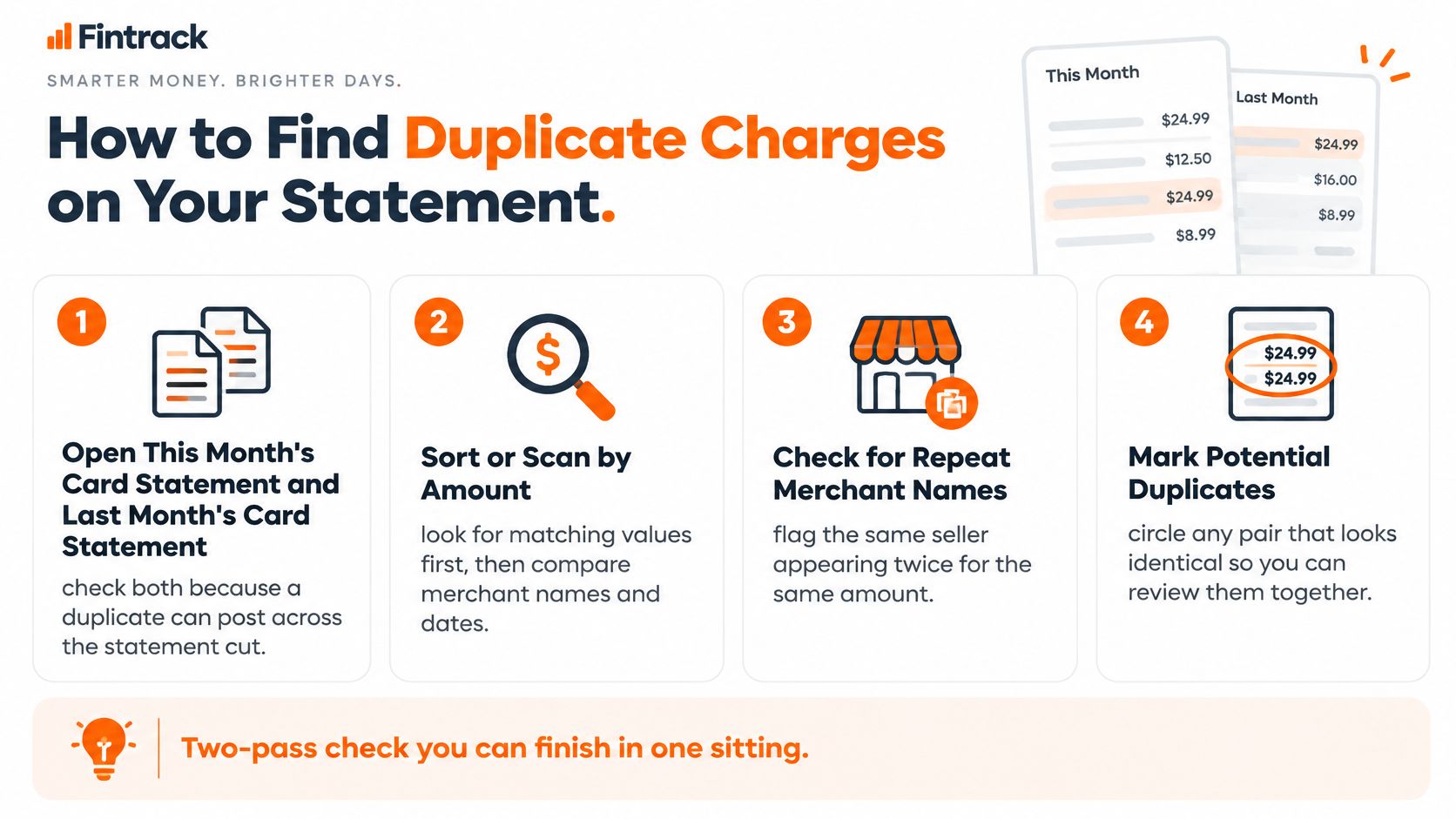
Use a two-pass review: find possible matches first, then explain each pair. This keeps you from overlooking an error because the merchant's name changed, or disputing a legitimate adjustment because the amounts look familiar.
First pass finds the candidates
- Open the current and previous statements. A purchase and its possible duplicate can fall on opposite sides of the statement cut. Keep the card's current activity screen open too, since it shows entries that aren't on a statement yet.
- Sort or scan by amount. Matching values are easier to notice than similar merchant names. Don't exclude a pair just because one description includes a processor's name or a different location.
- Record the identifying details. Note the merchant descriptor, amount, currency, card suffix, transaction date, posting date, and pending or settled status.
- Flag close matches. Focus on the same seller, amount, and payment instrument within a short period. Treat the time gap as a clue, not proof.
Keep the review manageable by marking candidates rather than opening a dispute for every match. A simple note beside each pair, such as receipt needed or household purchase confirmed, prevents repeated work. One grocery run flagged twice needs a receipt check, while two identical streaming charges a month apart likely signal a real renewal instead.
For help reading the statement's fields, use this guide to statement analysis. If you also maintain business books, Charter AI's tool to match bank entries with Tally is relevant to reconciling ledger records, rather than deciding consumer dispute rights.
Second pass explains each pair
Compare the complete receipt with the final amount. Include tax, tips, delivery fees, and any split payment, then look for an associated refund or reversal.
Ask another authorised cardholder whether they placed a separate order before assuming your matching entries represent one purchase. Two identical amounts posted days apart can be two real orders from the same household.
Save photographs of paper receipts and screenshots of both entries. Keep the original descriptions intact, even if you use a shorter merchant name in your budget. The raw descriptor is what the merchant and issuer will search for later.
Fintrack's spending alerts and subscription detection can surface entries worth checking, but you still need to compare the underlying purchase records against your receipts and statement.
"The spending alerts caught a duplicate charge I would have missed."
Kyle
If you're rebuilding your routine after Mint, this comparison of Mint alternatives can help you choose a workable review method. Mark unexplained, settled pairs for follow-up; leave recognised pending holds on a separate watch list.
How to Dispute a Duplicate Charge and Get a Refund
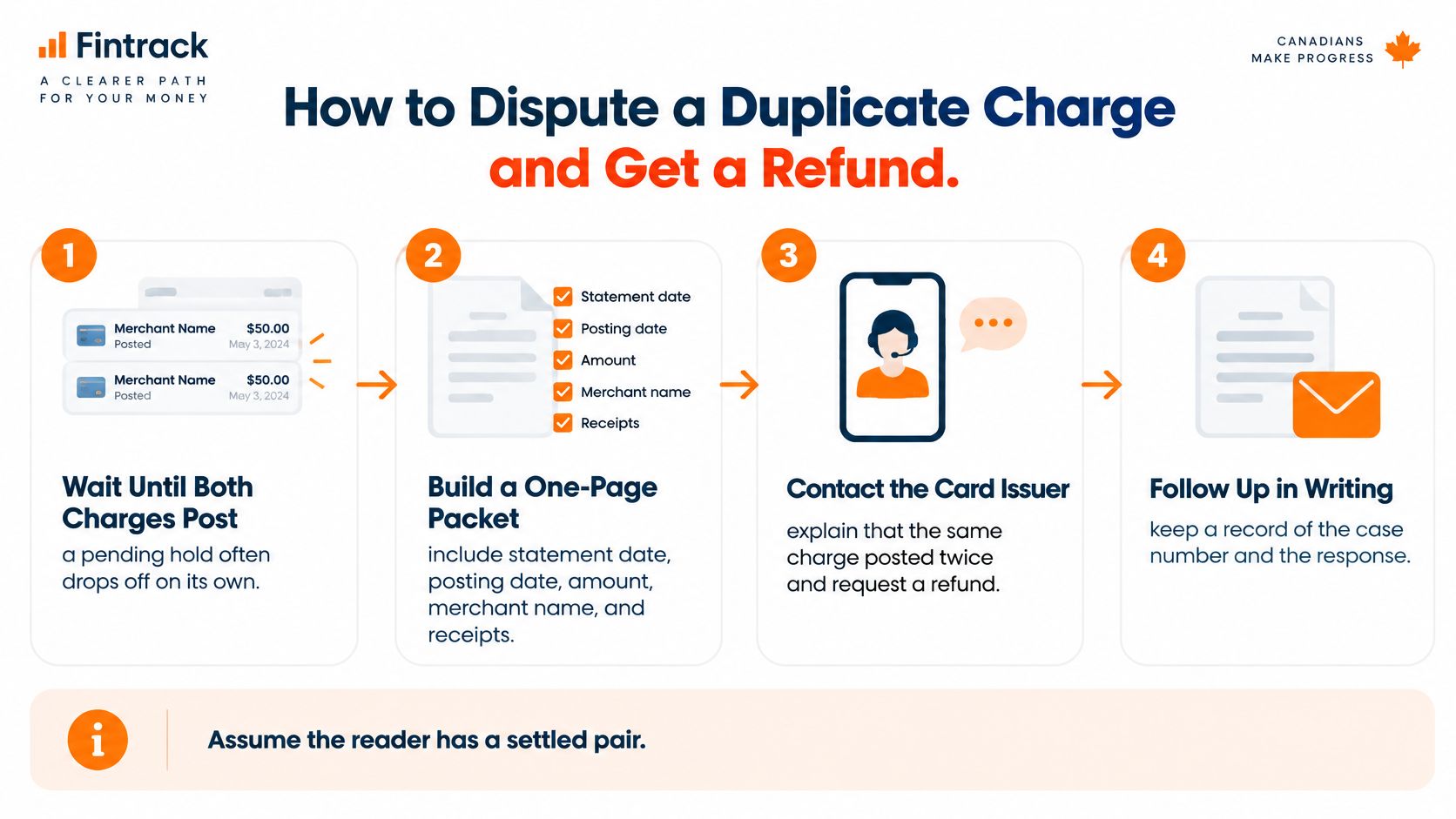
A second line on your statement is not automatically fraud. Pending holds, tip adjustments, split payments, and card fees all imitate duplicate charges, and filing too early can get a valid claim rejected on a technicality. Confirm both entries have settled before you contact anyone. Waiting a few days for a pending line to post costs little; disputing a hold that was about to drop off wastes your evidence and your deadline.
For a confirmed settled pair, ask the merchant to correct the duplicate first, then escalate to the card issuer if it stays unresolved. The process works like returning a misrung item at the till: the store that made the error usually fixes it fastest, and the issuer is the fallback. Don't let a merchant's promise to investigate run past your issuer's notice deadline.
The Financial Consumer Agency of Canada recommends comparing receipts with statements, contacting the merchant about mistakes, and contacting the issuing financial institution if the merchant doesn't correct the transaction.
Build the evidence before you call
Prepare a short packet containing:
- Account details: Statement date, posting dates, amount, currency, merchant descriptor, and card suffix. Don't send a full card number through ordinary email.
- Transaction evidence: Both transaction identifiers, screenshots showing settled status, the receipt, and the order confirmation.
- Your explanation: Identify the legitimate purchase and the extra posting. State plainly that you authorised one purchase.
- Contact records: Keep the merchant's response, proof your written request was sent, and any promised correction date.
Write to the merchant with a specific request: "The same purchase appears twice as completed transactions. Please check these transaction references and refund the duplicate posting." Avoid claiming that both payments were unauthorised when you recognise the original purchase. An overstated claim gives the issuer a reason to doubt the rest of your file.
Who to contact and when for a duplicate charge
The issuer's process matters more than the card-network logo. Keep this contact log alongside your evidence.
| Step | Who | Timing cue | Keep |
|---|---|---|---|
| Confirm both lines posted | Your statement | For a recognised purchase, don't submit a duplicate-processing dispute while one line is still pending | Amount, date, descriptor, card suffix |
| Ask for a correction | Merchant | As soon as the duplicate is clear | Written demand and proof it was sent |
| Open the dispute | Card-issuing bank or credit union | After the merchant doesn't fix it; Mastercard's Canadian guidance directs cardholders to the issuer, not Mastercard, because the issuer holds the account information and applicable dispute rights | Both transaction IDs, receipt, screenshots |
| Watch for a temporary credit | Issuer, where offered | Some issuers grant provisional credit while they investigate; that credit can be reversed if the investigation doesn't support the claim | Confirmation number |
| US written billing-error notice | Issuer billing-inquiries address | The California Attorney General says notice is generally due within 60 days of the first statement showing the error, with 30 days to acknowledge and up to 90 days to investigate | Dated letter and statement copy |
For a US written notice, identify the amount, date, seller, and reason for disputing it. Use the issuer's designated billing-inquiries address, which may differ from its payment address.
California also has a separate claims-and-defences route with eligibility conditions under Civil Code section 1747.90. Don't assume that remedy applies outside California or replaces the billing-error notice process.
Track the correction to completion
If the merchant says it has issued a refund but you can't locate it, ask for the refund reference. Sambapay's acquirer reference number guide explains a reference that may help trace a card refund.
Record every case number and follow-up date. A temporary credit isn't a guaranteed final refund, and a later credit can affect your balance, so review what happens when you overpay a credit card before treating that credit as available spending money.
How to Remove Duplicate and Recurring Entries
Correcting your budget doesn't correct your bank account. Deleting a transaction from an expense tracker won't cancel the card charge, and receiving a refund won't necessarily fix an incorrectly categorised budget entry.
Keep the bank record and your spending record aligned without erasing the evidence. The right treatment depends on whether the extra entry was temporary, settled, refunded, or imported twice.
Keep the purchase and correct the extra entry
| What happened | What to do in your budget |
|---|---|
| A pending hold disappeared without settling | Remove or hide only the temporary budget entry |
| The bank shows one purchase, but your tracker contains duplicate imports | Keep one accurate record and remove the extra imported copy |
| Both charges settled and one was refunded | Keep the legitimate purchase and match the refund against the duplicate |
| The refund hasn't arrived yet | Leave the unresolved charge visible and add a follow-up note |
| A household member confirms a separate purchase | Keep both genuine purchases and identify who made each |
Suppose a restaurant purchase was processed twice and the merchant later refunded one payment. Your records should show the actual meal expense, the extra debit, and its offsetting credit, or an equivalent matched treatment that preserves the audit trail.
Don't remove the legitimate meal and leave the refund behind. That would understate spending rather than repair the duplicate.
Handle renewals and bulk clean-up carefully
A trial conversion and an annual plan charge may represent overlapping subscriptions, not duplicate processing. Cancel the unwanted plan in the biller's account, then request a refund based on what happened rather than describing separate agreements as one sale billed twice.
If PayPal handles the recurring payment, follow the steps to cancel a PayPal subscription. Removing a budget entry doesn't stop the next collection.
For a larger clean-up, use this order:
- Group candidates: Gather matching amounts or merchant names without deleting anything.
- Verify each pair: Check receipts, order confirmations, and household purchases.
- Edit confirmed errors: Correct categories or remove duplicate imported records together, rather than wiping every entry from that merchant.
We support bulk category edits and deleting multiple transactions at once, but those controls should follow verification, not replace it.
A refund arriving in the next statement period needs a dated note. If your tracker records activity by posting date, the original month can remain higher while the later month contains the credit; don't change dates just to make the chart look tidy.
Final check: Your net category total should reflect one legitimate purchase plus any real tip or fee, not two full charges.
Prevent the Next Double Charge and Close the Month
A reliable review routine needs an owner, a source document, and a clear action for unresolved entries. Alerts can prompt you to look, but someone still has to open the statement and compare it with the receipt.
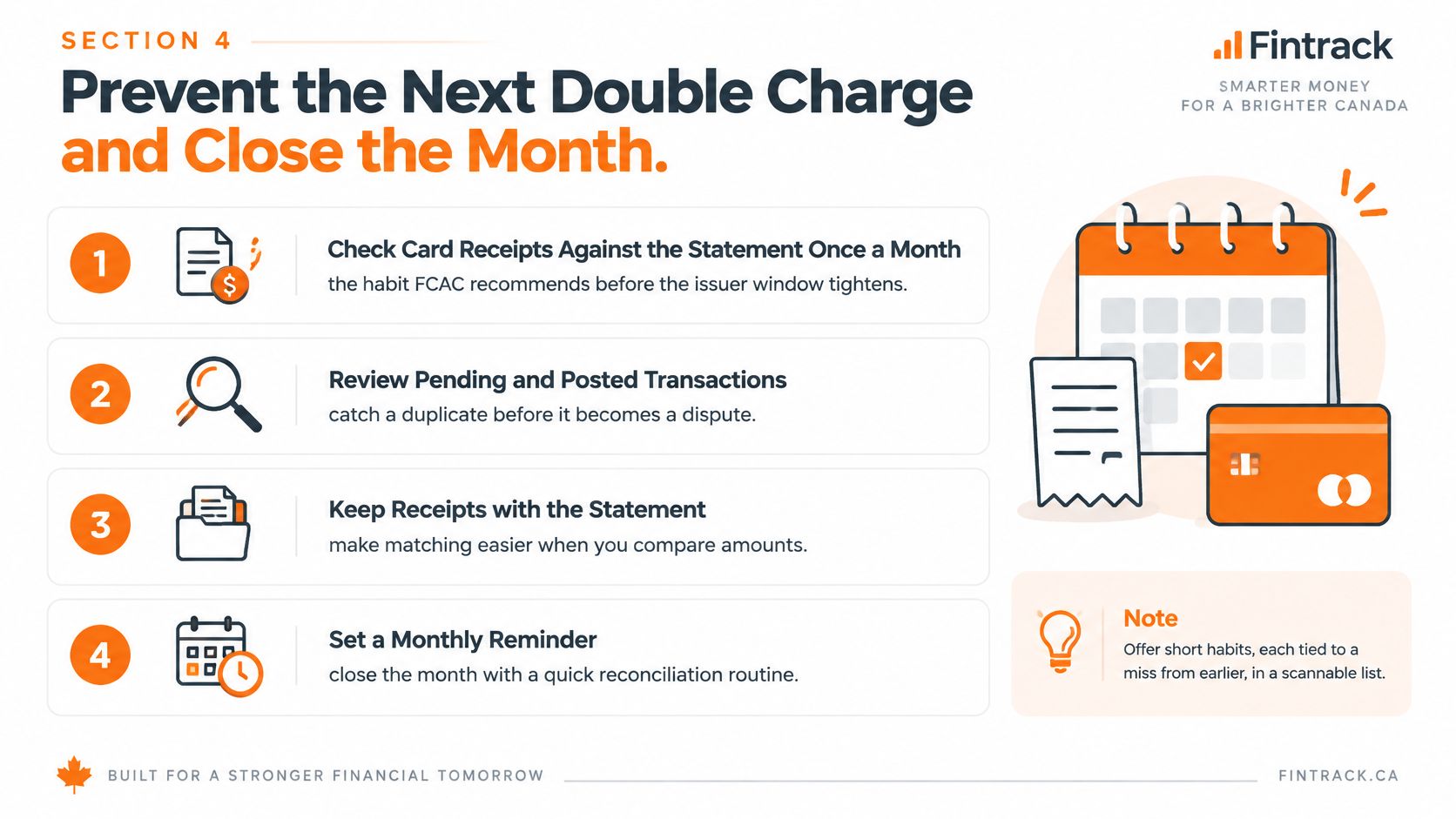
Use a monthly reconciliation appointment, supported by shorter checks when something unusual appears. This account reconciliation guide can help you turn that appointment into a repeatable process.
Give each common mistake a matching habit
- Compare receipts with the statement monthly. Don't rely only on the balance due. Review individual purchases while you can still find the order confirmation and remember what happened.
- Keep adjustment-heavy receipts. Save the final restaurant, delivery, hotel, and car-rental receipt, not just the original booking or pre-tip slip.
- Concentrate subscription records. Using one card for trials and memberships can make overlapping plans easier to notice. The trade-off is that replacing that card may require updating several billers.
- Cancel through the biller. Deleting an app doesn't establish that the subscription ended. Save the cancellation confirmation beside the last payment.
- Open spending alerts. Review repeated amounts and unfamiliar recurring names. Dismissing every notification makes an alert system less useful.
- Maintain a manual fallback. If your Canadian bank feed stops updating, record purchases from the issuer's activity screen and mark them as manually entered. Reconcile them carefully when imports resume so your own records don't create duplicates.
- Assign the household review. Agree who checks the shared card each Sunday and who follows up with merchants. Shared access shouldn't mean everyone assumes somebody else handled the problem.
If you want more manual control without an elaborate spreadsheet, these Goodbudget alternatives offer a starting point for comparing approaches. Choose a routine you'll maintain, not the one with the longest feature list.
Make a clear month-end decision
Give every unresolved item a status and a next action. Avoid leaving an unexplained entry labelled miscellaneous, where it can disappear into an otherwise balanced month.
Pending and recognised: Keep it on your watch list and check again after a few days. Contact the issuer if the hold persists unexpectedly or affects your available funds.
Settled and unexplained: Write to the merchant today and preserve the issuer's deadline while you wait. The notice clock doesn't begin only after the merchant refuses to help.
An unwanted subscription: Stop future renewals in the account, retain confirmation, and challenge only the payment you have a valid reason to dispute. Cancellation and refund requests are separate tasks.
Early review is about keeping your options open, not guaranteeing recovery.
Treat the week a charge posts as your chance to fix it, rather than waiting until a dispute window is about to expire.
Fintrack offers manual expense tracking without a bank connection, alongside spending alerts and subscription detection to support your review. Visit Fintrack to organise the entries you've checked, categorise the legitimate purchase, and keep the unresolved charge visible while you follow up.