
You check your chequing balance on the 20th. It looks reasonable, but rent still feels tight, your credit card balance is higher than expected, and you're not sure whether the money in savings is available.
Answering “where my money is” takes more than checking a balance. You need a picture of every account, every transaction and every spending pattern, including transfers and cash that never appear in a bank feed.
Why It Is Hard to Know Where Your Money Goes
Your chequing account shows what's there today. It doesn't tell you how much you've already committed to a credit card payment, whether a reimbursement is still outstanding, or which bills will arrive before your next paycheque.
Money also sits in places that don't look like everyday accounts. You might have a prepaid card, cash in your wallet, a workplace benefit or a shared account used only for household bills.
The blind spot is fragmented information, not necessarily careless spending. You can check each account regularly and still miss how the pieces fit together.
Separate visibility from availability
An account balance answers where money sits. Available money is what remains after you account for upcoming obligations and amounts reserved for specific purposes.
The distinction matters when you're trying to save. In the 2019 Canadian Financial Capability Survey, 65% of people who budgeted had emergency savings, compared with 39% of people who felt too time-crunched or overwhelmed to budget.
That finding doesn't prove budgeting caused the difference. It does show why a manageable routine is worth building.
Practical rule: Don't ask a single account balance to explain your whole financial life.
Use this three-part check:
- Every account: Record where money sits and what you owe.
- Every transaction: Identify income, spending and movements between your own accounts.
- Every pattern: Review what repeats, what changed and what needs attention.
Start by writing down every account and card you used last month. Include anything you paid with, borrowed from or moved money into, even if you rarely open its app.
Gather Every Account Into One Picture
Start with the sources of money, not with an app. A spreadsheet, notebook or tracking tool can hold the same basic inventory.
Accounts to list and what to record for each
| Account or source | Where it usually shows up | What to record |
|---|---|---|
| Chequing account | Pay deposits, bills, debit card purchases | Current balance, pay dates, bill dates |
| Savings account | Transfers from chequing, interest | Current balance, transfer amount and frequency |
| Credit cards | Purchases, payments, interest and fees | Statement balance, due date, payment amount |
| Loans and lines of credit | Monthly payments, interest charges | Balance owing, payment amount, payment date |
| Cash and prepaid cards | Spending that never reaches a bank feed | Weekly amount withdrawn or loaded, manual entries |
| Workplace benefits and rewards | Benefit credits, points, reimbursements | Annual value, expiry date, any amount used |
| Retirement accounts | Contributions and growth, not everyday spending | Balance and contributions, kept separate from monthly totals |
| Shared household accounts | Joint bills, shared cards, transfers to partners | Owner, split rule, who categorizes each transaction |
Build an inventory you control
Record a dated snapshot. Log in to each institution and note the current balance and the date you checked it. Record statement dates where applicable, since a statement balance and today's balance describe different moments.
Identify each account's job. Mark where your pay arrives and where bills are paid. If you use several accounts, this guide to managing multiple bank accounts can help you give each a clear purpose.
Add money outside account feeds. Record cash, prepaid balances and other sources by hand each week. Keep receipts or a phone note until you've entered the purchases.
Manual entry matters because some activity never passes through a connected bank account. Connections can also stop updating, so check the latest transaction date rather than assuming a displayed balance is current.
Keep spendable cash, restricted benefits and retirement assets separate. A benefit credit may offset an eligible expense, but it isn't cash you can use for rent.
For your cash accounts, check that opening balances plus incoming money, less outgoing money, equal closing balances. Exclude internal movements when combining accounts; if the result doesn't reconcile, investigate missing activity, timing differences or duplicate entries.
How to Categorize Every Transaction Step by Step
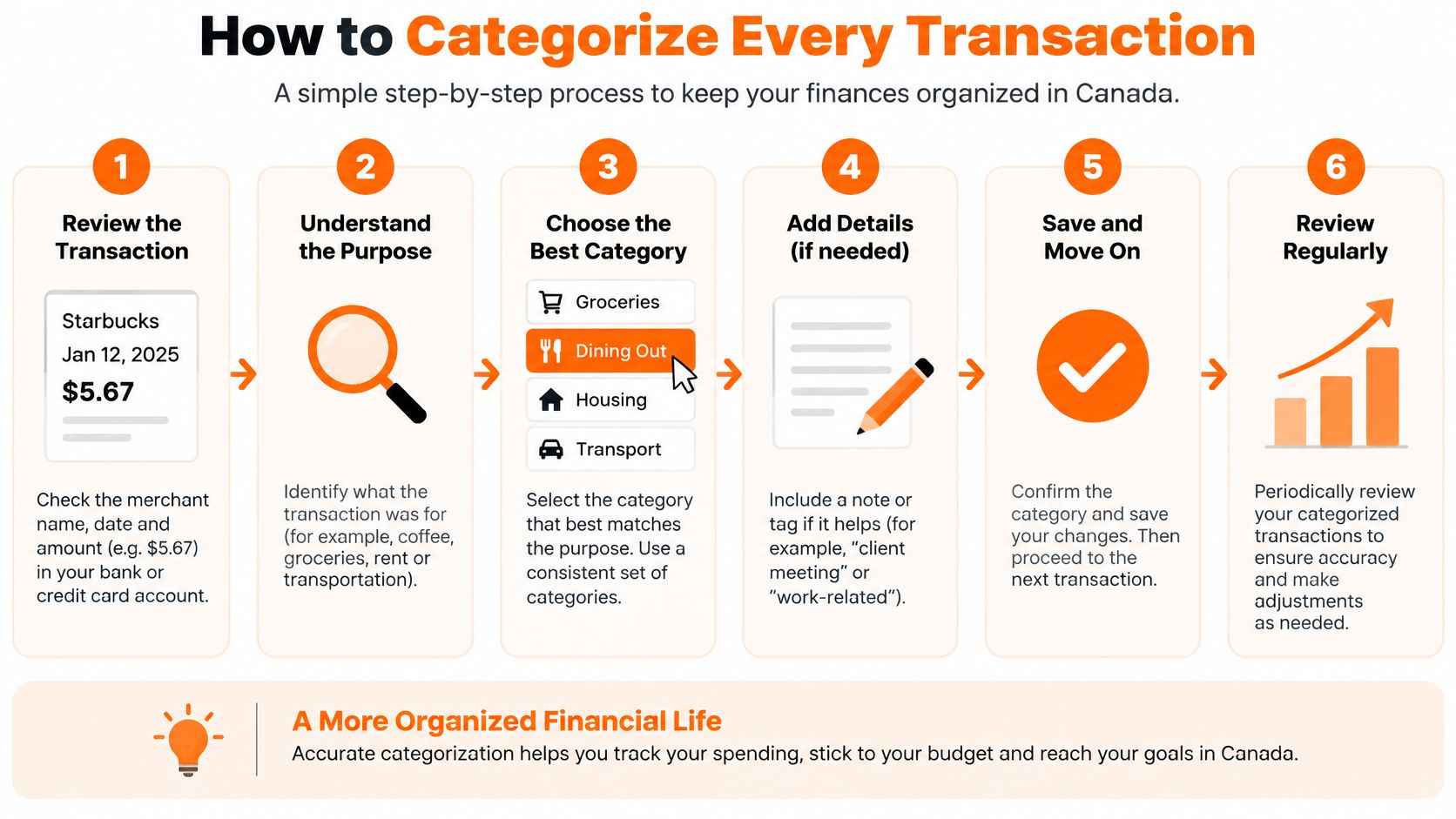
Categorizing works best when you make the same decision consistently. You're building a useful record, not trying to reconstruct every purchase perfectly from memory.
Follow a repeatable sorting routine
Collect a useful history. Start with the last 90 days of transactions from each account, downloading a CSV file if available. This gives you several billing cycles to inspect, though you'll still need to check separately for annual or seasonal bills.
Choose manageable categories. Try 8 to 12 top-level groups, such as Housing, Groceries, Transport, Utilities, Debt payments, Dining out, Subscriptions, Savings and Other. Treat that range as a starting setup, not a rule; the guide to expense categories can help you choose useful distinctions.
Identify transfers before purchases. Mark movements between your own accounts as transfers, including payments to a credit card whose purchases you're already tracking. Otherwise, you'll count the purchase when you buy something and again when you pay the card bill.
Categorize purchases and create repeatable rules. Assign each transaction a category, then use merchant rules where the merchant reliably represents the same expense. Review mixed retailers individually because a supermarket or online marketplace purchase might include groceries, clothing or household supplies.
Keep uncertainty visible. Put unfamiliar items in To Check rather than guessing. Search your receipt inbox, inspect the merchant details and ask another household member before deciding what the charge represents.
Reconcile the results. Compare the categorized entries with the original account records, accounting separately for transfers, refunds and payments. A difference can mean you missed an item, imported it twice or used mismatched dates.
Handle cash and debt carefully
Treat a cash withdrawal as a transfer into a cash wallet, then categorize purchases from that wallet. If you count both the withdrawal and the purchases as expenses, your totals will be inflated.
For a cash-flow budget, scheduled loan payments can appear under Debt payments. If you also track net worth, separate principal from interest in that view, because repaying principal reduces a liability.
Savings needs its own distinction: it's a budget allocation, but moving money into your savings account isn't consumption.
A finished month has no unexplained gaps: each transaction has a category or transfer label, and the records reconcile.
You don't need an elaborate category for every merchant. You need enough detail to answer a practical question, such as whether transport costs rose because of commuting, repairs or travel.
Reading Your Spending Patterns Each Month
A monthly review should answer three questions: which costs are committed, which change with your choices or circumstances, and whether you're adding to savings.
Compare the current month with your three-month average, using the same categories and date boundaries. That's a practical baseline, not proof of a trend; a reimbursement, annual bill or unusual trip can distort the comparison.

Common spending patterns and the question each one raises
| Pattern | What It Looks Like | Question to Ask |
|---|---|---|
| Creeping subscriptions | Small monthly charges add up over time | Which of these did I forget or stop using? |
| Dining out spikes | Restaurant totals double in some weeks | What triggered the spikes, such as payday or travel? |
| Fixed costs growing | Rent, insurance or loan payments rise | Can any of them be renegotiated or refinanced? |
| Savings transfers skipped | Savings line shows zero for two months | Did a bill or a gap in income cause it? |
| Duplicate or unfamiliar charges | Same amount appears twice, or an unknown merchant | Is it a refund, a retry, or something to report to the bank? |
Read these as diagnostic prompts, not automatic instructions to cut spending. Before refinancing, for example, compare fees, repayment terms and total interest rather than focusing only on a lower payment.
The main benefits of spending analysis come from connecting a change to its cause. Higher grocery spending after a household change calls for a different response than an unused subscription.
Check your reserves against actual expenses
For Canadians, the Financial Consumer Agency of Canada's budgeting guidance recommends an emergency fund covering 3–6 months of living expenses.
Calculate your target from categorized expenses:
- Find the monthly baseline: Include housing, food, transport, required debt payments and other living costs.
- Remove savings transfers: You're measuring the costs reserves would need to cover, not money moved between accounts.
- Calculate the range: Multiply the baseline by three and six, then compare it with accessible emergency savings.
Don't count retirement balances, reward points or money already earmarked for an imminent bill as available reserves. Also check whether an unusually cheap month has understated your normal costs.
Choose one pattern from the table that appears in your totals. Write down the question you'll answer next month and what evidence you'll check, such as renewal notices, receipts or changes in pay.
A Worked Example of One Month in Review
Say Sam is a renter with $4,200 in monthly take-home pay. These are hypothetical figures, intended to show how the method works rather than suggest what anyone else should spend.
After gathering account activity and removing internal transfers from spending, Sam has this monthly breakdown.
| Category | Hypothetical monthly amount |
|---|---|
| Rent | $1,850 |
| Groceries | $620 |
| Transport | $310 |
| Debt payments | $380 |
| Dining out | $290 |
| Subscriptions | $96 |
| Expenses excluding savings | $3,546 |
| Savings transfer | $200 |
That leaves $454 after the listed expenses and savings transfer. Sam checks that amount against the account balances and unpaid obligations before treating it as available.
Find the explanation before making a cut
Dining out reached $290, compared with Sam's usual $150. Receipts show that the extra came from a work trip, so Sam marks it as an unusual month rather than assuming restaurant spending has permanently increased.
Subscriptions include seven services, and Sam hasn't used two in months. Cancelling those would save about $30 a month in this example.
A $14 duplicate charge, already included in the recorded spending, also needs attention. Sam contacts the merchant and keeps it in the ledger until the refund arrives, then records the credit against the original category.
This kind of expense breakdown separates decisions from guesses. Sam has a temporary travel explanation, a recurring saving opportunity and a disputed transaction, each requiring a different action.
Turn the reserve gap into a plan
Sam has $6,000 saved, enough for about 1.7 months at the current expense level. Three months would require $10,638, leaving a gap of $4,638, or roughly $4,600.
A $75 weekly transfer would close that gap in about 14 months, assuming no withdrawals, no interest and unchanged expenses. Sam would replace the existing monthly transfer with this schedule, rather than accidentally budgeting for both.
Before automating: Check that the transfer leaves enough money for bills due before the next payday.
Run the same sequence with your totals: reconcile the month, explain the exceptions, choose a realistic change and calculate what it means for your reserves.
Confirm Where My Money Is Every Week
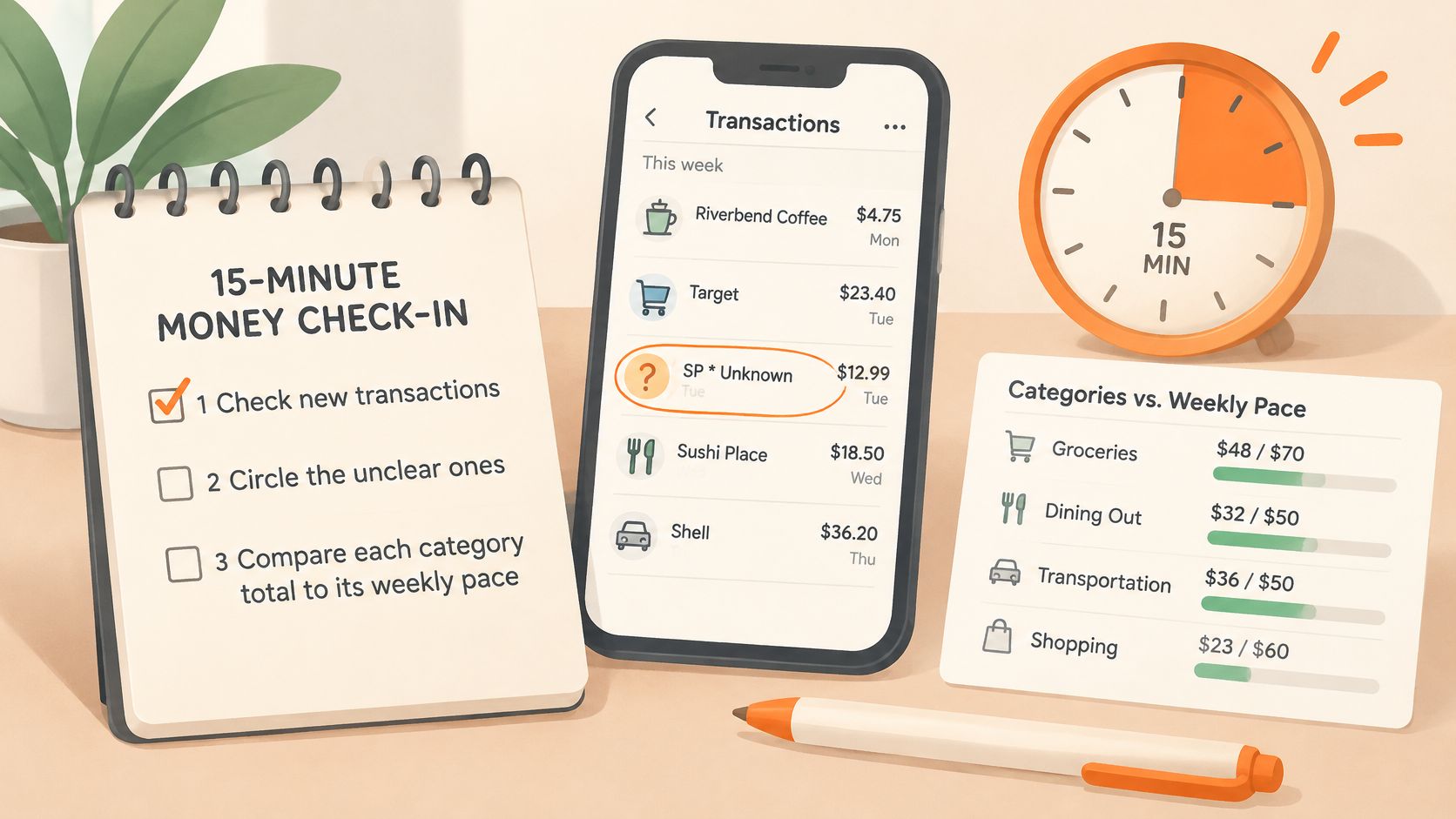
A weekly check is easier to keep than a full month-end reconstruction. Reserve about fifteen minutes and let it run longer only when an item needs investigation. Treat it as a three-part check: every account, every transaction, every pattern. Missing cash and transfers that never reach a bank feed are the usual reasons a total looks wrong even when the math is right.

Keep the weekly check small
Review new activity. Confirm recent transactions are present, then spend your categorizing effort on unclear or mislabelled items.
Check spending pace. Compare flexible categories with your planned weekly pace and allow for bills that land unevenly. You want to see a problem in week two, not after the month closes.
Update your inventory. Add a new account, card or cash source as soon as you start using it. Record who owns shared transactions so nobody enters them twice.
Schedule the deeper review. Once a month, examine patterns and recalculate reserve coverage when living costs change.
Use account reconciliation when the recorded balance does not match the actual account. Resolve the difference before you adjust a budget built on an unreliable total.
For categorizing, Fintrack's AI expense tracker auto-categorizes transactions, answers spending questions in plain language, and supports searches and filters by date, category, account or amount.
Fintrack brings income, expenses, budgets and goals into one dashboard so you can review your money together rather than account by account. Visit Fintrack if you want to apply this routine with a shared view of your balances and spending, starting with the accounts and transactions you have already gathered.